- Products
- Learn
- Local User Groups
- Partners
- More

AI Security Masters E7:
How CPR Broke ChatGPT's Isolation and What It Means for You
Blueprint Architecture for Securing
The AI Factory & AI Data Center
Call For Papers
Your Expertise. Our Stage
Good, Better, Best:
Prioritizing Defenses Against Credential Abuse
Ink Dragon: A Major Nation-State Campaign
Watch HereCheckMates Go:
CheckMates Fest
I have a question about logging for CloudGuard VMSS instances and logging.
My management server is on a on premise network and all check point ports are forwarded via static NAT from the internet gateway to the SMS. Unfortunately, I do not receive any log information from the Cloudguard VMSS instance on port 257. There is no traffic on the VMSS gateway or on the on premise internet gateway visible.
tcpdump -i eth0 -nn port --> does not display any packet
I had also tried to implement the following sk102712:
$FWDIR/conf/masters file on Security Gateway is overwritten during each policy installation - proced...
Therefore my question:
Does CloudGuard VMSS instances also use port 257?
Or Azure CME mechanissmen are used here to upload loggging informations?
Design:
[Azure VMSS instance] --> [Internet] --> [on premise FW gateway with static NAT rule] --> [SMS]
Hi @Nir_Shamir
I had done all that and thanks for the tips.
But I have found the issue!
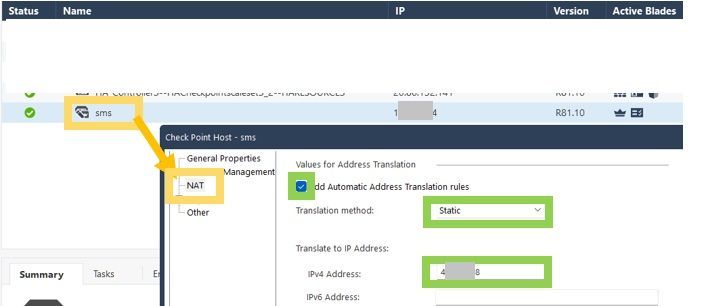
If I create a static NAT rule for the management object, everything works fine.
You may have to implement the following sk171055.
Then you can roll out the parameter via the routing script when activating the VMSS instance.
# vi $MDS_FWDIR/conf/static_route_config_<CONFIGURATION-TEMPLATE-NAME>.sh
# chmod u+x $MDS_FWDIR/conf/static_route_config_<CONFIGURATION-TEMPLATE-NAME>.sh
# autoprov_cfg set template –tn <CONFIGURATION-TEMPLATE-NAME> –cg $MDS_FWDIR/conf/static_route_config_<CONFIGURATION-TEMPLATE-NAME>.sh
Here is the content of the script. The area marked with the dots is the original routing script.
$MDS_FWDIR/conf/static_route_config_<CONFIGURATION-TEMPLATE-NAME>.sh
------------------------------------------------------------------------
#! /bin/bash
ckp_regedit -a SOFTWARE\\CheckPoint\\FW1 FORCE_NATTED_IP -n 1
.......
Hi,
All Check Point Gateways use port 257 for logging , this of course includes CloudGuard Gateways.
which Log Server is configured in the GWs ? is it configured with its public IP or its private IP ?
You should see traffic with port 257 on the GWs , no matter what is configured.
Hi @Nir_Shamir,
Is it configured with a public IP.
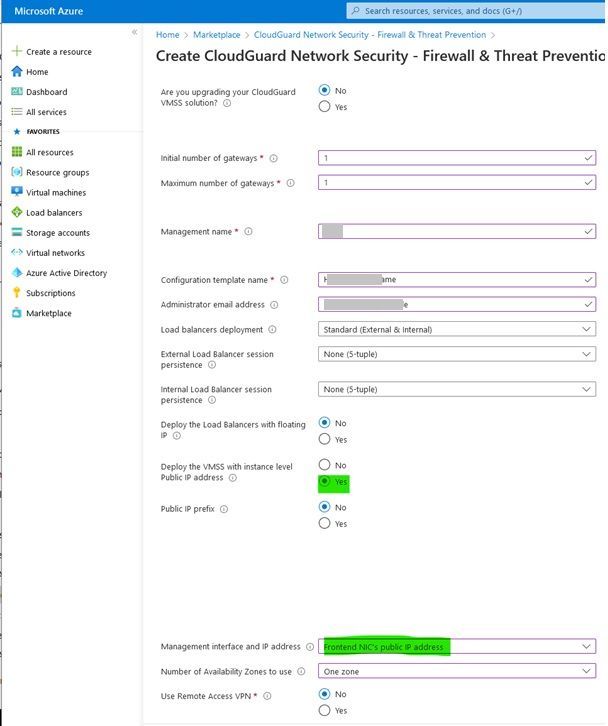
Here I do not have the option of specifying a management IP if I roll this out via marketplace.
I am missing the IP address of the management server here:
So I had tried implement sk102712 and configure the "$FWDIR/conf/masters" file. That didn't work either.
the IP Address of the management server in the template is isn't part of the GWs configuration. its just for NSG configuration.
I am guessing you followed sk100583 Scenario 2 to configure the Public IP address of the Management server as the log server ?
Hi @Nir_Shamir,
That's exactly what I did and it doesn't work either.
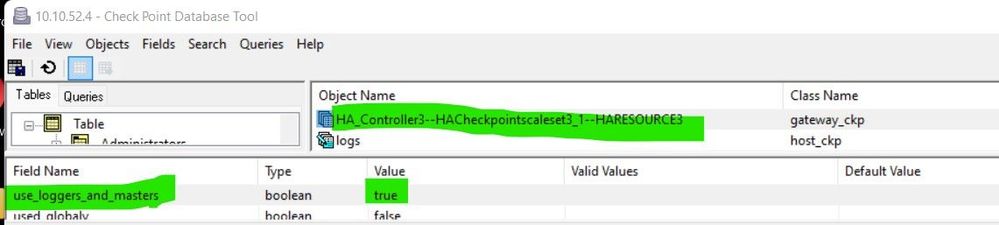
On the VMSS gateway:
Gguidbedit on SMS :
use_loggers_and_masters = true:
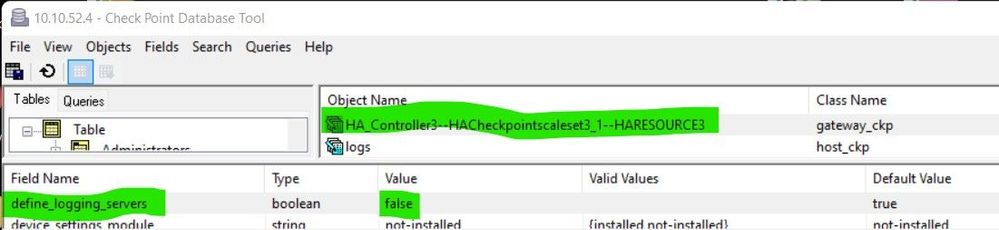
and
define_logging_servers = false:
and you don't see any tcp port 257 traffic on the GWs ?
have you tried installing DB , rebooting GWs .
of there is no logging traffic then something is off
Hi @Nir_Shamir
I had done all that and thanks for the tips.
But I have found the issue!
If I create a static NAT rule for the management object, everything works fine.
Of course, the suboptimal thing is that I have to change the masters for each VMSS instance.
Furthermore, I have to change the GuiDBEdit entries for each VMSS instance.
This is a problem with autoscaling!
Is there a better approach here for a on premise management server connection?
well , basically the NAT configuration on the management server should be enough.
I would change everything back as it was (GUIDBEDIT etc.) and only leave the NAT on the management server.
Both solutions do not work!
You may have to implement the following sk171055.
Then you can roll out the parameter via the routing script when activating the VMSS instance.
# vi $MDS_FWDIR/conf/static_route_config_<CONFIGURATION-TEMPLATE-NAME>.sh
# chmod u+x $MDS_FWDIR/conf/static_route_config_<CONFIGURATION-TEMPLATE-NAME>.sh
# autoprov_cfg set template –tn <CONFIGURATION-TEMPLATE-NAME> –cg $MDS_FWDIR/conf/static_route_config_<CONFIGURATION-TEMPLATE-NAME>.sh
Here is the content of the script. The area marked with the dots is the original routing script.
$MDS_FWDIR/conf/static_route_config_<CONFIGURATION-TEMPLATE-NAME>.sh
------------------------------------------------------------------------
#! /bin/bash
ckp_regedit -a SOFTWARE\\CheckPoint\\FW1 FORCE_NATTED_IP -n 1
.......
Leaderboard
Epsum factorial non deposit quid pro quo hic escorol.
| User | Count |
|---|---|
| 7 | |
| 4 | |
| 3 | |
| 2 | |
| 2 | |
| 2 | |
| 1 | |
| 1 |
Tue 28 Apr 2026 @ 06:00 PM (IDT)
Under the Hood: Securing your GenAI-enabled Web Applications with Check Point WAFTue 28 Apr 2026 @ 06:00 PM (IDT)
Under the Hood: Securing your GenAI-enabled Web Applications with Check Point WAFTue 12 May 2026 @ 10:00 AM (CEST)
The Cloud Architects Series: Check Point Cloud Firewall delivered as a serviceThu 30 Apr 2026 @ 03:00 PM (PDT)
Hillsboro, OR: Securing The AI Transformation and Exposure ManagementAbout CheckMates
Learn Check Point
Advanced Learning
YOU DESERVE THE BEST SECURITY