- Products
- Learn
- Local User Groups
- Partners
- More

AI Security Masters E7:
How CPR Broke ChatGPT's Isolation and What It Means for You
Blueprint Architecture for Securing
The AI Factory & AI Data Center
Call For Papers
Your Expertise. Our Stage
Good, Better, Best:
Prioritizing Defenses Against Credential Abuse
Ink Dragon: A Major Nation-State Campaign
Watch HereCheckMates Go:
CheckMates Fest
We are deploying a new cluster for a customer and we wanted to test failover. I have tested this in a test Azure account previously and this worked.
I built another test environment today and I am showing the same symptoms as the customer.
Everything seems to deploy fine, can establish SIC with management server and install policy etc. However, if we failover, either by running clusterXL_admin down or by powering off the active gateway. A failover is triggered within Check Point, i.e., cphaprob stat on the secondary gateway shows it is now active but the cluster-vip IP is still showing in Azure on the other gateway. This has not moved across to the second gateway.
This suggests to me that either the gateway isn't triggering the API call or the API call is triggered but not actioned and I wonder how we troubleshoot this.
Was hoping to get some help from the community before going through TAC because you have to do the initial hoop jumping before you get to someone who knows cloud.
Thanks
Scott
I'd start with running $FWDIR/scripts/azure_ha_test.py and see what it says.
So the output I get is: -
Image version is: harry_main-294-801-GW
Reading configuration file...
Setting api versions for "ha" solution
ARM versions are: {
"resources": "?api-version=2019-07-01"
}
Error:
The hostname xxxxfw002 should be either 'xxxxfw01' or 'xxxxfw02'
[Expert@xxxxfw002:0]#
What is it comparing it to? The name in the SmartConsole or the name in Azure?
Must be Azure as I have checked SmartConsole and it has the fw002 object name matching the fw002 hostname on GAIA.
Yes it is checking the name of the VM in the azure portal.
If you deployed the ARM template and manually did some changes to the hostname you're in for some fun changes in the azure_ha_test.py and azure_had.py script on the gateways
This is part of the script where it (hardcoded) looks for cluster_name+1 as the name of the first member
if conf['hostname'] not in {cluster_name + '1', cluster_name + '2'}:
Please also check
It explains manual testing without executing the failover
And the important part about the naming convention (because of the hardcoded scripts):
Naming Constraints
Do not change the name of any resources.
Cluster Members VM names must match the Cluster name with a suffix of '1' and '2'.
Network Interface names must match the Cluster Member VM names with a suffix of '-eth0' and '-eth1'.
The IP address of the cluster has to match the configuration file.
By default it should match the cluster name.
Hi PB, Is this script ok to run in prod? Doesn't stop start services/ change state etc?
I don't believe it does anything harmful.
It might be worth double checking with TAC, though.
Have you got any solution for this issue?
Hi Serv,
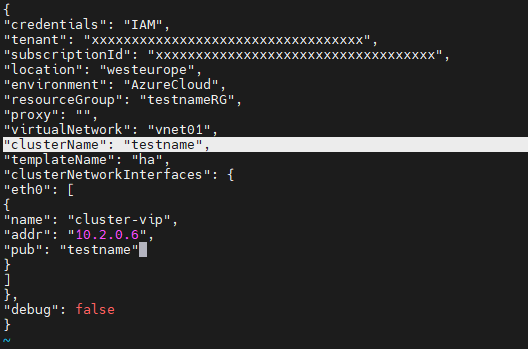
If you are facing the same issue, it might be possible your "clusterName" value in azure-ha.json doesn't match the VM names.
You can find this file under $FWDIR/conf/azure-ha.json
As mentioned in earlier posts the value here must match the name of the VM in Azure.
For example, if you VM names are Azure is "testname1" and "testname2", the value under "clusterName" should be "testname"
Hope this helps,
Hello Edan_Leventhal,
Thanks for your suggestions.
We already have the correct name in place still the VIP is not shifting to secondary gateway interface after failover.
Hi @Serv
First, I would recommend taking a look at the HA logs located in $FWDIR/log/azure_had.elg. Check if there are any errors present that could provide insight into the issue.
Additionally, when you executed the azure_ha_test.py, did it complete successfully, or did you encounter the same error message: 'The hostname xxxxfw002 should be either 'xxxxfw01' or 'xxxxfw02''?
There's a possibility that the alterations you've implemented to the azure-ha.json might not have loaded properly. To address this, you could attempt to kill the HA process "kill -9 $(cpwd_admin getpid -name AZURE_HAD)".
Alternatively, you can execute the command "$FWDIR/scripts/azure_ha_cli.py reconf" to ensure the configuration gets properly loaded.
Leaderboard
Epsum factorial non deposit quid pro quo hic escorol.
| User | Count |
|---|---|
| 7 | |
| 4 | |
| 3 | |
| 2 | |
| 2 | |
| 2 | |
| 1 | |
| 1 |
Tue 28 Apr 2026 @ 06:00 PM (IDT)
Under the Hood: Securing your GenAI-enabled Web Applications with Check Point WAFThu 30 Apr 2026 @ 03:00 PM (PDT)
Hillsboro, OR: Securing The AI Transformation and Exposure ManagementTue 28 Apr 2026 @ 06:00 PM (IDT)
Under the Hood: Securing your GenAI-enabled Web Applications with Check Point WAFTue 12 May 2026 @ 10:00 AM (CEST)
The Cloud Architects Series: Check Point Cloud Firewall delivered as a serviceThu 30 Apr 2026 @ 03:00 PM (PDT)
Hillsboro, OR: Securing The AI Transformation and Exposure ManagementAbout CheckMates
Learn Check Point
Advanced Learning
YOU DESERVE THE BEST SECURITY