- Products
- Learn
- Local User Groups
- Partners
- More

Scaling Check Point Automation with Arodonata
7 October @ 5pm CET / 11am EDT
AI Security Masters
LGTM: Bypassing an LLM Build Gate
When Prompt Injection Fails
What's New in Check Point SASE
The State of Ransomware Q2 2026:
This Quarter's Trends, and Their Impact on Your Defenses
CheckMates Go:
Half is Not Enough
How to configure Static NAT (Bi-directional) and Outbound NAT (Source NAT) in Azure Checkpoint.
I have 3 VMs and want to send outbound traffic towards internet each with unique public IP. how can we configure such type of NAT in Azure checkpoint point.
Thanks
Upen
Hi Upen,
are you using a Single Gateway ?
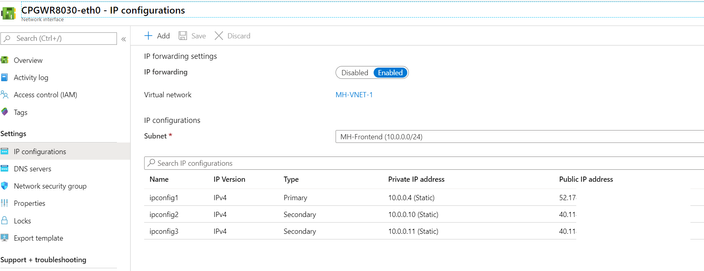
In this case you could use additional public/private IPs on the external Interface (eth0) of the FW:
and do the Source NAT for each vm on the FW (to the Private IP, Azure in return is then NATing to the Public IP)
At least a outbound NAT is possible in this case.
Matthias
Hi Upen,
are you using a Single Gateway ?
In this case you could use additional public/private IPs on the external Interface (eth0) of the FW:
and do the Source NAT for each vm on the FW (to the Private IP, Azure in return is then NATing to the Public IP)
At least a outbound NAT is possible in this case.
Matthias
I have cluster in Azure.. and want to outbound NAT like VM private IP 10.1.1.1 go to Internet, it will be NATTed with 1.1.1.1
please help me suggest how can I achieve this...
Thanks
Upen
Hello there,
In my case I need to know how to add a new public IP in my FW to be used by my prod Vnet in outbond. Currently all my VNETS (backend) when they go to the internet use the same public IP. But in my environment I need the Prod VNET to use a different public IP than the rest of the other Vnets. Somebody could help me? Thanks
Hi,
I know that if you remove the Public IPs from the instances themselves (not the VIP) then the GWs will go out via the Frontend LB and then you can create an Outbound NAT rules on the Frontend LB with a different PIP which is allocated on the Frontend LB
Hello there,
Do you have an example of the necessary rules to create in the Firewall and in the Load Balancer?
Thanks
usually the frontend-lb is created with an example rule you can copy. the Firewall NAT rules can be seen our admin guide:
Just to be sure, this information that you share with me is for outbond traffic. Since in my case I already managed to carry out inbound traffic with an LB. Thanks
no, that's for Inbound traffic.
For outbound you need to create outbound NAT rules on the Fronend-LB.
Hello there,
Do you know where I can find some configuration example?
Thanks
I don't know if there are examples some where but the procedure is like this:
1) remove the PIPs from the Cluster members.
2) add a NAT rule which hides you specific traffic behind the cluster members external IP (Dynamic object named 'LocalGatewayExternal'
3) create an Outbound rule on the Frontend-LB behind a specific Frontend PIP for your specific traffic.
all the traffic that equals to that rule will be hidden behind the Frontend-LB PIP and not the Cluster VIP.
Hello there,
In my case it is a single gateway. The procediment will be the same?
On the other hand when you say: 1) remove the PIPs from the Cluster members.
In my case I cannot delete my only public IP from the Gateway, it is used for S2S and P2S VPN connection. Please can you explain in more detail?
Thanks
On a single gateway it's much more easier.
you can add a secondary private IP on the external interface of the Gateway (usually eth0) and attach to it a new PIP.
then in the rule base you do Source-NAT on your specific server and hide it behind the new Private IP you added.
From there it will be hidden behind the new PIP.
Thanks, I'll try that solution
Hello Nir,
If we remove the PIP assigned to each cluster member, how do we connect to the individual cluster members through ssh and https when they are managed from the external interface.
Is this the only solution for cluster cloudguard setup?
Looking forward to your feedback.
Hello @Matthias_Haas,
That will not work for an HA cluster, since that from Azure side you'll not be able to assign the same Public IP object to two different network interfaces.
How can we bypass this?
Cheers!
Is there any resolution to this? How do we fix this on an HA Cluster ?
Thanks
Hello there,
In this solution you provide. Is it necessary to change something in the routing of the FW? So that the main public IP (created by default) remains the IP for S2S and P2S VPN and Hide nat?
Thx
For VPN to work in this situation, you'll probably have to adjust the Link Selection setting in the relevant gateway object to use the public IP.
Hi,
Here I share a screenshot of my configuration in Link selection settings. Do you think the configuration is correct for the main public IP (created by default) remains the IP for S2S and P2S VPN and Hide nat? The ip you see in the screenshot 52xxxxxx is my main public IP.
Do you think that with this configuration there is no problem when I create other public IPs in the eth0 interface of my FW?
Thank you
Yes this is how you’d configure it.
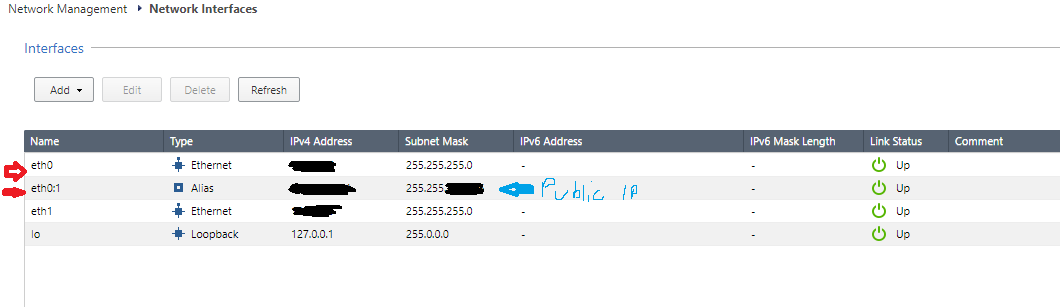
A question regarding @yunier88 @PhoneBoy @Nir_Shamir , initial question; After adding an in Azure Portal Secondary Static Private IP with a Public IP, should the Network Interface panel in the WebUI browser; should we see an alias with its new Private IP and Public IP? Or do we need to manually add in the WebUI this Private and Public IPs?
Thanks so much!!
In general, this is not necessary, so long as you have the appropriate rules in place to deal with that specific IP.

Thu 01 Oct 2026 @ 05:00 PM (CEST)
Under the Hood: Check Point WAF | Preventing minus-zero-day attacksTue 06 Oct 2026 @ 12:00 PM (ACDT)
Rethinking Network Security for the AI Era : Session 2 - From User, to Branch and Campus APACTue 06 Oct 2026 @ 03:00 PM (CEST)
Rethinking Network Security for the AI Era : Session 2 - From User, to Branch and Campus EMEAThu 01 Oct 2026 @ 05:00 PM (CEST)
Under the Hood: Check Point WAF | Preventing minus-zero-day attacksTue 06 Oct 2026 @ 12:00 PM (ACDT)
Rethinking Network Security for the AI Era : Session 2 - From User, to Branch and Campus APACTue 06 Oct 2026 @ 03:00 PM (CEST)
Rethinking Network Security for the AI Era : Session 2 - From User, to Branch and Campus EMEATue 06 Oct 2026 @ 02:00 PM (EDT)
Rethinking Network Security for the AI Era : Session 2 - From User, to Branch and Campus AMERAbout CheckMates
Learn Check Point
Advanced Learning

YOU DESERVE THE BEST SECURITY