- Products
- Learn
- Local User Groups
- Partners
- More
Step Into the Future of
AI-Powered Cyber Security
The State of Ransomware Q1 2026
Key Trends and Their Impact
AI Security Masters E8:
Claude Mythos: New Era in Cyber Security
Blueprint Architecture for Securing
The AI Factory & AI Data Center
Call For Papers
Your Expertise. Our Stage
CheckMates Go:
CheckMates Fest
Hi all experts.
Our question for experts experienced with deploying of Checkpoint firewall virtual instances.
We facing issue with deploying of Checkpoint R 80.40 virtual gateway.
Hypervisor - ESXi VMware 6.5.0
Server HW – HP Proliant DL360 Gen8
CPU HW- intel Xeon CPU E5-2670
Checkpoint installation iso file - Check_Point_R80.40_T294.iso
VM general settings
Guest OS RHEL7 64-bit
HDD – 100 GB
Memory – 12GB
Number of the CPU – 4
Number of the vNIC -10
Installation has been completed successfully. But vNIC’s sequence doesn’t match with Checkoint gateway interfaces. For example if we disconnect vNIC – 1 on Checkpoint gateway eth5 going down. This issue has been solved with sk69621. We have found correct sequence’s for ID PCI bus Instead renaming eth’s.
Next step – performance test.
Using iperf we have tested bandwidth. Data rate was unstable form 40 Mbits/s to 413 Mbits/s. In CPview the SND CPU has utilization up to 100%
We decide to move another one CPU to SND. Using cpconfig we have set two CPU for SND and reboot the VM.
Result:
Our question is what we are doing wrong?
-P should help with parallel threads up to the limits of the test hosts CPU.
See an example here depending on the scale that you hope to achieve.
Deploying JHFs on top of the base image is recommended as best practice.
Note OVA images are available here for reference:
sk158292: CloudGuard Network for Private Cloud images
Is there a JHF applied to this machine and can you share some specifics of the iperf test, were multiple parallel threads used or just a single flow?
Which interface driver/type is used for the VM?
Dear Chris
Iperf test string - iperf.exe -c 172.21.126.166 -p 443 -t 120
Clean installation with iso - Check_Point_R80.40_T294.iso no any additional JHF were installed.
vNIC driver - VMXNET3.
We would like to use this driver instead E1000. It was major reason for choosing guest OS RHEL7 but no Other Linux.
-P should help with parallel threads up to the limits of the test hosts CPU.
See an example here depending on the scale that you hope to achieve.
Deploying JHFs on top of the base image is recommended as best practice.
Note OVA images are available here for reference:
sk158292: CloudGuard Network for Private Cloud images
Will try OVA from SK. Will see.
Dear Chris.
We have download tar archive with VMDK, OVF, CERT and MF files instead OVA.
Gateway installation has been completed successfully. We can change numbers of vCPUs via VM settings or change CoreXL parameters in cpconfig command without any issues.
Thank you for advices.
To be sure you're aware, the guest OS option in ESX is just for configuration presets. It doesn't actually do anything on an ongoing basis. You can change any vNIC to vmxnet3.
Agreed with @Chris_Atkinson that you should really install a jumbo. R80.40 jumbo 192 has 2225 fixes over the initial release of R80.40.
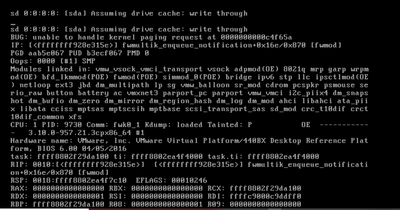
I can't make out the screenshot well, is the system no longer booting post the changes or something else?
Yes, VM no longer bootable, but we have fresh install snapshot. No any changes for VM only cpconfig - CoreXL and VM has gone.
Make sure you've tuned the configuration appropriately per: https://support.checkpoint.com/results/sk/sk169252
Also, you really should install the latest recommended JHF: https://sc1.checkpoint.com/documents/Jumbo_HFA/R80.40/R80.40/R80.40_Downloads.htm?tocpath=_____3
Leaderboard
Epsum factorial non deposit quid pro quo hic escorol.
| User | Count |
|---|---|
| 1 | |
| 1 | |
| 1 |
Wed 13 May 2026 @ 11:00 AM (EDT)
TechTalk: The State of Ransomware Q1 2026: Key Trends and Their ImpactThu 14 May 2026 @ 07:00 PM (EEST)
Under the Hood: Presentando Check Point Cloud Firewall como ServicioAbout CheckMates
Learn Check Point
Advanced Learning
YOU DESERVE THE BEST SECURITY
