Hi all,
I've an ansible playbook to add hosts to Check Point managed based on a yaml input file (vars_file)
example of file:
host_table:
- fqdn: <a href="http://www.youtube.com" target="_blank">www.youtube.com</a>
  host_name: fqdn-<a href="http://www.youtube.com-172.217.23.206" target="_blank">www.youtube.com-172.217.23.206</a>
  ip_address: 172.217.23.206
  name: fqdn-<a href="http://www.youtube.com-172.217.23.206" target="_blank">www.youtube.com-172.217.23.206</a>
- fqdn: <a href="http://www.youtube.com" target="_blank">www.youtube.com</a>
  host_name: fqdn-<a href="http://www.youtube.com-172.217.23.238" target="_blank">www.youtube.com-172.217.23.238</a>
  ip_address: 172.217.23.238
  name: fqdn-<a href="http://www.youtube.com-172.217.23.238" target="_blank">www.youtube.com-172.217.23.238</a>
- fqdn: <a href="http://www.youtube.com" target="_blank">www.youtube.com</a>
  host_name: fqdn-<a href="http://www.youtube.com-216.58.201.78" target="_blank">www.youtube.com-216.58.201.78</a>
  ip_address: 216.58.201.78
  name: fqdn-<a href="http://www.youtube.com-216.58.201.78" target="_blank">www.youtube.com-216.58.201.78</a>
And this playbook is working well:
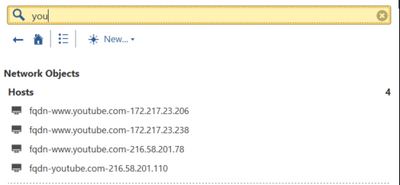
The next step is to use the same yaml file as input for the next playbook.
The next playbook should add all the relevant host object into the network group object.
command to execute the ansible playbook:
ansible-playbook cp_add_fqdn_network_group_object-playbook.yml --extra-vars "var_file=<a href="http://www.youtube.com.yml" target="_blank">www.youtube.com.yml</a> group_name=<a href="http://www.youtube.com" target="_blank">www.youtube.com</a>"
the actual playbook:
---
- hosts: "localhost"                        # Note #2 in the Description section
  vars_files:
  - "{{var_file}}"
  tasks:
  - name: "login"                           # You have to login to the management
                                            # server before running any commands
    check_point_mgmt:
      command: login
      parameters:
        username: "{{username}}"           # Variables set in /etc/ansible/hosts, to avoid needing
        password: "{{password}"       # to type your login details in every playbook.
        management: "{{mds_ip}}"
        domain: "{{mds_domain}}"
      fingerprint: "{{mds_fingerprint}}"
    register: login_response                # Register the output from the login
                                            # command so we can use it later to run commands.
  - name: "add group"
    check_point_mgmt:
      command: add-group
      parameters:
        name: "{{group_name}}"
        members:
          -  "{{ item.host_name }}"
      session-data: "{{ login_response }}"
    with_items: "{{ host_table }}"
  - name: "publish"                         # Publishing is important if you want
                                            # your changes to be saved.
    check_point_mgmt:                       # This will actually 'discard' when
                                            # check mode is enabled (ansible-playbook -C)
                                            # unless you add 'always_run: yes' to the task.
      command: publish
      session-data: "{{login_response}}"
  - name: logout
    check_point_mgmt:
      command: logout
      session-data: '{{login_response}}'
When executing this playbook I get the following error:
PLAY [localhost] *****************************************************************************************************************************************************************************************************************************

TASK [Gathering Facts] ***********************************************************************************************************************************************************************************************************************
ok: [localhost]

TASK [login] *********************************************************************************************************************************************************************************************************************************
ok: [localhost]

TASK [add group] *****************************************************************************************************************************************************************************************************************************
failed: [localhost] (item={u'ip_address': u'172.217.23.206', u'fqdn': u'<a href="http://www.youtube.com" target="_blank">www.youtube.com</a>', u'name': u'fqdn-<a href="http://www.youtube.com-172.217.23.206" target="_blank">www.youtube.com-172.217.23.206</a>', u'host_name': u'fqdn-<a href="http://www.youtube.com-172.217.23.206" target="_blank">www.youtube.com-172.217.23.206</a>'}) => {"changed": false, "failed": true, "item": {"fqdn": "<a href="http://www.youtube.com" target="_blank">www.youtube.com</a>", "host_name": "fqdn-<a href="http://www.youtube.com-172.217.23.206" target="_blank">www.youtube.com-172.217.23.206</a>", "ip_address": "172.217.23.206", "name": "fqdn-<a href="http://www.youtube.com-172.217.23.206" target="_blank">www.youtube.com-172.217.23.206</a>"}, "msg": "Command 'add-group {u'name': u'<a href="http://www.youtube.com" target="_blank">www.youtube.com</a>', u'members': [u'fqdn-<a href="http://www.youtube.com-172.217.23.206" target="_blank">www.youtube.com-172.217.23.206</a>']}' failed with error message: Validation failed with 1 error. All changes are discarded and the session is invalidated."}
failed: [localhost] (item={u'ip_address': u'172.217.23.238', u'fqdn': u'<a href="http://www.youtube.com" target="_blank">www.youtube.com</a>', u'name': u'fqdn-<a href="http://www.youtube.com-172.217.23.238" target="_blank">www.youtube.com-172.217.23.238</a>', u'host_name': u'fqdn-<a href="http://www.youtube.com-172.217.23.238" target="_blank">www.youtube.com-172.217.23.238</a>'}) => {"changed": false, "failed": true, "item": {"fqdn": "<a href="http://www.youtube.com" target="_blank">www.youtube.com</a>", "host_name": "fqdn-<a href="http://www.youtube.com-172.217.23.238" target="_blank">www.youtube.com-172.217.23.238</a>", "ip_address": "172.217.23.238", "name": "fqdn-<a href="http://www.youtube.com-172.217.23.238" target="_blank">www.youtube.com-172.217.23.238</a>"}, "msg": "Command 'add-group {u'name': u'<a href="http://www.youtube.com" target="_blank">www.youtube.com</a>', u'members': [u'fqdn-<a href="http://www.youtube.com-172.217.23.238" target="_blank">www.youtube.com-172.217.23.238</a>']}' failed with error message: Wrong session id [yPqyWrEVg9vFOHP2RwE2LyoQUmbGAkNl8UDLZnBARxI]. Session may be expired. Please check session id and resend the request.. All changes are discarded and the session is invalidated."}
failed: [localhost] (item={u'ip_address': u'216.58.201.78', u'fqdn': u'<a href="http://www.youtube.com" target="_blank">www.youtube.com</a>', u'name': u'fqdn-<a href="http://www.youtube.com-216.58.201.78" target="_blank">www.youtube.com-216.58.201.78</a>', u'host_name': u'fqdn-<a href="http://www.youtube.com-216.58.201.78" target="_blank">www.youtube.com-216.58.201.78</a>'}) => {"changed": false, "failed": true, "item": {"fqdn": "<a href="http://www.youtube.com" target="_blank">www.youtube.com</a>", "host_name": "fqdn-<a href="http://www.youtube.com-216.58.201.78" target="_blank">www.youtube.com-216.58.201.78</a>", "ip_address": "216.58.201.78", "name": "fqdn-<a href="http://www.youtube.com-216.58.201.78" target="_blank">www.youtube.com-216.58.201.78</a>"}, "msg": "Command 'add-group {u'name': u'<a href="http://www.youtube.com" target="_blank">www.youtube.com</a>', u'members': [u'fqdn-<a href="http://www.youtube.com-216.58.201.78" target="_blank">www.youtube.com-216.58.201.78</a>']}' failed with error message: Wrong session id [yPqyWrEVg9vFOHP2RwE2LyoQUmbGAkNl8UDLZnBARxI]. Session may be expired. Please check session id and resend the request.. All changes are discarded and the session is invalidated."}
        to retry, use: --limit @/root/workspace/ansible/cp/cp_add_fqdn_network_group_object-playbook.retry

PLAY RECAP ***********************************************************************************************************************************************************************************************************************************
localhost                  : ok=2    changed=0    unreachable=0    failed=1
When I change the command from add-group to set-group, the playbook will be executed without failure, but only the last action is stored on Check Point Management. So it looks like the loop is working well but not in combination with the add-group command.
PLAY [localhost] *****************************************************************************************************************************************************************************************************************************

TASK [Gathering Facts] ***********************************************************************************************************************************************************************************************************************
ok: [localhost]

TASK [login] *********************************************************************************************************************************************************************************************************************************
ok: [localhost]

TASK [add group] *****************************************************************************************************************************************************************************************************************************
changed: [localhost] => (item={u'ip_address': u'172.217.23.206', u'fqdn': u'<a href="http://www.youtube.com" target="_blank">www.youtube.com</a>', u'name': u'fqdn-<a href="http://www.youtube.com-172.217.23.206" target="_blank">www.youtube.com-172.217.23.206</a>', u'host_name': u'fqdn-<a href="http://www.youtube.com-172.217.23.206" target="_blank">www.youtube.com-172.217.23.206</a>'})
changed: [localhost] => (item={u'ip_address': u'172.217.23.238', u'fqdn': u'<a href="http://www.youtube.com" target="_blank">www.youtube.com</a>', u'name': u'fqdn-<a href="http://www.youtube.com-172.217.23.238" target="_blank">www.youtube.com-172.217.23.238</a>', u'host_name': u'fqdn-<a href="http://www.youtube.com-172.217.23.238" target="_blank">www.youtube.com-172.217.23.238</a>'})
changed: [localhost] => (item={u'ip_address': u'216.58.201.78', u'fqdn': u'<a href="http://www.youtube.com" target="_blank">www.youtube.com</a>', u'name': u'fqdn-<a href="http://www.youtube.com-216.58.201.78" target="_blank">www.youtube.com-216.58.201.78</a>', u'host_name': u'fqdn-<a href="http://www.youtube.com-216.58.201.78" target="_blank">www.youtube.com-216.58.201.78</a>'})

TASK [publish] *******************************************************************************************************************************************************************************************************************************
ok: [localhost]

TASK [logout] ********************************************************************************************************************************************************************************************************************************
ok: [localhost]

PLAY RECAP ***********************************************************************************************************************************************************************************************************************************
localhost                  : ok=5    changed=1    unreachable=0    failed=0
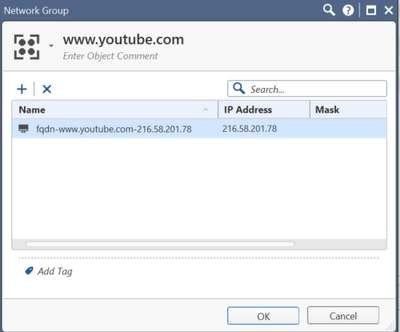
Does somebody know what I'm doing wrong? Or what the best way is to add multiple host members in a network group object using Ansible.
Thanks and kind regards!





