Create a Post
cancel
Showing results for 
Search instead for 
Did you mean: 
This widget could not be displayed.
9 Replies
This widget could not be displayed.

Hello all,

I would like to share with you a tool for automatic configuration of Check Point management server and Check Point gateways. The tool is based on CP Management API, CP GAiA API, Ansible and enables a range of gateways and management related configuration actions. The tool is easily extendable.

The tool can be considered as a good starting point for the automation of your Check Point environment.

For management server

Following configuration is possible on management server:

  • Create/delete network, ranges, services objects
  • Create/delete policy packages
  • Add rules to the policy packages
  • Add gateways, establish SIC
  • Install policy on the gateways

For gateways

Following configuration is possible on gateways in accordance to various gateways attributes like CMA, SW version, gateway type, platform type, gateway IP.

  • DNS configuration
  • Users configuraion
  • Expert password configuration
  • User public keys copy
  • ...

Which means you can configure DNS, Users, Expert password or Users public keys specifically for gateways in certain CMAs or for gateways having certain SW version, or platform type, or IP address.

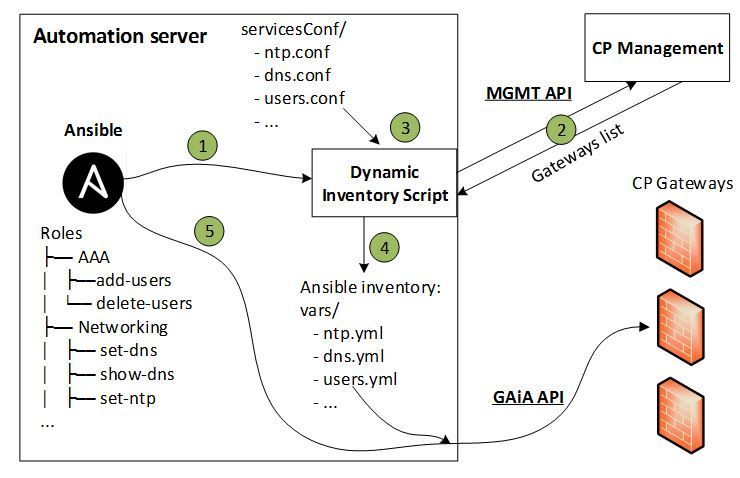
Below are the tool structure and the steps for the gateways configuration part. 
GAAnT.JPG

  1. Ansible playbook starts Dynamic Inventory Script
  2. Dynamic Inventory Script gets the list of all gateways from SMS or MDS via MGMT API.
  3. Dynamic Inventory Script reads the services configuration files.  
  4. Dynamic Inventory Script creates the Ansible inventory files based on gateways list and services configuration.  
  5. Ansible configures the gateways via GAiA API (and via SSH for expert mode) according to inventory files.

License, warranty, contact

The tool is provided with APACHE2.0 and without any liability, warranty or support. In case, you are interested in support or customization please contact Check Point Profession Services under:

[email protected].


Detailed tool information is provided in the attached documentations and videos.

I hope the tool will be beneficial for you and I would appreciate your feedback. 🙂


Regards,

Yevgeniy

Hello all,

I would like to share with you a tool for automatic configuration of Check Point management server and Check Point gateways. The tool is based on CP Management API, CP GAiA API, Ansible and enables a range of gateways and management related configuration actions. The tool is easily extendable.

The tool can be considered as a good starting point for the automation of your Check Point environment.

For management server

Following configuration is possible on management server:

  • Create/delete network, ranges, services objects
  • Create/delete policy packages
  • Add rules to the policy packages
  • Add gateways, establish SIC
  • Install policy on the gateways

For gateways

Following configuration is possible on gateways in accordance to various gateways attributes like CMA, SW version, gateway type, platform type, gateway IP.

  • DNS configuration
  • Users configuraion
  • Expert password configuration
  • User public keys copy
  • ...

Which means you can configure DNS, Users, Expert password or Users public keys specifically for gateways in certain CMAs or for gateways having certain SW version, or platform type, or IP address.

Below are the tool structure and the steps for the gateways configuration part. 

GAAnT.JPG

  1. Ansible playbook starts Dynamic Inventory Script
  2. Dynamic Inventory Script gets the list of all gateways from SMS or MDS via MGMT API.
  3. Dynamic Inventory Script reads the services configuration files.  
  4. Dynamic Inventory Script creates the Ansible inventory files based on gateways list and services configuration.  
  5. Ansible configures the gateways via GAiA API (and via SSH for expert mode) according to inventory files.

License, warranty, contact

The tool is provided with APACHE2.0 and without any liability, warranty or support. In case, you are interested in support or customization please contact Check Point Profession Services under:

[email protected].


Detailed tool information is provided in the attached documentations and videos.

I hope the tool will be beneficial for you and I would appreciate your feedback. 🙂


Regards,

Yevgeniy

Hello all,

I would like to share with you a tool for automatic configuration of Check Point management server and Check Point gateways. The tool is based on CP Management API, CP GAiA API, Ansible and enables a range of gateways and management related configuration actions. The tool is easily extendable.

The tool can be considered as a good starting point for the automation of your Check Point environment.

For management server

Following configuration is possible on management server:

  • Create/delete network, ranges, services objects
  • Create/delete policy packages
  • Add rules to the policy packages
  • Add gateways, establish SIC
  • Install policy on the gateways

For gateways

Following configuration is possible on gateways in accordance to various gateways attributes like CMA, SW version, gateway type, platform type, gateway IP.

  • DNS configuration
  • Users configuraion
  • Expert password configuration
  • User public keys copy
  • ...

Which means you can configure DNS, Users, Expert password or Users public keys specifically for gateways in certain CMAs or for gateways having certain SW version, or platform type, or IP address.

Below are the tool structure and the steps for the gateways configuration part. 

GAAnT.JPG

  1. Ansible playbook starts Dynamic Inventory Script
  2. Dynamic Inventory Script gets the list of all gateways from SMS or MDS via MGMT API.
  3. Dynamic Inventory Script reads the services configuration files.  
  4. Dynamic Inventory Script creates the Ansible inventory files based on gateways list and services configuration.  
  5. Ansible configures the gateways via GAiA API (and via SSH for expert mode) according to inventory files.

License, warranty, contact

The tool is provided with APACHE2.0 and without any liability, warranty or support. In case, you are interested in support or customization please contact Check Point Profession Services under:

[email protected].


Detailed tool information is provided in the attached documentations and videos.

I hope the tool will be beneficial for you and I would appreciate your feedback. 🙂


Regards,

Yevgeniy

Hello all,

I would like to share with you a tool for automatic configuration of Check Point management server and Check Point gateways. The tool is based on CP Management API, CP GAiA API, Ansible and enables a range of gateways and management related configuration actions. The tool is easily extendable.

The tool can be considered as a good starting point for the automation of your Check Point environment.

For management server

Following configuration is possible on management server:

  • Create/delete network, ranges, services objects
  • Create/delete policy packages
  • Add rules to the policy packages
  • Add gateways, establish SIC
  • Install policy on the gateways

For gateways

Following configuration is possible on gateways in accordance to various gateways attributes like CMA, SW version, gateway type, platform type, gateway IP.

  • DNS configuration
  • Users configuraion
  • Expert password configuration
  • User public keys copy
  • ...

Which means you can configure DNS, Users, Expert password or Users public keys specifically for gateways in certain CMAs or for gateways having certain SW version, or platform type, or IP address.

Below are the tool structure and the steps for the gateways configuration part. 

GAAnT.JPG

  1. Ansible playbook starts Dynamic Inventory Script
  2. Dynamic Inventory Script gets the list of all gateways from SMS or MDS via MGMT API.
  3. Dynamic Inventory Script reads the services configuration files.  
  4. Dynamic Inventory Script creates the Ansible inventory files based on gateways list and services configuration.  
  5. Ansible configures the gateways via GAiA API (and via SSH for expert mode) according to inventory files.

License, warranty, contact

The tool is provided with APACHE2.0 and without any liability, warranty or support. In case, you are interested in support or customization please contact Check Point Profession Services under:

[email protected].


Detailed tool information is provided in the attached documentations and videos.

I hope the tool will be beneficial for you and I would appreciate your feedback. 🙂


Regards,

Yevgeniy

Hello all,

I would like to share with you a tool for automatic configuration of Check Point management server and Check Point gateways. The tool is based on CP Management API, CP GAiA API, Ansible and enables a range of gateways and management related configuration actions. The tool is easily extendable.

The tool can be considered as a good starting point for the automation of your Check Point environment.

For management server

Following configuration is possible on management server:

  • Create/delete network, ranges, services objects
  • Create/delete policy packages
  • Add rules to the policy packages
  • Add gateways, establish SIC
  • Install policy on the gateways

For gateways

Following configuration is possible on gateways in accordance to various gateways attributes like CMA, SW version, gateway type, platform type, gateway IP.

  • DNS configuration
  • Users configuraion
  • Expert password configuration
  • User public keys copy
  • ...

Which means you can configure DNS, Users, Expert password or Users public keys specifically for gateways in certain CMAs or for gateways having certain SW version, or platform type, or IP address.

Below are the tool structure and the steps for the gateways configuration part. 

GAAnT.JPG

  1. Ansible playbook starts Dynamic Inventory Script
  2. Dynamic Inventory Script gets the list of all gateways from SMS or MDS via MGMT API.
  3. Dynamic Inventory Script reads the services configuration files.  
  4. Dynamic Inventory Script creates the Ansible inventory files based on gateways list and services configuration.  
  5. Ansible configures the gateways via GAiA API (and via SSH for expert mode) according to inventory files.

License, warranty, contact

The tool is provided with APACHE2.0 and without any liability, warranty or support. In case, you are interested in support or customization please contact Check Point Profession Services under:

[email protected].


Detailed tool information is provided in the attached documentations and videos.

I hope the tool will be beneficial for you and I would appreciate your feedback. 🙂


Regards,

Yevgeniy

Ansible-based automation for Check Point Management Server and Check Point Gateways

Ansible-based automation for Check Point Management Server and Check Point Gateways

Ansible-based automation for Check Point Management Server and Check Point Gateways

Ansible-based automation for Check Point Management Server and Check Point Gateways

Ansible-based automation for Check Point Management Server and Check Point Gateways

Ansible-based automation for Check Point Management Server and Check Point Gateways

Ansible-based automation for Check Point Management Server and Check Point Gateways

Ansible-based automation for Check Point Management Server and Check Point Gateways

Ansible-based automation for Check Point Management Server and Check Point Gateways

Hello all,

I would like to share with you a tool for automatic configuration of Check Point management server and Check Point gateways. The tool is based on CP Management API, CP GAiA API, Ansible and enables a range of gateways and management related configuration actions. The tool is easily extendable.

The tool can be considered as a good starting point for the automation of your Check Point environment.

For management server

Following configuration is possible on management server:

  • Create/delete network, ranges, services objects
  • Create/delete policy packages
  • Add rules to the policy packages
  • Add gateways, establish SIC
  • Install policy on the gateways

For gateways

Following configuration is possible on gateways in accordance to various gateways attributes like CMA, SW version, gateway type, platform type, gateway IP.

  • DNS configuration
  • Users configuraion
  • Expert password configuration
  • User public keys copy
  • ...

Which means you can configure DNS, Users, Expert password or Users public keys specifically for gateways in certain CMAs or for gateways having certain SW version, or platform type, or IP address.

Below are the tool structure and the steps for the gateways configuration part. 

GAAnT.JPG

  1. Ansible playbook starts Dynamic Inventory Script
  2. Dynamic Inventory Script gets the list of all gateways from SMS or MDS via MGMT API.
  3. Dynamic Inventory Script reads the services configuration files.  
  4. Dynamic Inventory Script creates the Ansible inventory files based on gateways list and services configuration.  
  5. Ansible configures the gateways via GAiA API (and via SSH for expert mode) according to inventory files.

License, warranty, contact

The tool is provided with APACHE2.0 and without any liability, warranty or support. In case, you are interested in support or customization please contact Check Point Profession Services under:

[email protected].


Detailed tool information is provided in the attached documentations and videos.

I hope the tool will be beneficial for you and I would appreciate your feedback. 🙂


Regards,

Yevgeniy

Hello all,

I would like to share with you a tool for automatic configuration of Check Point management server and Check Point gateways. The tool is based on CP Management API, CP GAiA API, Ansible and enables a range of gateways and management related configuration actions. The tool is easily extendable.

The tool can be considered as a good starting point for the automation of your Check Point environment.

For management server

Following configuration is possible on management server:

  • Create/delete network, ranges, services objects
  • Create/delete policy packages
  • Add rules to the policy packages
  • Add gateways, establish SIC
  • Install policy on the gateways

For gateways

Following configuration is possible on gateways in accordance to various gateways attributes like CMA, SW version, gateway type, platform type, gateway IP.

  • DNS configuration
  • Users configuraion
  • Expert password configuration
  • User public keys copy
  • ...

Which means you can configure DNS, Users, Expert password or Users public keys specifically for gateways in certain CMAs or for gateways having certain SW version, or platform type, or IP address.

Below are the tool structure and the steps for the gateways configuration part. 

GAAnT.JPG

  1. Ansible playbook starts Dynamic Inventory Script
  2. Dynamic Inventory Script gets the list of all gateways from SMS or MDS via MGMT API.
  3. Dynamic Inventory Script reads the services configuration files.  
  4. Dynamic Inventory Script creates the Ansible inventory files based on gateways list and services configuration.  
  5. Ansible configures the gateways via GAiA API (and via SSH for expert mode) according to inventory files.

License, warranty, contact

The tool is provided with APACHE2.0 and without any liability, warranty or support. In case, you are interested in support or customization please contact Check Point Profession Services under:

[email protected].


Detailed tool information is provided in the attached documentations and videos.

I hope the tool will be beneficial for you and I would appreciate your feedback. 🙂


Regards,

Yevgeniy

Hello all,

I would like to share with you a tool for automatic configuration of Check Point management server and Check Point gateways. The tool is based on CP Management API, CP GAiA API, Ansible and enables a range of gateways and management related configuration actions. The tool is easily extendable.

The tool can be considered as a good starting point for the automation of your Check Point environment.

For management server

Following configuration is possible on management server:

  • Create/delete network, ranges, services objects
  • Create/delete policy packages
  • Add rules to the policy packages
  • Add gateways, establish SIC
  • Install policy on the gateways

For gateways

Following configuration is possible on gateways in accordance to various gateways attributes like CMA, SW version, gateway type, platform type, gateway IP.

  • DNS configuration
  • Users configuraion
  • Expert password configuration
  • User public keys copy
  • ...

Which means you can configure DNS, Users, Expert password or Users public keys specifically for gateways in certain CMAs or for gateways having certain SW version, or platform type, or IP address.

Below are the tool structure and the steps for the gateways configuration part. 

GAAnT.JPG

  1. Ansible playbook starts Dynamic Inventory Script
  2. Dynamic Inventory Script gets the list of all gateways from SMS or MDS via MGMT API.
  3. Dynamic Inventory Script reads the services configuration files.  
  4. Dynamic Inventory Script creates the Ansible inventory files based on gateways list and services configuration.  
  5. Ansible configures the gateways via GAiA API (and via SSH for expert mode) according to inventory files.

License, warranty, contact

The tool is provided with APACHE2.0 and without any liability, warranty or support. In case, you are interested in support or customization please contact Check Point Profession Services under:

[email protected].


Detailed tool information is provided in the attached documentations and videos.

I hope the tool will be beneficial for you and I would appreciate your feedback. 🙂


Regards,

Yevgeniy

Hello all,

I would like to share with you a tool for automatic configuration of Check Point management server and Check Point gateways. The tool is based on CP Management API, CP GAiA API, Ansible and enables a range of gateways and management related configuration actions. The tool is easily extendable.

The tool can be considered as a good starting point for the automation of your Check Point environment.

For management server

Following configuration is possible on management server:

  • Create/delete network, ranges, services objects
  • Create/delete policy packages
  • Add rules to the policy packages
  • Add gateways, establish SIC
  • Install policy on the gateways

For gateways

Following configuration is possible on gateways in accordance to various gateways attributes like CMA, SW version, gateway type, platform type, gateway IP.

  • DNS configuration
  • Users configuraion
  • Expert password configuration
  • User public keys copy
  • ...

Which means you can configure DNS, Users, Expert password or Users public keys specifically for gateways in certain CMAs or for gateways having certain SW version, or platform type, or IP address.

Below are the tool structure and the steps for the gateways configuration part. 

GAAnT.JPG

  1. Ansible playbook starts Dynamic Inventory Script
  2. Dynamic Inventory Script gets the list of all gateways from SMS or MDS via MGMT API.
  3. Dynamic Inventory Script reads the services configuration files.  
  4. Dynamic Inventory Script creates the Ansible inventory files based on gateways list and services configuration.  
  5. Ansible configures the gateways via GAiA API (and via SSH for expert mode) according to inventory files.

License, warranty, contact

The tool is provided with APACHE2.0 and without any liability, warranty or support. In case, you are interested in support or customization please contact Check Point Profession Services under:

[email protected].


Detailed tool information is provided in the attached documentations and videos.

I hope the tool will be beneficial for you and I would appreciate your feedback. 🙂


Regards,

Yevgeniy

Hello all,

I would like to share with you a tool for automatic configuration of Check Point management server and Check Point gateways. The tool is based on CP Management API, CP GAiA API, Ansible and enables a range of gateways and management related configuration actions. The tool is easily extendable.

The tool can be considered as a good starting point for the automation of your Check Point environment.

For management server

Following configuration is possible on management server:

  • Create/delete network, ranges, services objects
  • Create/delete policy packages
  • Add rules to the policy packages
  • Add gateways, establish SIC
  • Install policy on the gateways

For gateways

Following configuration is possible on gateways in accordance to various gateways attributes like CMA, SW version, gateway type, platform type, gateway IP.

  • DNS configuration
  • Users configuraion
  • Expert password configuration
  • User public keys copy
  • ...

Which means you can configure DNS, Users, Expert password or Users public keys specifically for gateways in certain CMAs or for gateways having certain SW version, or platform type, or IP address.

Below are the tool structure and the steps for the gateways configuration part. 

GAAnT.JPG

  1. Ansible playbook starts Dynamic Inventory Script
  2. Dynamic Inventory Script gets the list of all gateways from SMS or MDS via MGMT API.
  3. Dynamic Inventory Script reads the services configuration files.  
  4. Dynamic Inventory Script creates the Ansible inventory files based on gateways list and services configuration.  
  5. Ansible configures the gateways via GAiA API (and via SSH for expert mode) according to inventory files.

License, warranty, contact

The tool is provided with APACHE2.0 and without any liability, warranty or support. In case, you are interested in support or customization please contact Check Point Profession Services under:

[email protected].


Detailed tool information is provided in the attached documentations and videos.

I hope the tool will be beneficial for you and I would appreciate your feedback. 🙂


Regards,

Yevgeniy

Hello all,

I would like to share with you a tool for automatic configuration of Check Point management server and Check Point gateways. The tool is based on CP Management API, CP GAiA API, Ansible and enables a range of gateways and management related configuration actions. The tool is easily extendable.

The tool can be considered as a good starting point for the automation of your Check Point environment.

For management server

Following configuration is possible on management server:

  • Create/delete network, ranges, services objects
  • Create/delete policy packages
  • Add rules to the policy packages
  • Add gateways, establish SIC
  • Install policy on the gateways

For gateways

Following configuration is possible on gateways in accordance to various gateways attributes like CMA, SW version, gateway type, platform type, gateway IP.

  • DNS configuration
  • Users configuraion
  • Expert password configuration
  • User public keys copy
  • ...

Which means you can configure DNS, Users, Expert password or Users public keys specifically for gateways in certain CMAs or for gateways having certain SW version, or platform type, or IP address.

Below are the tool structure and the steps for the gateways configuration part. 

GAAnT.JPG

  1. Ansible playbook starts Dynamic Inventory Script
  2. Dynamic Inventory Script gets the list of all gateways from SMS or MDS via MGMT API.
  3. Dynamic Inventory Script reads the services configuration files.  
  4. Dynamic Inventory Script creates the Ansible inventory files based on gateways list and services configuration.  
  5. Ansible configures the gateways via GAiA API (and via SSH for expert mode) according to inventory files.

License, warranty, contact

The tool is provided with APACHE2.0 and without any liability, warranty or support. In case, you are interested in support or customization please contact Check Point Profession Services under:

[email protected].


Detailed tool information is provided in the attached documentations and videos.

I hope the tool will be beneficial for you and I would appreciate your feedback. 🙂


Regards,

Yevgeniy

Hello all,

I would like to share with you a tool for automatic configuration of Check Point management server and Check Point gateways. The tool is based on CP Management API, CP GAiA API, Ansible and enables a range of gateways and management related configuration actions. The tool is easily extendable.

The tool can be considered as a good starting point for the automation of your Check Point environment.

For management server

Following configuration is possible on management server:

  • Create/delete network, ranges, services objects
  • Create/delete policy packages
  • Add rules to the policy packages
  • Add gateways, establish SIC
  • Install policy on the gateways

For gateways

Following configuration is possible on gateways in accordance to various gateways attributes like CMA, SW version, gateway type, platform type, gateway IP.

  • DNS configuration
  • Users configuraion
  • Expert password configuration
  • User public keys copy
  • ...

Which means you can configure DNS, Users, Expert password or Users public keys specifically for gateways in certain CMAs or for gateways having certain SW version, or platform type, or IP address.

Below are the tool structure and the steps for the gateways configuration part. 

GAAnT.JPG

  1. Ansible playbook starts Dynamic Inventory Script
  2. Dynamic Inventory Script gets the list of all gateways from SMS or MDS via MGMT API.
  3. Dynamic Inventory Script reads the services configuration files.  
  4. Dynamic Inventory Script creates the Ansible inventory files based on gateways list and services configuration.  
  5. Ansible configures the gateways via GAiA API (and via SSH for expert mode) according to inventory files.

License, warranty, contact

The tool is provided with APACHE2.0 and without any liability, warranty or support. In case, you are interested in support or customization please contact Check Point Profession Services under:

[email protected].


Detailed tool information is provided in the attached documentations and videos.

I hope the tool will be beneficial for you and I would appreciate your feedback. 🙂


Regards,

Yevgeniy

Hello all,

I would like to share with you a tool for automatic configuration of Check Point management server and Check Point gateways. The tool is based on CP Management API, CP GAiA API, Ansible and enables a range of gateways and management related configuration actions. The tool is easily extendable.

The tool can be considered as a good starting point for the automation of your Check Point environment.

For management server

Following configuration is possible on management server:

  • Create/delete network, ranges, services objects
  • Create/delete policy packages
  • Add rules to the policy packages
  • Add gateways, establish SIC
  • Install policy on the gateways

For gateways

Following configuration is possible on gateways in accordance to various gateways attributes like CMA, SW version, gateway type, platform type, gateway IP.

  • DNS configuration
  • Users configuraion
  • Expert password configuration
  • User public keys copy
  • ...

Which means you can configure DNS, Users, Expert password or Users public keys specifically for gateways in certain CMAs or for gateways having certain SW version, or platform type, or IP address.

Below are the tool structure and the steps for the gateways configuration part. 

GAAnT.JPG

  1. Ansible playbook starts Dynamic Inventory Script
  2. Dynamic Inventory Script gets the list of all gateways from SMS or MDS via MGMT API.
  3. Dynamic Inventory Script reads the services configuration files.  
  4. Dynamic Inventory Script creates the Ansible inventory files based on gateways list and services configuration.  
  5. Ansible configures the gateways via GAiA API (and via SSH for expert mode) according to inventory files.

License, warranty, contact

The tool is provided with APACHE2.0 and without any liability, warranty or support. In case, you are interested in support or customization please contact Check Point Profession Services under:

[email protected].


Detailed tool information is provided in the attached documentations and videos.

I hope the tool will be beneficial for you and I would appreciate your feedback. 🙂


Regards,

Yevgeniy

Hello all,

I would like to share with you a tool for automatic configuration of Check Point management server and Check Point gateways. The tool is based on CP Management API, CP GAiA API, Ansible and enables a range of gateways and management related configuration actions. The tool is easily extendable.

The tool can be considered as a good starting point for the automation of your Check Point environment.

For management server

Following configuration is possible on management server:

  • Create/delete network, ranges, services objects
  • Create/delete policy packages
  • Add rules to the policy packages
  • Add gateways, establish SIC
  • Install policy on the gateways

For gateways

Following configuration is possible on gateways in accordance to various gateways attributes like CMA, SW version, gateway type, platform type, gateway IP.

  • DNS configuration
  • Users configuraion
  • Expert password configuration
  • User public keys copy
  • ...

Which means you can configure DNS, Users, Expert password or Users public keys specifically for gateways in certain CMAs or for gateways having certain SW version, or platform type, or IP address.

Below are the tool structure and the steps for the gateways configuration part. 

GAAnT.JPG

  1. Ansible playbook starts Dynamic Inventory Script
  2. Dynamic Inventory Script gets the list of all gateways from SMS or MDS via MGMT API.
  3. Dynamic Inventory Script reads the services configuration files.  
  4. Dynamic Inventory Script creates the Ansible inventory files based on gateways list and services configuration.  
  5. Ansible configures the gateways via GAiA API (and via SSH for expert mode) according to inventory files.

License, warranty, contact

The tool is provided with APACHE2.0 and without any liability, warranty or support. In case, you are interested in support or customization please contact Check Point Profession Services under:

[email protected].


Detailed tool information is provided in the attached documentations and videos.

I hope the tool will be beneficial for you and I would appreciate your feedback. 🙂


Regards,

Yevgeniy

Vlad_Tonne
Employee Alumnus
Employee Alumnus
Vlad_Tonne
Employee Alumnus
Employee Alumnus
Vlad_Tonne
Employee Alumnus
Employee Alumnus
Vlad_Tonne
Employee Alumnus
Employee Alumnus
Vlad_Tonne
Employee Alumnus
Employee Alumnus
Vlad_Tonne
Employee Alumnus
Employee Alumnus
Vlad_Tonne
Employee Alumnus
Employee Alumnus
Vlad_Tonne
Employee Alumnus
Employee Alumnus
Vlad_Tonne
Employee Alumnus
Employee Alumnus

According to sk114661, you need to configure Ansible inventory or /etc/ansible/hosts with the relevant ansible_network_os.


ansible_network_os=checkpoint


Full configuration shown in sk114661.


BR,

Vlad Tonne.

According to sk114661, you need to configure Ansible inventory or /etc/ansible/hosts with the relevant ansible_network_os.


ansible_network_os=checkpoint


Full configuration shown in sk114661.


BR,

Vlad Tonne.

According to sk114661, you need to configure Ansible inventory or /etc/ansible/hosts with the relevant ansible_network_os.


ansible_network_os=checkpoint


Full configuration shown in sk114661.


BR,

Vlad Tonne.

According to sk114661, you need to configure Ansible inventory or /etc/ansible/hosts with the relevant ansible_network_os.


ansible_network_os=checkpoint


Full configuration shown in sk114661.


BR,

Vlad Tonne.

According to sk114661, you need to configure Ansible inventory or /etc/ansible/hosts with the relevant ansible_network_os.


ansible_network_os=checkpoint


Full configuration shown in sk114661.


BR,

Vlad Tonne.

According to sk114661, you need to configure Ansible inventory or /etc/ansible/hosts with the relevant ansible_network_os.


ansible_network_os=checkpoint


Full configuration shown in sk114661.


BR,

Vlad Tonne.

According to sk114661, you need to configure Ansible inventory or /etc/ansible/hosts with the relevant ansible_network_os.


ansible_network_os=checkpoint


Full configuration shown in sk114661.


BR,

Vlad Tonne.

According to sk114661, you need to configure Ansible inventory or /etc/ansible/hosts with the relevant ansible_network_os.


ansible_network_os=checkpoint


Full configuration shown in sk114661.


BR,

Vlad Tonne.

According to sk114661, you need to configure Ansible inventory or /etc/ansible/hosts with the relevant ansible_network_os.


ansible_network_os=checkpoint


Full configuration shown in sk114661.


BR,

Vlad Tonne.