- Products
- Learn
- Local User Groups
- Partners
- More
What's New in R82.10?
Watch HereWhen the Agents Attack
A Live Look at Agentic Exposure Validation
AI Security Masters E8:
Claude Mythos: New Era in Cyber Security
CheckMates Go:
CheckMates Fest
Hello,
i'm trying to modify objects colors using mgmt_cli. it's working with simple colors.
but doesn't on two or three words colors
add host name host_1 ip-address an_ip color "dark orange"
error: The parameters of add-host command should be provided in pairs (key and value). You have provided an odd number of parameters which suggests that you are probably missing a parameter.
same issue when using set_host
any ideas ?
What version is this, tested on R80.20M1 and all seems well, but colors have changed.
this is R80.10 version
This should work. Are you using mgmt_cli over SSH at the MGMT machine? How do you provide the username and password?
if you run it exactly like Robert's examples, then please proceed with a support ticket.
Probably the missing link is the Case Sensitivity?
look at the color picker in the gui, there is a list there.
robert.
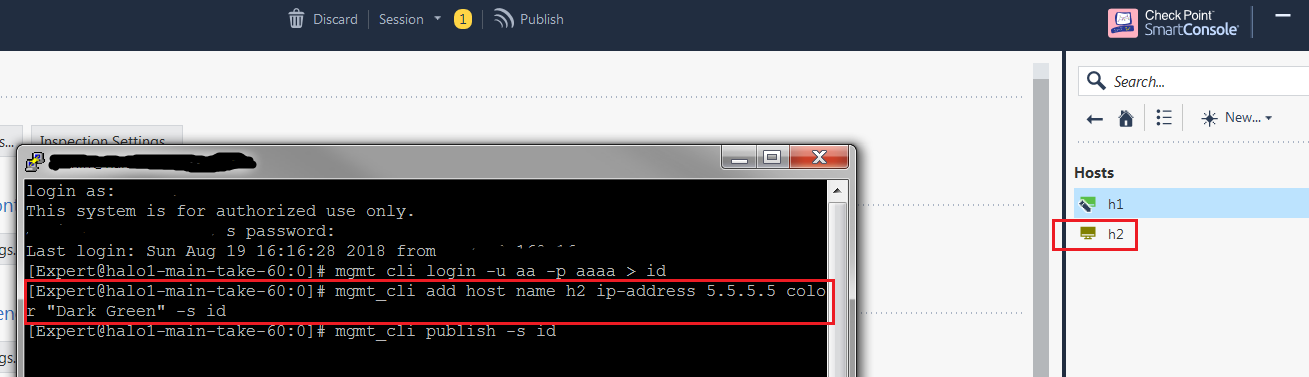
Attached the working command examples both from GUI and from server CLI -


Robert.
i hadn't test it, but it indeed works when i run the command direclty in a ssh window ...
unfortunately it does not in my bash script ... the script read mgmt_cli cmds from an input file and apply them one by one.
and it does work with single words color ... i'm certainly missing something in the below command.
_MSG=`mgmt_cli -s ${_SESSION_ID_F} ${1}`
$1 is add host name o365_40.81.156.153_32 ip-address 40.81.156.153 color "dark orange"
i thought it was maybe a mgmt_cli issue ... it's apparently not.
anyway, i will not ask you to troubleshoot my bash, thanks for your replies.
for information, it's not case sensitiv, And when entering a wrong color, it replies with the below error message that contains the list of allowed colors.
code: "generic_err_invalid_parameter"
message: "Invalid parameter for [color]. The invalid value [DarkOrange] should be replaced by one of the following values: [aquamarine, black, blue, crete blue, burlywood, cyan, dark green, khaki, orchid, dark orange, dark sea green, pink, turquoise, dark blue, firebrick, brown, forest green, gold, dark gold, gray, dark gray, light green, lemon chiffon, coral, sea green, sky blue, magenta, purple, slate blue, violet red, navy blue, olive, orange, red, sienna, yellow]"
thanks for your help
In the error you posted, there is no space in DarkOrange.
Leaderboard
Epsum factorial non deposit quid pro quo hic escorol.
Thu 02 Jul 2026 @ 06:00 PM (CST)
Revolucionando la Seguridad con IA Generativa: Prevención Inteligente en Tiempo RealThu 09 Jul 2026 @ 10:00 AM (CEST)
Schutz souveräner Workloads: Check Point & die AWS European Sovereign CloudThu 09 Jul 2026 @ 11:00 AM (CEST)
The Cloud Architects Series: Check Point Edge Protection SD-WAN & SASETue 14 Jul 2026 @ 10:00 AM (PDT)
AI Security Masters E11: READY OR NOT: Securing the AI Enterprise 3/5 - AI Workforce SecurityThu 30 Jul 2026 @ 10:00 AM (PDT)
AI Security Masters E12: READY OR NOT: Securing the AI Enterprise 4/5 - AI GatewayThu 20 Aug 2026 @ 10:00 AM (PDT)
AI Security Masters E13: READY OR NOT: Securing the AI Ent 5/5 - AI Research & Threat LandscapeTue 14 Jul 2026 @ 10:00 AM (PDT)
AI Security Masters E11: READY OR NOT: Securing the AI Enterprise 3/5 - AI Workforce SecurityThu 30 Jul 2026 @ 10:00 AM (PDT)
AI Security Masters E12: READY OR NOT: Securing the AI Enterprise 4/5 - AI GatewayThu 20 Aug 2026 @ 10:00 AM (PDT)
AI Security Masters E13: READY OR NOT: Securing the AI Ent 5/5 - AI Research & Threat LandscapeThu 02 Jul 2026 @ 06:00 PM (CST)
Revolucionando la Seguridad con IA Generativa: Prevención Inteligente en Tiempo RealAbout CheckMates
Learn Check Point
Advanced Learning
YOU DESERVE THE BEST SECURITY