- Products
- Learn
- Local User Groups
- Partners
- More

MVP 2026: Submissions
Are Now Open!
What's New in R82.10?
Watch NowOverlap in Security Validation
Help us to understand your needs better
CheckMates Go:
Maestro Madness
Hi CheckMates,
Encountered an issue with Management API while creating a rule via Web API.
Trying to set track level according to https://sc1.checkpoint.com/documents/latest/APIs/index.html#web/set-access-rule~v1.5%20 , track field is able to receive "log" (even though it seems not to be documented).
However, it automatically switches on "Accounting" log feature as well.
Trying to adjust the accounting setting results in an error.
Any thoughts how it can be resolved?
Sent payload that creates a rule with logging enabled plus accounting:
payload_For_API = {
"layer": "Network",
"position": "top",
"name": "API 1",
"action": "Accept",
"destination": "hst_dst_1.10.1.100",
"service": "Kubernetes1",
"enabled": True,
"source": "Any",
"track": "log"
}
Trying to use track.type (as in https://community.checkpoint.com/t5/Policy-Management/change-to-Track-setting-in-policy/m-p/47958#M2...) results in
{'code': 'generic_err_invalid_parameter_name', 'message': 'Unrecognized parameter [track.type]'}
Trying to configure track using additional fields:
{'code': 'generic_err_invalid_parameter', 'message': 'Invalid parameter for [track]. The invalid value [ "accounting" : False }] should be replaced by one of the following values: [none, log, extended log, detailed log]'}
or:
{'code': 'generic_err_invalid_parameter', 'message': 'Invalid parameter for [track]. The invalid value [ "log" , {"accounting" : False }] should be replaced by one of the following values: [none, log, extended log, detailed log]'}
Thanks,
Vlad Tonne
@Vlad_Tonne , @Maik ,
Which version are we talking about?
Here are commands that worked for me on R80.30.
mgmt_cli:
mgmt_cli add access-rule layer "Network" position 1 name "Rule 1" track.type "Log" track.accounting true
Web Services:
{
"name": "amiad rule1",
"position" : 1,
"track": {
"accounting": true,
"type": "Log"
},
"layer": "Network"
}
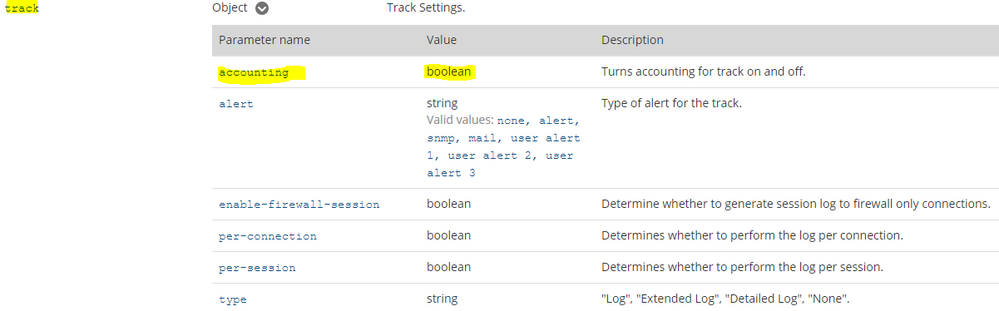
As Maarten mentioned "track.accounting true" should work fine.
The documentation mentions that accounting only accepts boolean values; meaning true or false.
The "type" option can only be used with "Log", "Extended Log", "Detailed Log" or "None".
Hi,
Usage of "track.accounting" results in error.
"track": "log",
"track.accounting": False
{'layer': 'Network', 'position': 'top', 'name': 'API 1', 'action': 'Accept', 'destination': 'hst_dst_1.10.1.100', 'service': 'Kubernetes1', 'enabled': True, 'source': 'Any', 'track': 'log', 'track.accounting': False}
{'code': 'generic_err_invalid_parameter_name', 'message': 'Unrecognized parameter [track.accounting]'}
BR,
Vlad Tonne.
Works via management cli:
"add access-rule name 'Test' layer Network position bottom track.accounting true"
My guess is that you cant use both statements with one task:
"track": "log",
"track.accounting": False
Try to create the rule with track log first and afterwards use the set access rule command and enable account via "track.accounting": True.
Maybe @Amiad_Stern can help.
@Vlad_Tonne , @Maik ,
Which version are we talking about?
Here are commands that worked for me on R80.30.
mgmt_cli:
mgmt_cli add access-rule layer "Network" position 1 name "Rule 1" track.type "Log" track.accounting true
Web Services:
{
"name": "amiad rule1",
"position" : 1,
"track": {
"accounting": true,
"type": "Log"
},
"layer": "Network"
}
Leaderboard
Epsum factorial non deposit quid pro quo hic escorol.
| User | Count |
|---|---|
| 4 | |
| 1 | |
| 1 | |
| 1 | |
| 1 | |
| 1 | |
| 1 | |
| 1 | |
| 1 | |
| 1 |
Tue 16 Dec 2025 @ 05:00 PM (CET)
Under the Hood: CloudGuard Network Security for Oracle Cloud - Config and Autoscaling!Thu 18 Dec 2025 @ 10:00 AM (CET)
Cloud Architect Series - Building a Hybrid Mesh Security Strategy across cloudsTue 16 Dec 2025 @ 05:00 PM (CET)
Under the Hood: CloudGuard Network Security for Oracle Cloud - Config and Autoscaling!Thu 18 Dec 2025 @ 10:00 AM (CET)
Cloud Architect Series - Building a Hybrid Mesh Security Strategy across cloudsAbout CheckMates
Learn Check Point
Advanced Learning
YOU DESERVE THE BEST SECURITY