- Products
- Learn
- Local User Groups
- Partners
- More

The Great Exposure Reset
24 February 2026 @ 5pm CET / 11am EST
CheckMates Fest 2026
Watch Now!AI Security Masters
Hacking with AI: The Dark Side of Innovation
CheckMates Go:
CheckMates Fest
Hi There,
I'm trying to run API towards the CheckPoint MDS CMAs.
From thread below thread I came to know that I need to generate the sid along with the domain name
When I try to run the query towards the MDS IP and without domain I can get the SID without any issues.
Once I send the domain as key, value parameter I'm getting authentication failures as below.
{
"code" : "err_login_failed",
"message" : "Authentication to server failed."
}
I can login to all the SmartConsole of CMA with the password, which I'm supplying to the REST API Post request.
Thanks in advance
Are you using latest JHF recommended for you version?
What does the audit log say?
What do you see if you try to authenticate with mgmt_cli locally on the MDS? For example, 'mgmt_cli -d "<CMA name>" login read-only true'.
I don't see any logs under the audit.
mgmt_cli command that you have shared was able to extract the SID successfully.
I have also noticed that when I give the domain UID instead of the name I am able to generate the SID.
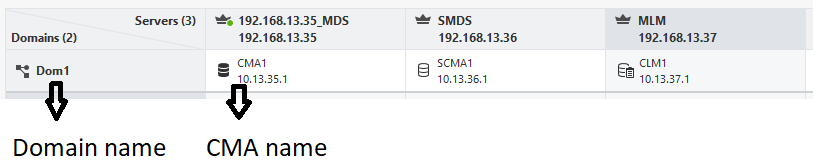
Try <domain_name> instead of <CMA_name>
Hi @Amir_Senn
How can I differentiate the Domain Name and CMA name?
Best Regards,
Prashanth
Thank you Amir.
Indeed, I have tried both Domain and CMA names but in vain.
What platform are you using
Try: mgmt_cli login -d <domain_name> -r true
You can also try: mgmt_cli login -d <CMA_IP> -r true
If this succeeds than the problem is with credentials/permissions of that specific admin, if this doesn't login properly perhaps you have a different issue and would consult with support.
I'm using an Open Server to construct my python code.
I'm able to login with mgmt_cli login -d <domain_name> -r true and mgmt_cli login -d <CMA_IP> -r true. Both returns the SID and other variables while executing the command.
Further I'm using the admin account to execute my code which is a "Multi-Domain Super User" account. Do I need to add any permissions apart from that for the API call?
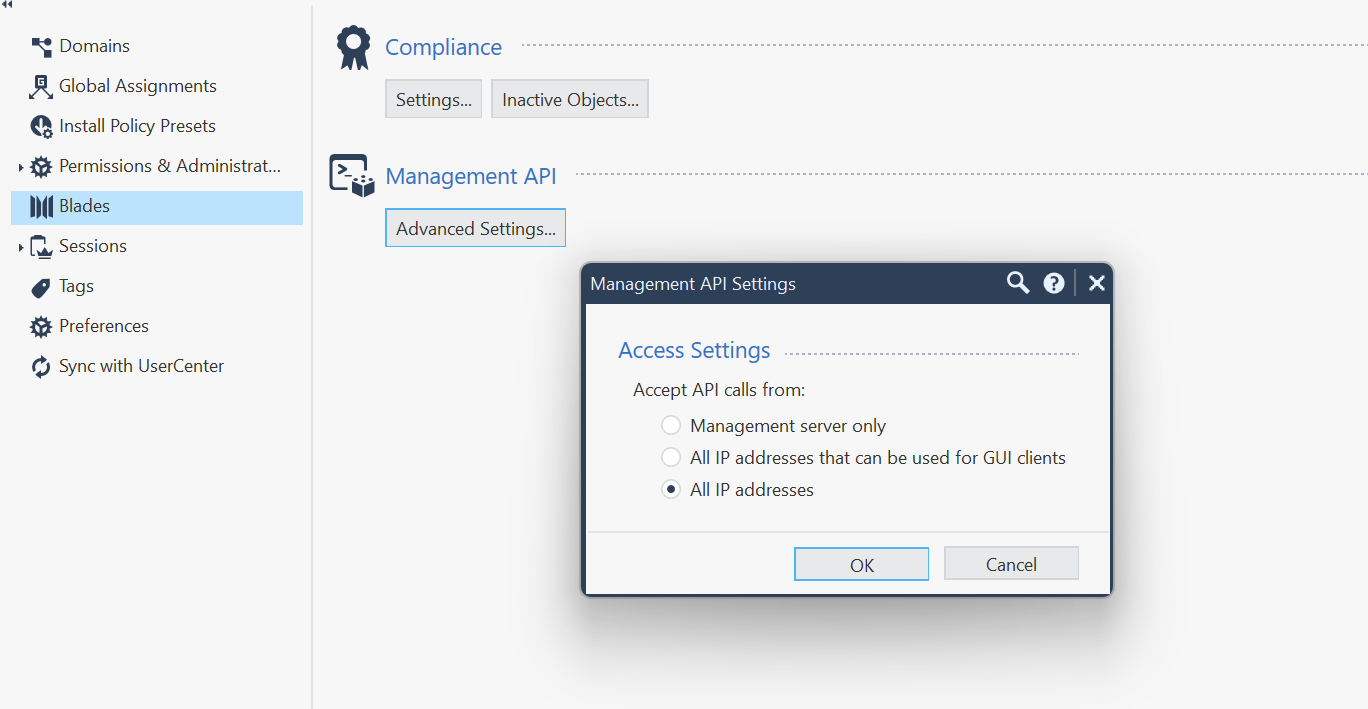
Indeed, I have allowed all the IP address for the API call.
Stange that the script is working for domain UID but not for the domain name.
From the API guide below, the API should take UID or name.
https://sc1.checkpoint.com/documents/latest/APIs/?#web/login~v1.9.1%20
Are you using latest JHF recommended for you version?
Thank you @Amir_Senn
The issue was due to the JHF. As I was running it on my lab I didn't install the hotfix.
Leaderboard
Epsum factorial non deposit quid pro quo hic escorol.
| User | Count |
|---|---|
| 1 | |
| 1 | |
| 1 | |
| 1 | |
| 1 | |
| 1 | |
| 1 |
Thu 12 Feb 2026 @ 05:00 PM (CET)
AI Security Masters Session 3: AI-Generated Malware - From Experimentation to Operational RealityFri 13 Feb 2026 @ 10:00 AM (CET)
CheckMates Live Netherlands - Sessie 43: Terugblik op de Check Point Sales Kick Off 2026Thu 19 Feb 2026 @ 03:00 PM (EST)
Americas Deep Dive: Check Point Management API Best PracticesThu 12 Feb 2026 @ 05:00 PM (CET)
AI Security Masters Session 3: AI-Generated Malware - From Experimentation to Operational RealityFri 13 Feb 2026 @ 10:00 AM (CET)
CheckMates Live Netherlands - Sessie 43: Terugblik op de Check Point Sales Kick Off 2026Thu 19 Feb 2026 @ 03:00 PM (EST)
Americas Deep Dive: Check Point Management API Best PracticesAbout CheckMates
Learn Check Point
Advanced Learning
YOU DESERVE THE BEST SECURITY