- Products
- Learn
- Local User Groups
- Partners
- More

MVP 2026: Submissions
Are Now Open!
What's New in R82.10?
Watch NowOverlap in Security Validation
Help us to understand your needs better
CheckMates Go:
Maestro Madness
Hi All,
I have some issue when trying to export the rule base and NAT.
The problem appears when I try to execute this command
show access-rulebase offset 0 limit 20 name "Network" details-level "standard" use-object-dictionary true --format json
but I confuse with the value of Network, I try to change it to Policy Name, but the result is not found that the object.
I also try on my lab, for that command, and if I used Network the command will successfully execute, but if I use standard, which is my package policy on lab it's not working.
Does anyone know what it refers for a value name?
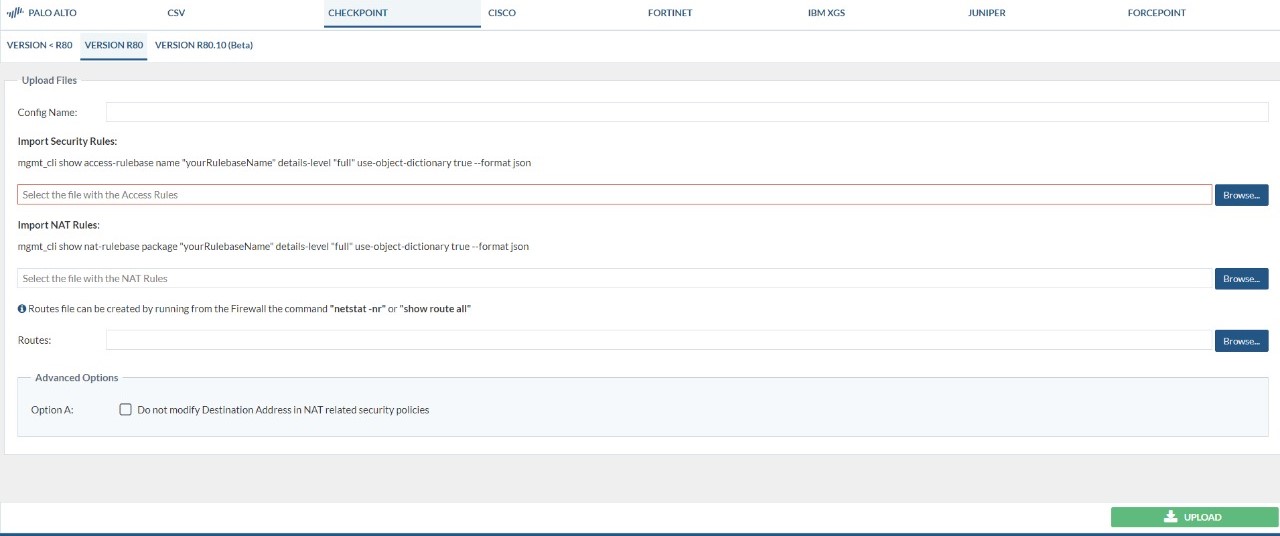
Actually, I try to export this rule base and NAT for migration from CP to Palo Alto, since my customer used expedition tools for migration.
I also attached, the capture requirement for using migrate tool Palo alto, it seems to use mgmt_cli but I refer use smartconsole CLI because i think it's almost same.
For NAT command I already successfully execute the rest only for the rule base.
If my explanation is not clear, please let me know.
Thanks Regards
Dio Aditya Pradana
Right, because what SmartConsole shows you is the policy package name.
A policy package is made up of one or more layers, one or more of which is an access-rulebase.
What you need to know is the name of the relevant layer(s).
To get that easily, use show package: https://sc1.checkpoint.com/documents/latest/APIs/index.html#cli/show-package~v1.8%20
Example: mgmt_cli -r true show package name Network
Right, because what SmartConsole shows you is the policy package name.
A policy package is made up of one or more layers, one or more of which is an access-rulebase.
What you need to know is the name of the relevant layer(s).
To get that easily, use show package: https://sc1.checkpoint.com/documents/latest/APIs/index.html#cli/show-package~v1.8%20
Example: mgmt_cli -r true show package name Network
Hi @PhoneBoy,
Thanks for your feedback, I also try another command for smartconsole CLI, and the result I can execute for show access rulebase.
But do you have any way to copy and paste to a file or export by command? for now, I just drag all output from above until down and copy it to the file, and then I change it to a JSON file.
Thanks Regards
Dio Aditya Pradana
Not from SmartConsole CLI.
mgmt_cli from the gateway or management can output its results directly in JSON when called with --format json
Leaderboard
Epsum factorial non deposit quid pro quo hic escorol.
| User | Count |
|---|---|
| 4 | |
| 1 | |
| 1 | |
| 1 | |
| 1 | |
| 1 | |
| 1 | |
| 1 | |
| 1 | |
| 1 |
Tue 16 Dec 2025 @ 05:00 PM (CET)
Under the Hood: CloudGuard Network Security for Oracle Cloud - Config and Autoscaling!Thu 18 Dec 2025 @ 10:00 AM (CET)
Cloud Architect Series - Building a Hybrid Mesh Security Strategy across cloudsTue 16 Dec 2025 @ 05:00 PM (CET)
Under the Hood: CloudGuard Network Security for Oracle Cloud - Config and Autoscaling!Thu 18 Dec 2025 @ 10:00 AM (CET)
Cloud Architect Series - Building a Hybrid Mesh Security Strategy across cloudsAbout CheckMates
Learn Check Point
Advanced Learning
YOU DESERVE THE BEST SECURITY