- Products
- Learn
- Local User Groups
- Partners
- More

The Great Exposure Reset
24 February 2026 @ 5pm CET / 11am EST
CheckMates Fest 2026
Watch Now!AI Security Masters
Hacking with AI: The Dark Side of Innovation
CheckMates Go:
CheckMates Fest
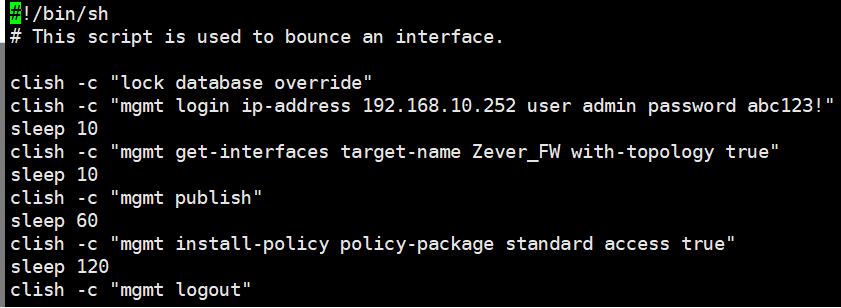
Hello everyone, I encountered a problem when using the API here. I hope to get help.
I call the API command in the gateway's Clish, and use mgmt login user (user_name) password (password) ip-address (address) in clish. But I add it to the script and use clish -c "mgmt login ip- address 192.168.10.252 user admin password ***" After running the script, I found that the login was not successful, and no error message was found in the message log file. Does any friend encounter this kind of problem?
Add this to the top of your script: source /opt/CPshrd-R80.40/tmp/.CPprofile.sh
(Replace R80.40 with your version)
This will add mgmt_cli to the path so you can include it in your scripts.
I've never seen anyone call it that way before (i.e. using clish -c in a script).
Why aren't you using mgmt_cli instead, which can be called from a script?
i know, but mgmt_cli Cannot be used in scheduled tasks
Add this to the top of your script: source /opt/CPshrd-R80.40/tmp/.CPprofile.sh
(Replace R80.40 with your version)
This will add mgmt_cli to the path so you can include it in your scripts.
OK, thank you very much, I will try
I tried the method you said, adding at the top of bash:
source /opt/CPshrd-R81.10/tmp/.CPprofile.sh
I did not see the execution process in the message log file, but I saw the execution log in the Audit log.
Thank you for your answer
clish -c "...." is a single CLISH command called from bash. API calls will not work like that. To use API from bash and for scripts, do mgmt_cli, as @PhoneBoy already said.
I need to make this action into a scheduled task. I tried to replace clish -c "mgmt" with mgmt_cli, but mgmt_cli will not be executed in the scheduled task
I use many scripts through the schedulers to run many Check Point tasks and it works well. Your problem is your CP environment is not loaded (Ex: $FWDIR, $PCDIR, etc. are missing) when you execute a CP program through your script. Add this line ". /etc/bashrc" (valid if you are running GAIA) in the top of your script. Example:
#!/bin/bash
. /etc/bashrc # Load the Check Point environment if a GAIA (DOT space must be at the beginning of the line)
:
The rest of your script here
If my script is running on a SMB (ex 1400, 1500, etc.), I use: . /pfrm2.0/etc/bashrc
Leaderboard
Epsum factorial non deposit quid pro quo hic escorol.
| User | Count |
|---|---|
| 2 | |
| 1 | |
| 1 | |
| 1 |
Thu 19 Feb 2026 @ 03:00 PM (EST)
Americas Deep Dive: Check Point Management API Best PracticesMon 23 Feb 2026 @ 11:00 AM (EST)
Latest updates on Quantum Spark including R82 features and Spark Management zero touch - AMERTue 24 Feb 2026 @ 10:00 AM (CET)
Latest updates on Quantum Spark including R82 features and Spark Management zero touch - EMEAThu 19 Feb 2026 @ 03:00 PM (EST)
Americas Deep Dive: Check Point Management API Best PracticesMon 23 Feb 2026 @ 11:00 AM (EST)
Latest updates on Quantum Spark including R82 features and Spark Management zero touch - AMERTue 24 Feb 2026 @ 10:00 AM (CET)
Latest updates on Quantum Spark including R82 features and Spark Management zero touch - EMEAAbout CheckMates
Learn Check Point
Advanced Learning
YOU DESERVE THE BEST SECURITY