- Products
- Learn
- Local User Groups
- Partners
- More

Simplify Admin Operations with R82.20
Watch HereThe State of Ransomware Q2 2026:
This Quarter's Trends, and Their Impact on Your Defenses
READY OR NOT: Securing the AI Enterprise
AI Research & Threat Landscape
CheckMates Go:
Half is Not Enough
Hello,
I recently stood up a standalone R80.40 gateway in a lab environment to perform some testing for policy changes to support Office 365. I'm working through a scenario with a customer who has HTTPS inspection enabled globally, but I'm unable to get inspection working on my lab gateway. I've enabled HTTPS Inspection on the Gateway, have verified the HTTPS Inspection Policy is what I want, and have adjusted the Topology so respective interfaces are configured appropriately.
There's not much to configure here, so I'm beating my head against a wall trying to figure out why this appliance isn't inspecting outbound HTTPS traffic. Any help would be appreciated!
Here are a few screenshots of the configuration and I've followed the guide here when putting this in place.
firewall-policy.jpg
firewall-topology.jpg
https-inspection-configuration.jpg
https-inspection-policy.jpg
outbound-logs-no-inspection.jpg
Hi @DarrenR
A few more tips:
1) Did you import the outbound certificate correctly in the browser?
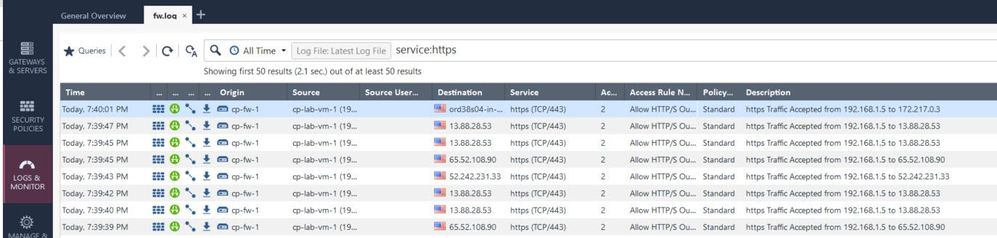
2) Are there log entries for https inspection? If so, please take a picture.
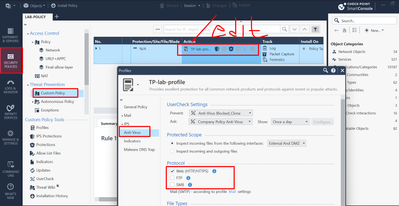
3) Is the https interception enabled in the protocol tab?
4) Set "Internet" instead of "all internet" in the destination:ht2.JPG
Boom! I missed the enabling the protocol signature. Thanks!
Are you referring to the protocol setting in the Threat Prevention Profile editor?
Trying to extrapolate from the small screenshot, it looks like the setting that exists for the various Threat Prevention engines.
Indeed, it's possible to specify which protocols will be included in the scanning, but the default value for these profiles is to be "On" for HTTP/HTTPS. Most customers should not encounter this issue or have to touch this setting for HTTPS inspection to work.
Did you deactivate this in the past for your environment?
I'd like to better understand this case to make sure more customers don't encounter it.
Thanks!
Can you tell me where the config is in your step 3 ? Because i couldn't find it. Thank you.
Can somebody tell me, where can I find the protocol tab and setup the protocol signature feature? Is this a must config to work with HTTPS Inspection?
So without this feature the inspection not working? Thanks!
can't find it either. does it still exist in R81?
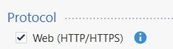
Where do you find that "Protocol" option with the checkbox for "Web (HTTP/HTTPS)"?
Screenshot_1.png
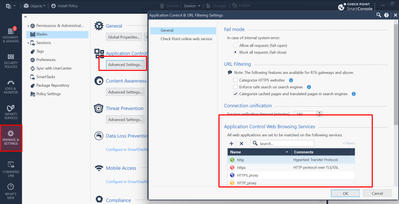
Thank you. This I knew for Threat Prevention. I was wondering if there was another similar configuration available under HTTPS shared policies > inspection settings.
Only one I know is this
Andy
Screenshot_1.png
Leaderboard
Epsum factorial non deposit quid pro quo hic escorol.
| User | Count |
|---|---|
| 116 | |
| 84 | |
| 12 | |
| 10 | |
| 8 | |
| 7 | |
| 5 | |
| 4 | |
| 4 | |
| 3 |
Tue 25 Aug 2026 @ 05:00 PM (CEST)
The State of Ransomware Q2 2026: This Quarter's Trends, and Their Impact on Your DefensesThu 27 Aug 2026 @ 10:00 AM (EDT)
Why Email Agent Hijacking is a Game-Changer for Email SecurityTue 25 Aug 2026 @ 05:00 PM (CEST)
The State of Ransomware Q2 2026: This Quarter's Trends, and Their Impact on Your DefensesThu 27 Aug 2026 @ 10:00 AM (EDT)
Why Email Agent Hijacking is a Game-Changer for Email SecurityTue 01 Sep 2026 @ 05:00 PM (CEST)
Under the Hood | Check Point SASE: Onboarding, Step by StepTue 15 Sep 2026 @ 12:00 PM (MDT)
Lone Tree, CO: Workspace Security and Exposure ManagementAbout CheckMates
Learn Check Point
Advanced Learning
YOU DESERVE THE BEST SECURITY