- Products
- Learn
- Local User Groups
- Partners
- More

Scaling Check Point Automation with Arodonata
7 October @ 5pm CET / 11am EDT
What's New in Check Point SASE
The State of Ransomware Q2 2026:
This Quarter's Trends, and Their Impact on Your Defenses
AI Security Masters
Implementing the AI Security Trifecta
CheckMates Go:
Half is Not Enough
Hello everyone,
Currently, I'm introducing the Checkpoint FW product to a school.
Every feature is relevant until they want to check out Filtering feature:
- They are using the following website for testing: http://testfiltering.com/
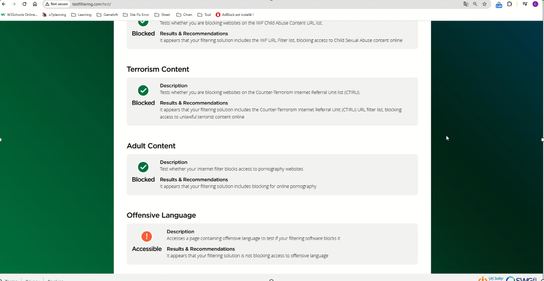
- I have implemented relevant categories, http/https inspection,..., however when performing "run test", the test results still do not prevent access to Offensive Language.
- I will leave the video with the configuration and perform the test below (video in file .pptx):

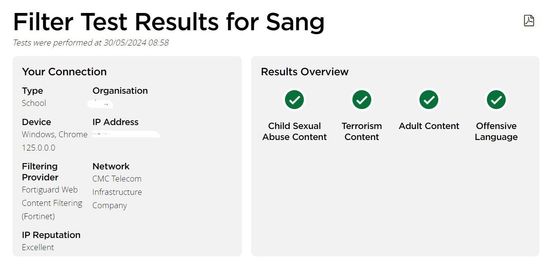
Now competitor Fortinet is also pitching to that school, and they passed the test, pictured below:
If our solution can pass this test, that school will be very likely to buy the solution, because they are more favorable towards Checkpoint than Fortinet.
So please help me, is there any way to configure and pass the test?
Thank you very much, everyone.
Best regards.
What do you configure in the policy to prevent those categories?
Hi _Val_,
You can check configure on the .pptx file attachment.
And what made you think I did not check it before asking a question?
You put there a video of the test. It is virtually impossible to see in the video how you configured your URLF policy.
Hi!
What blades you have enabled to achieve this goal? I assume you want to use URL filtering and application control?
At this moment I am not able to find a URL filtering category related to bad language. Is does also not make sense I think. For example if there is a bad word in a youtube video comment this video then needs to be blocked? Maybe this has education purposes. So I would reconsider to advise against blocking this category.
Also I found the DLP (data leak prevention) blade has an option for blocking bad language. Below screenshots as reference.
Hi!
What blades you have enabled to achieve this goal? I assume you want to use URL filtering and application control?
At this moment I am not able to find a URL filtering category related to bad language. Is does also not make sense I think. For example if there is a bad word in a youtube video comment this video then needs to be blocked? Maybe this has education purposes. So I would reconsider to advise against blocking this category.
Also I found the DLP (data leak prevention) blade has an option for blocking bad language. Below screenshots as reference.
Hi!
What blades you have enabled to achieve this goal? I assume you want to use URL filtering and application control?
At this moment I am not able to find a URL filtering category related to bad language. Is does also not make sense I think. For example if there is a bad word in a youtube video comment this video then needs to be blocked? Maybe this has education purposes. So I would reconsider to advise against blocking this category.
Also I found the DLP (data leak prevention) blade has an option for blocking bad language. Below screenshots as reference.
There are plenty, see below
There are plenty, see below
Just logging in now to S1C for one customer, let me see.
Andy
Just logging in now to S1C for one customer, let me see.
Andy
@_Val_ I dont see inappropriate sites by default, I assume you added it yourself? Other ones are there...
Andy
@_Val_ I dont see inappropriate sites by default, I assume you added it yourself? Other ones are there...
Andy
Anyhow, make sure you add these categories to the block rule, and see if it makes any difference.
On top, I hope your HTTPS Inspection is on.
Anyhow, make sure you add these categories to the block rule, and see if it makes any difference.
On top, I hope your HTTPS Inspection is on.