- Products
- Learn
- Local User Groups
- Partners
- More

The Great Exposure Reset
24 February 2026 @ 5pm CET / 11am EST
AI Security Masters E4:
Introducing Cyata - Securing the Agenic AI Era
AI Security Masters E3:
AI-Generated Malware
CheckMates Go:
CheckMates Fest
I haven't been able to find a setting anywhere, but when I was at CPX one of the CP engineers swore there was a setting to customize a default time period used when users launch logs in R80.10. As it stands today the default is set to 7 days, and we have seen a hit in performance with the expansion of user access. Realistically most of them would only need "Last hour" for troubleshooting purposes. I haven't been able to find the answer in CP documentation so any input is appreciated. Cheers!
I also wish that it was easy to change to "Last hour" instead of 7 days. As usually when I need to see logs it's something that I'm currently troubleshooting and then last hour what I need.
You can close your SmartConsole and take a look in C:\Program Files (x86)\CheckPoint\SmartConsole\R80.10\PROGRAM at the SmartConsole.exe.config file. Maybe it's possible to change the value there. Haven't tried myself.
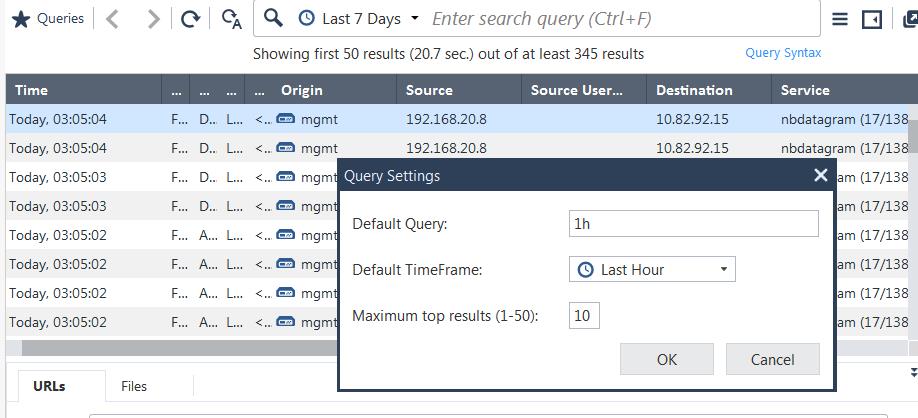
Easy, just open the menue and select Tools > Query Settings:

Now choose, name what you want:

Add a new log tab and enjoy
!
Not that easy with +40 administrators. This should be done centrally. Not on each endpoint.
/Henrik
I see no problem with every Admin configuring his own default time span. Even if most of them need only one hour, i would refrain from setting that centrally. But if really needed, you can involve TAC in finding a way to enable that...
The use case being that telling +40 admins to change various default settings in SMC, I guess 2 people would actually be bothered to change it.
Plus education the same admins for the various features that is user customizable is a pain.
If they get payed to do their job customization should be self-evident 😉
Nice! Just don't put anything in the "Default query" field and it works as you want it Nathan.
As shown in the screenshot, i did name it 1h, and on new Log tab or Dashboard re-open, Log tab showed Last Hour.
How change default time frame of SmartView ?
I have the same question. Our Smartview is quite slow with getting data for de default 7 days, so to start with 1 hour default for anyone loggin in would be nice.
Yes, see my response below about slow startup of new logging tabs and a trick to make them start up like lightning:
Timothy_Hall, thanks but our question about SmartView exactly, that availible on https://sms_ip/smartview/
We olredy opened case in support, and engineer tel us wat this curently not supported and if we actualy need this feature contact through our sales manager to open Feature Request.
You know, how do something with with SmartView exactly?
Leaderboard
Epsum factorial non deposit quid pro quo hic escorol.
| User | Count |
|---|---|
| 47 | |
| 31 | |
| 14 | |
| 13 | |
| 11 | |
| 8 | |
| 8 | |
| 7 | |
| 6 | |
| 6 |
Mon 23 Feb 2026 @ 11:00 AM (EST)
Latest updates on Quantum Spark including R82 features and Spark Management zero touch - AMERTue 24 Feb 2026 @ 10:00 AM (CET)
Latest updates on Quantum Spark including R82 features and Spark Management zero touch - EMEATue 24 Feb 2026 @ 11:00 AM (EST)
Under The Hood: CloudGuard Network Security for Azure Virtual WANMon 23 Feb 2026 @ 11:00 AM (EST)
Latest updates on Quantum Spark including R82 features and Spark Management zero touch - AMERTue 24 Feb 2026 @ 10:00 AM (CET)
Latest updates on Quantum Spark including R82 features and Spark Management zero touch - EMEATue 24 Feb 2026 @ 11:00 AM (EST)
Under The Hood: CloudGuard Network Security for Azure Virtual WANThu 26 Feb 2026 @ 05:00 PM (CET)
AI Security Masters Session 4: Introducing Cyata, Securing the Agentic AI EraFri 06 Mar 2026 @ 08:00 AM (COT)
Check Point R82 Hands‑On Bootcamp – Comunidad DOJO PanamáAbout CheckMates
Learn Check Point
Advanced Learning
YOU DESERVE THE BEST SECURITY