- Products
- Learn
- Local User Groups
- Partners
- More

On-Premise SD-WAN Management
Register HereWhat's New in R82.10?
Watch Here AI Security Masters E8:
Claude Mythos: New Era in Cyber Security
CheckMates Go:
The Moment Before
Observed in SmartEvent that the Anti-virus is not preventing the malicious files with extension .doc, .zip etc [with severity : critical and confidence : High ], instead it is just getting detected.
I would like to know whether this is a normal behavior in hashtag#checkpoint or did i have to make any changes in my anti-virus profile configured in threat prevention blade?
Note : Threat Emulation is not enabled in this environment.
A screenshot of the log (with sensitive data masked) might be helpful.
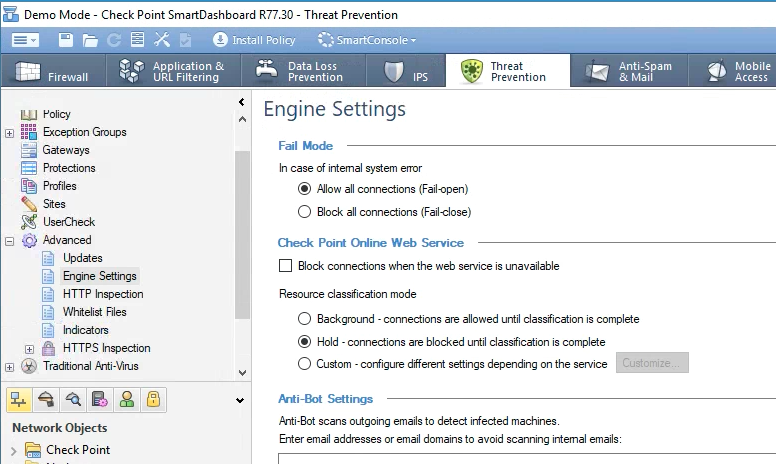
Also curious what setting you're using for Resource Classification as shown here:

Hi Dameon
Kindly find the relevant logs regarding the issue.
Log from SmartEvent :

Engine settings :

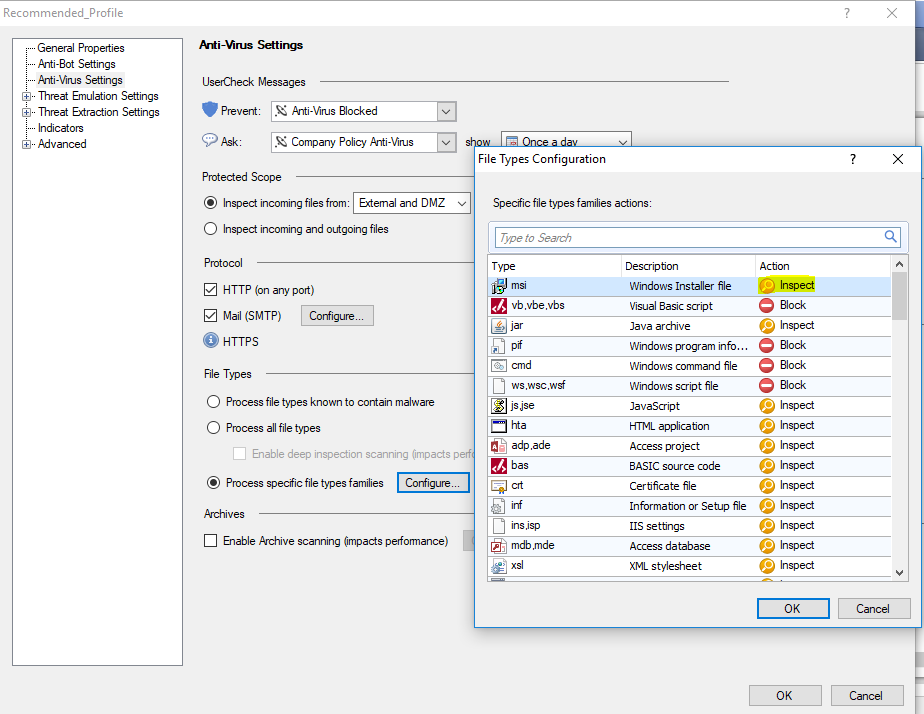
Anti-virus Profile :

The first thing I would do is try setting the Resource Classification Mode to Hold instead of Background.
This will not allow the entire file to be sent to the endpoint until it is scanned.
Hi Dameon
I got your point. At this point we cannot set the Resource classification to Hold, as there will be an impact on traffic as it holds the files till the scanning is completed .
But the thing is, i am I able to observe some of the events with Severity High and confidence level High is getting prevented by Antivirus inspection. but the same is not happening for Critical events. Any idea on this?
And it will be really helpful if you let me know what the "inspect" option under [Threat Prevention->Profile->(Profile name)->Anti-Virus settings->Process specific file types families ] do and what will be the outcome of it?

In some cases, the file can be blocked by URL or other characteristics without transferring the entire file.
This may be why you are seeing "prevent" in some cases and "inspect" in others.
It's likely a side effect of leaving Resource Classification in Background.
If you're concerned about end users being impacted by putting Resource Classification in Hold, create a separate Threat Prevention profile just for your mail server where it set to Hold.
Create a Threat Prevention rule that refers to your email server in the Protected Scope and apply your new profile.
Mail is pretty fault-tolerant and should not be negatively impacted by this.
In the Threat Prevention profile with regard to extensions
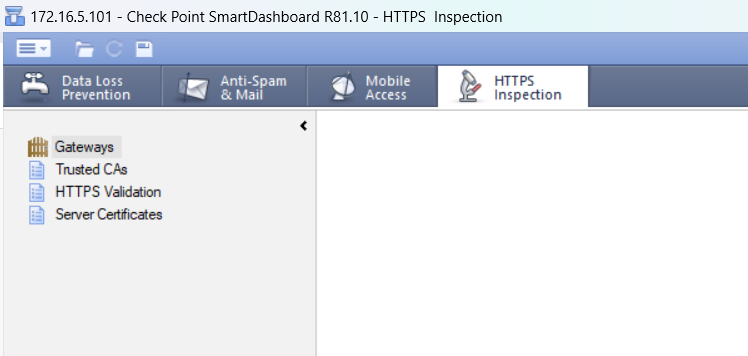
My smartdashboard only consist of 4 categories. Is there anything that I will have to change to make the other categories appear as well. I am currently using Checkpoint Network All In One Security.
A lot of the options from that area in previous (old) releases are now in the main SmartConsole.
The version mentioned in this thread being a no longer supported one in R77.30
Background classification means the file passes and classification is done afterwards.
With hold it would wait for classification and the allow/block it based on verdict.
Leaderboard
Epsum factorial non deposit quid pro quo hic escorol.
| User | Count |
|---|---|
| 74 | |
| 30 | |
| 8 | |
| 7 | |
| 5 | |
| 4 | |
| 4 | |
| 3 | |
| 3 | |
| 3 |
Thu 30 Jul 2026 @ 10:00 AM (PDT)
AI Security Masters E12: READY OR NOT: Securing the AI Enterprise 4/5 - AI GatewayThu 20 Aug 2026 @ 10:00 AM (PDT)
AI Security Masters E13: READY OR NOT: Securing the AI Ent 5/5 - AI Research & Threat LandscapeThu 30 Jul 2026 @ 10:00 AM (PDT)
AI Security Masters E12: READY OR NOT: Securing the AI Enterprise 4/5 - AI GatewayThu 20 Aug 2026 @ 10:00 AM (PDT)
AI Security Masters E13: READY OR NOT: Securing the AI Ent 5/5 - AI Research & Threat LandscapeAbout CheckMates
Learn Check Point
Advanced Learning
YOU DESERVE THE BEST SECURITY