- Products
- Learn
- Local User Groups
- Partners
- More

What's New in Check Point SASE
Wednesday, 9 September @ 5pm CET / 11am EDT
The State of Ransomware Q2 2026:
This Quarter's Trends, and Their Impact on Your Defenses
AI Security Masters
Implementing the AI Security Trifecta
CheckMates Go:
Half is Not Enough
Hello,
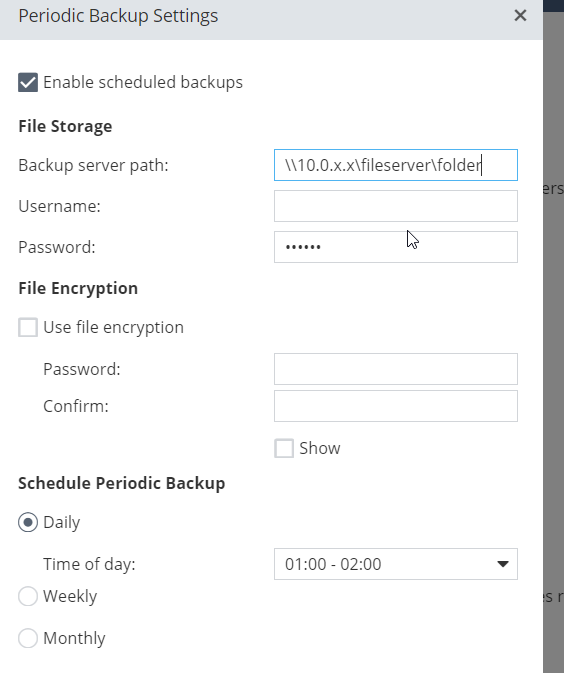
I am trying to enable the scheduled backup but its not working ( for me ) .
Ive tried with IP /hostname but still nothing. What I am doing wrong :S
The goal is to upload the backup on Azure storage. For now ,I am testing with the fileserver.
Can you please help?
Thank you !
Nope, still the same. Maybe I am missing something. I thought I just need to enable the scheduled backup. But maybe something extra needs to be done. Do I need to make some changes via ssh? It should be an FTP server, right? Any specific for the path ?
I remember last time I tried it and it was working fine. Then I switched to central management and regular backup was not needed anymore so I disabled it. But the path if I remember correctly was something like:
Unfortunately documentation is again far from clear on this. Enter a "Backup server path" ?!? Come on CheckPoint, do you realize how many ways there are to specify this ??? An example is needed here!
Hello ,
I will appreciate your reply 🙂 Any ideas ?
Login with ssh and check if there is /logs/backup.log file
Login with SSH into appliance and try to upload /storage/localhost_R77.20.81_990172541_2020-Mar-24-07_33_00.zip to your FTP server using 'ftp' command line utility. If you succeed paste here screenshot from your backup settings in WebUI.
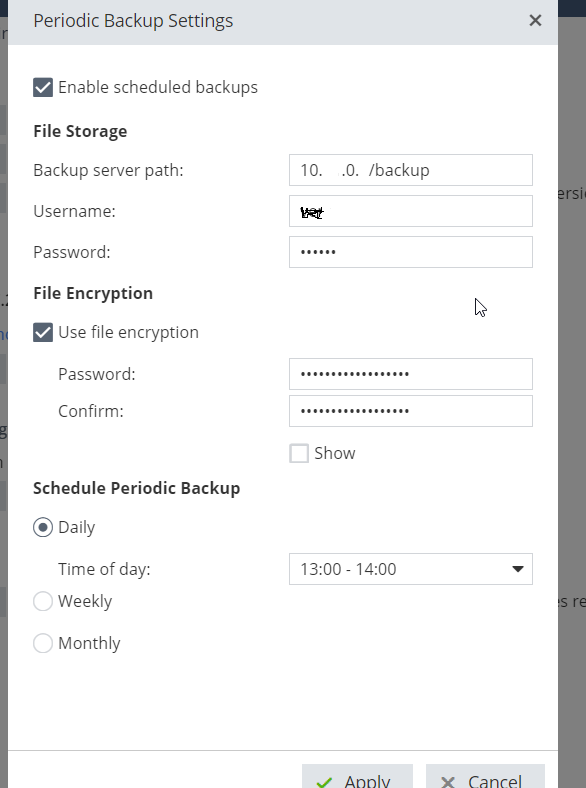
Ove changed my settings, it was a network issue. My fileserver did not respond to ping. So now Ive change the server, I am using a different one. Those are my settings on the GUI. So assume that when my FW server is not able to reach the server path ( my fileserver) it stores the backup on it. I will try with this one and I will let you know. Thank you for your help.
Nope, still the same. Maybe I am missing something. I thought I just need to enable the scheduled backup. But maybe something extra needs to be done. Do I need to make some changes via ssh? It should be an FTP server, right? Any specific for the path ?
I remember last time I tried it and it was working fine. Then I switched to central management and regular backup was not needed anymore so I disabled it. But the path if I remember correctly was something like:
Unfortunately documentation is again far from clear on this. Enter a "Backup server path" ?!? Come on CheckPoint, do you realize how many ways there are to specify this ??? An example is needed here!
Leaderboard
Epsum factorial non deposit quid pro quo hic escorol.
Tue 08 Sep 2026 @ 10:00 AM (CEST)
Keeping Pace with AI-Powered Threats: A New Approach to Closing Security Gaps Faster - EMEATue 08 Sep 2026 @ 05:00 PM (CEST)
Keeping Pace with AI-Powered Threats: A New Approach to Closing Security Gaps Faster - AmericasWed 09 Sep 2026 @ 11:00 AM (EDT)
What's New in Check Point SASE: Extending Secure Connectivity to China and BeyondTue 08 Sep 2026 @ 10:00 AM (CEST)
Keeping Pace with AI-Powered Threats: A New Approach to Closing Security Gaps Faster - EMEATue 08 Sep 2026 @ 05:00 PM (CEST)
Keeping Pace with AI-Powered Threats: A New Approach to Closing Security Gaps Faster - AmericasThu 17 Sep 2026 @ 10:00 AM (CEST)
The Cloud Architects Series: Check Point Cloud Firewall Architectures - AWS, Azure & GCPThu 17 Sep 2026 @ 05:00 PM (CEST)
Under the Hood: Unified Hybrid Mesh Management across AWS Firewalls, SASE and SD-WANThu 17 Sep 2026 @ 03:00 PM (EDT)
Americas Deep Dive: Troubleshooting 101 for Check Point FirewallsTue 15 Sep 2026 @ 12:00 PM (MDT)
Lone Tree, CO: Workspace Security and Exposure ManagementAbout CheckMates
Learn Check Point
Advanced Learning
YOU DESERVE THE BEST SECURITY