- Products
- Learn
- Local User Groups
- Partners
- More

AI Security Masters E7:
How CPR Broke ChatGPT's Isolation and What It Means for You
Blueprint Architecture for Securing
The AI Factory & AI Data Center
Call For Papers
Your Expertise. Our Stage
Good, Better, Best:
Prioritizing Defenses Against Credential Abuse
Ink Dragon: A Major Nation-State Campaign
Watch HereCheckMates Go:
CheckMates Fest
Hello,
I am trying to enable the scheduled backup but its not working ( for me ) .
Ive tried with IP /hostname but still nothing. What I am doing wrong :S
The goal is to upload the backup on Azure storage. For now ,I am testing with the fileserver.
Can you please help?
Thank you !
Nope, still the same. Maybe I am missing something. I thought I just need to enable the scheduled backup. But maybe something extra needs to be done. Do I need to make some changes via ssh? It should be an FTP server, right? Any specific for the path ?
I remember last time I tried it and it was working fine. Then I switched to central management and regular backup was not needed anymore so I disabled it. But the path if I remember correctly was something like:
Unfortunately documentation is again far from clear on this. Enter a "Backup server path" ?!? Come on CheckPoint, do you realize how many ways there are to specify this ??? An example is needed here!
Hello ,
I will appreciate your reply 🙂 Any ideas ?
Login with ssh and check if there is /logs/backup.log file
Login with SSH into appliance and try to upload /storage/localhost_R77.20.81_990172541_2020-Mar-24-07_33_00.zip to your FTP server using 'ftp' command line utility. If you succeed paste here screenshot from your backup settings in WebUI.
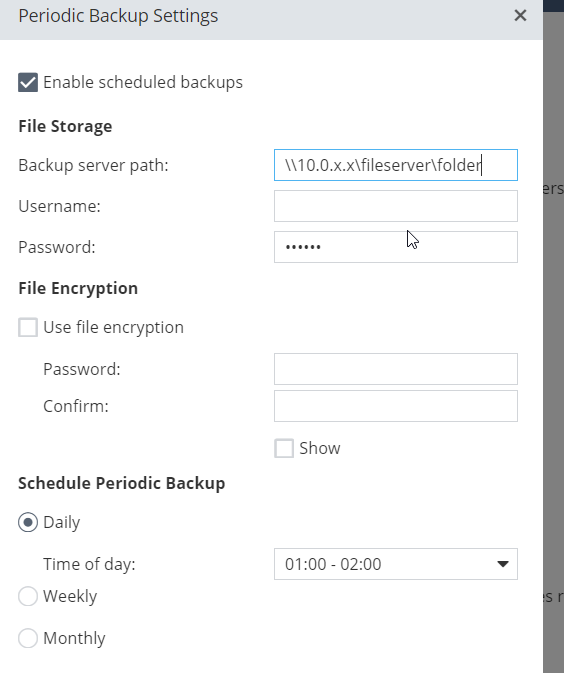
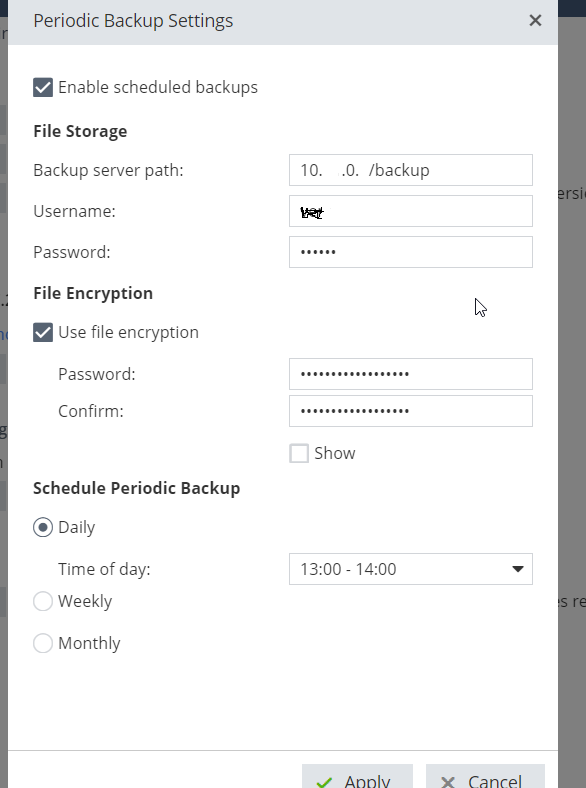
Ove changed my settings, it was a network issue. My fileserver did not respond to ping. So now Ive change the server, I am using a different one. Those are my settings on the GUI. So assume that when my FW server is not able to reach the server path ( my fileserver) it stores the backup on it. I will try with this one and I will let you know. Thank you for your help.
Nope, still the same. Maybe I am missing something. I thought I just need to enable the scheduled backup. But maybe something extra needs to be done. Do I need to make some changes via ssh? It should be an FTP server, right? Any specific for the path ?
I remember last time I tried it and it was working fine. Then I switched to central management and regular backup was not needed anymore so I disabled it. But the path if I remember correctly was something like:
Unfortunately documentation is again far from clear on this. Enter a "Backup server path" ?!? Come on CheckPoint, do you realize how many ways there are to specify this ??? An example is needed here!
Leaderboard
Epsum factorial non deposit quid pro quo hic escorol.
| User | Count |
|---|---|
| 4 | |
| 4 | |
| 3 | |
| 3 | |
| 3 | |
| 2 | |
| 2 | |
| 2 | |
| 2 | |
| 1 |
Tue 28 Apr 2026 @ 06:00 PM (IDT)
Under the Hood: Securing your GenAI-enabled Web Applications with Check Point WAFThu 30 Apr 2026 @ 03:00 PM (PDT)
Hillsboro, OR: Securing The AI Transformation and Exposure ManagementTue 28 Apr 2026 @ 06:00 PM (IDT)
Under the Hood: Securing your GenAI-enabled Web Applications with Check Point WAFTue 12 May 2026 @ 10:00 AM (CEST)
The Cloud Architects Series: Check Point Cloud Firewall delivered as a serviceThu 30 Apr 2026 @ 03:00 PM (PDT)
Hillsboro, OR: Securing The AI Transformation and Exposure ManagementAbout CheckMates
Learn Check Point
Advanced Learning
YOU DESERVE THE BEST SECURITY