- Products
- Learn
- Local User Groups
- Partners
- More

AI Security Masters E7:
How CPR Broke ChatGPT's Isolation and What It Means for You
Blueprint Architecture for Securing
The AI Factory & AI Data Center
Call For Papers
Your Expertise. Our Stage
Good, Better, Best:
Prioritizing Defenses Against Credential Abuse
Ink Dragon: A Major Nation-State Campaign
Watch HereCheckMates Go:
CheckMates Fest
When we go to the http resource on port 8080, in the browser debug we notice that there is no HEAD header. In the case where we bypass CheckPoint, the HEAD header appears.
Because of the absence of this header, we don't see the video image when accessing from a PC.
When accessing from an IPAD, we can't even authenticate to the resource, at which time we see a blank screen when we try to log in through the app.
We assume that all of the problems are due to the fact that we are not getting a HEAD header through CheckPoint. The client cannot automatically get the HEAD header.
We did manage to copy the header itself though, while we were checking for access bypassing CheckPoint. After that, we connected to the network behind CheckPoint and navigated to the header in the browser and were able to get the image.
When we go to the http resource on port 8080, in the browser debug we notice that there is no HEAD header. In the case where we bypass CheckPoint, the HEAD header appears.
Because of the absence of this header, we don't see the video image when accessing from a PC.
When accessing from an IPAD, we can't even authenticate to the resource, at which time we see a blank screen when we try to log in through the app.
We assume that all of the problems are due to the fact that we are not getting a HEAD header through CheckPoint. The client cannot automatically get the HEAD header.
We did manage to copy the header itself though, while we were checking for access bypassing CheckPoint. After that, we connected to the network behind CheckPoint and navigated to the header in the browser and were able to get the image.
When we go to the http resource on port 8080, in the browser debug we notice that there is no HEAD header. In the case where we bypass CheckPoint, the HEAD header appears.
Because of the absence of this header, we don't see the video image when accessing from a PC.
When accessing from an IPAD, we can't even authenticate to the resource, at which time we see a blank screen when we try to log in through the app.
We assume that all of the problems are due to the fact that we are not getting a HEAD header through CheckPoint. The client cannot automatically get the HEAD header.
We did manage to copy the header itself though, while we were checking for access bypassing CheckPoint. After that, we connected to the network behind CheckPoint and navigated to the header in the browser and were able to get the image.

 Chris_Atkinson
 Chris_Atkinson
Which version/JHF, what blades are enabled?
Is the gateway working/configured as a proxy?
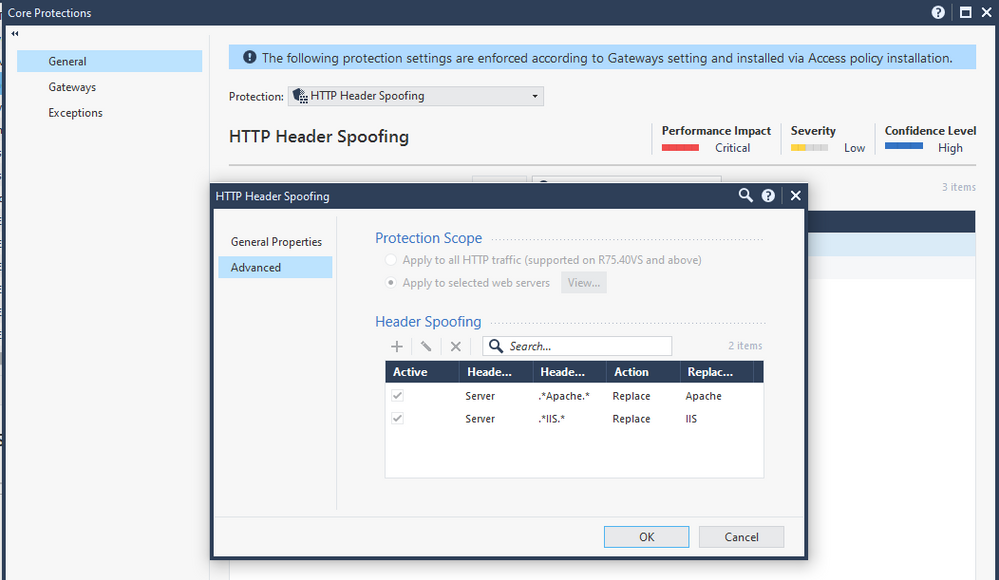
Do you have non-standard configuration for IPS protections such as:
Which version/JHF, what blades are enabled?
Is the gateway working/configured as a proxy?
Do you have non-standard configuration for IPS protections such as:
Which version/JHF, what blades are enabled? - 81.10, Take 66, firewall, mab, app control, url f, IA, monitoring, ips ab and av
Is the gateway working/configured as a proxy? - NO
Do you have non-standard configuration for IPS protections such as: - NO
Which version/JHF, what blades are enabled? - 81.10, Take 66, firewall, mab, app control, url f, IA, monitoring, ips ab and av
Is the gateway working/configured as a proxy? - NO
Do you have non-standard configuration for IPS protections such as: - NO
That didn't solve our problem
That didn't solve our problem
Chris_Atkinson
Chris_Atkinson
Recommend investigating further with TAC in that case.
Anything you can share with them about exceptions you've tested / trialed will also help.
Recommend investigating further with TAC in that case.
Anything you can share with them about exceptions you've tested / trialed will also help.