- Products
- Learn
- Local User Groups
- Partners
- More

AI Security Masters E7:
How CPR Broke ChatGPT's Isolation and What It Means for You
Blueprint Architecture for Securing
The AI Factory & AI Data Center
Call For Papers
Your Expertise. Our Stage
Good, Better, Best:
Prioritizing Defenses Against Credential Abuse
Ink Dragon: A Major Nation-State Campaign
Watch HereCheckMates Go:
CheckMates Fest
Hi All,
We tried to set up an Identity Collector host to replace the original AD Query function of the firewall.
After the erection is complete. We found it in the log column of "Source user name". No user account information appears. In the IA-related Log, we saw the following error message:
"Failed to get user groups for the domain.
Verify that this domain name is configured in your LDAP Account Unit."
We have closed the local firewall of the AD and Identity Collector hosts, but still cannot collect user information.
Our AD version is Windows Server 2019. Can someone who has encountered the same problem give guidance.
Thanks
Identity Collector changes how the gateways acquire users (using Security Logs instead of WMI).
The actual groups are still pulled the same way as with ADQuery: via LDAP queries from the relevant gateways.
Which means you should verify the information needed to perform these lookups is correct: https://support.checkpoint.com/results/sk/sk180392
After I add a LDAP account unit object. The problem has been solved.
Finally we found two problems:
1. PDP Problem: After we disable the AD Query function, the Monitor's device status will never change.
2. The VPN certificate has expired.
After weReboot the device and re-sign the certificate. The problem is solved.
When you open IC software, does gateway show as connected status? Also, did you make sure AD query is fully off?
Andy
Identity Collector changes how the gateways acquire users (using Security Logs instead of WMI).
The actual groups are still pulled the same way as with ADQuery: via LDAP queries from the relevant gateways.
Which means you should verify the information needed to perform these lookups is correct: https://support.checkpoint.com/results/sk/sk180392
After I add a LDAP account unit object. The problem has been solved.
Good job!
We made some architectural adjustments today. The Identity Collector host is placed on a different network segment from the Gateway management interface. As a result, the Identity Collector cannot establish a connection with the Gateway, but the Allow Log is displayed. Has anyone encountered such a situation?
Do you have proper rules configured? Does ping work back and forth?
Andy
Yes,
We have set the firewall rule from IC to gateway over TCP 443. And ping is work well.
Does gateway show as green in IC software? Also, can you pull identity source on the software itself? I will send screenshots later of what Im referring to.
Andy
That sort of makes sense, since as we all know, when hosts are on the same subnet, all that needs to happen is they know about one another's ARP, no routing needed, so its logical it works.
If it fails on different subnets, confirm the routing, as well as access policy. Do basic zdebug, as well as fw up_execute as well
Andy
That sort of makes sense, since as we all know, when hosts are on the same subnet, all that needs to happen is they know about one another's ARP, no routing needed, so its logical it works.
If it fails on different subnets, confirm the routing, as well as access policy. Do basic zdebug, as well as fw up_execute as well
Andy
Right, so we need to find out WHY it fails, so only way to know is by running basic captures, simple debugs and see where its "stuck"
Andy
Right, so we need to find out WHY it fails, so only way to know is by running basic captures, simple debugs and see where its "stuck"
Andy
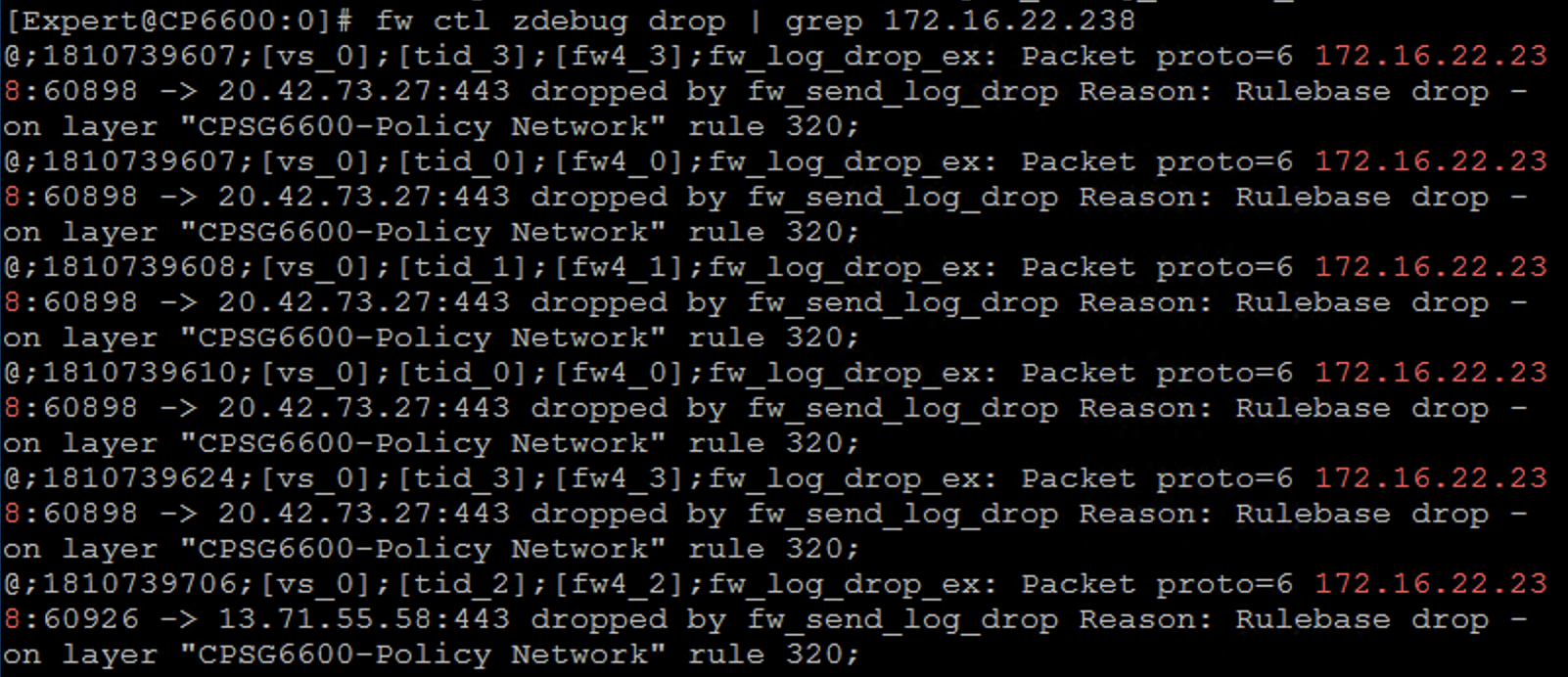
Attach file is fw monitor and zdebug result. I think the connection between the Gateway and the IC host is normal.
Attach file is fw monitor and zdebug result. I think the connection between the Gateway and the IC host is normal.
I think quick remote session with TAC would probably solve your issue, I feel like its something basic thats missing.
Andy
I think quick remote session with TAC would probably solve your issue, I feel like its something basic thats missing.
Andy
Finally we found two problems:
1. PDP Problem: After we disable the AD Query function, the Monitor's device status will never change.
2. The VPN certificate has expired.
After weReboot the device and re-sign the certificate. The problem is solved.
Finally we found two problems:
1. PDP Problem: After we disable the AD Query function, the Monitor's device status will never change.
2. The VPN certificate has expired.
After weReboot the device and re-sign the certificate. The problem is solved.
Good job!
Good job!