- Products
- Learn
- Local User Groups
- Partners
- More

The State of Ransomware Q1 2026
Key Trends and Their Impact
Good, Better, Best:
Prioritizing Defenses Against Credential Abuse
AI Security Masters E7:
How CPR Broke ChatGPT's Isolation and What It Means for You
Blueprint Architecture for Securing
The AI Factory & AI Data Center
Call For Papers
Your Expertise. Our Stage
CheckMates Go:
CheckMates Fest
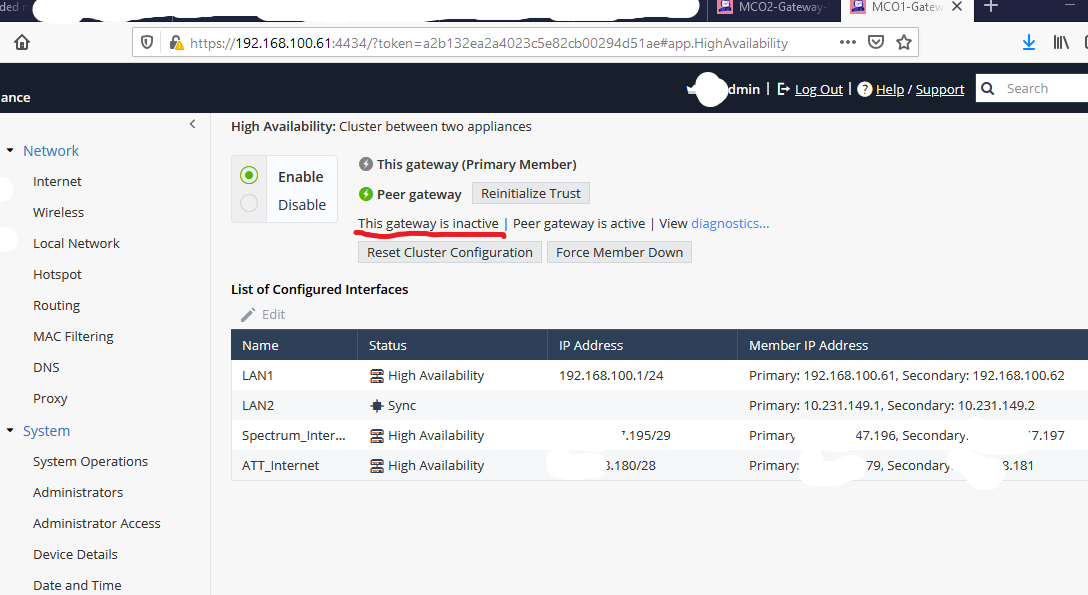
Client has two 790 Wifi appliances configured in HA mode. Firmware is at R77.20.87 (990173042)
Device2 shows as active cluster member, Device1 shows as inactive cluster member.
Client's postage meter (Wifi) lost Internet connection. Examination of Device1 Active Users showed 8-10 Wifi connections, even though inactive.
Is it expected behavior for the inactive device in HA to accept Wifi connections?
This is Embedded GAiA - so there is a big difference between these ! SMB clustering does go back to the set config concerning backup role. Download the new firmware and install it - checking for newer firmware does not really work with SMB stagging mechanism and you have to manually install it, sad but true...
I don't think the clustering disables WiFi on the inactive member of the cluster.
That said, I would think it should still work.
Recommend a TAC case here.
How can the HA member show users ? Note that the WebUI of the standby cluster member only has one tab: Device.
Please answer my question: How can the HA member show users ?
I agree. When it is working normally, the HA shows only the basic screen.
When the users complained of slow performance and web apps with unusual behavior, I logged on to both devices and took the screenshots attached, and ran CPInfo on both devices. I did not take a screenshot of the Active Connections at this time. I was puzzled at what I saw.
If it shows more than the Device Tab, i would assume that Clustering is not working anymore... You really should contact TAC with this issue !
Did you find out more about this strange phenomenon ?
Thanks for checking back. Nothing yet. I reconnected the primary device on Monday, it is still working normally, with the secondary device showing only the one (Device) tab.
It appears that with the 700 series HA, when the primary device comes back online, the secondary automatically resumes its backup role with the one device tab, correct? I expected when bringing the primary online, the secondary would continue its full GUI and the primary would show only the Device tab, until the secondary was rebooted.
This behavior appears to be different from the HA clusters (R77 and R80.3) I have created.
When viewing the system resources on the devices, the primary device /fwtmp shows 100% used, the secondary shows 80% used.
Could this be causing the unpredictable and occasional wonky behavior? Firmware is 990173042 on both, when checking for newer firmware, it comes back with "Firmware is up to date". I see from other posts 990173072 is available to fix /fwtmp high usage.
This is Embedded GAiA - so there is a big difference between these ! SMB clustering does go back to the set config concerning backup role. Download the new firmware and install it - checking for newer firmware does not really work with SMB stagging mechanism and you have to manually install it, sad but true...
Leaderboard
Epsum factorial non deposit quid pro quo hic escorol.
| User | Count |
|---|---|
| 5 | |
| 4 | |
| 4 | |
| 4 | |
| 3 | |
| 1 | |
| 1 | |
| 1 | |
| 1 | |
| 1 |
Tue 12 May 2026 @ 10:00 AM (CEST)
The Cloud Architects Series: Check Point Cloud Firewall delivered as a serviceWed 13 May 2026 @ 11:00 AM (EDT)
TechTalk: The State of Ransomware Q1 2026: Key Trends and Their ImpactThu 14 May 2026 @ 07:00 PM (EEST)
Under the Hood: Presentando Check Point Cloud Firewall como ServicioTue 12 May 2026 @ 10:00 AM (CEST)
The Cloud Architects Series: Check Point Cloud Firewall delivered as a serviceTue 19 May 2026 @ 06:00 PM (IDT)
AI Security Masters E8 - Claude Myphos: New Era in Cyber SecurityAbout CheckMates
Learn Check Point
Advanced Learning
YOU DESERVE THE BEST SECURITY