- Products
- Learn
- Local User Groups
- Partners
- More

What’s New in Identity and Trust?
11 November @ 5pm CET / 11am EST
CPX is Back!
Join us in Las Vegas, Vienna, and/or Bangkok!
What’s New in Agentic Network Orchestration
AI Security Masters
LGTM: Bypassing an LLM Build Gate
When Prompt Injection Fails
CheckMates Go:
Fun Ding
Scenario
Notebook With client Endpoint Security --> Checkpoint Quantum Spark 1530 Appliance
Notebook connect to Checkpoint all fine, he can see the entire LAN network, i used office mode. All fine.
What i need is a bidirectional comunication. Pc on lan network to have access to one port listening on notebook.
It's possible ?
Thank's
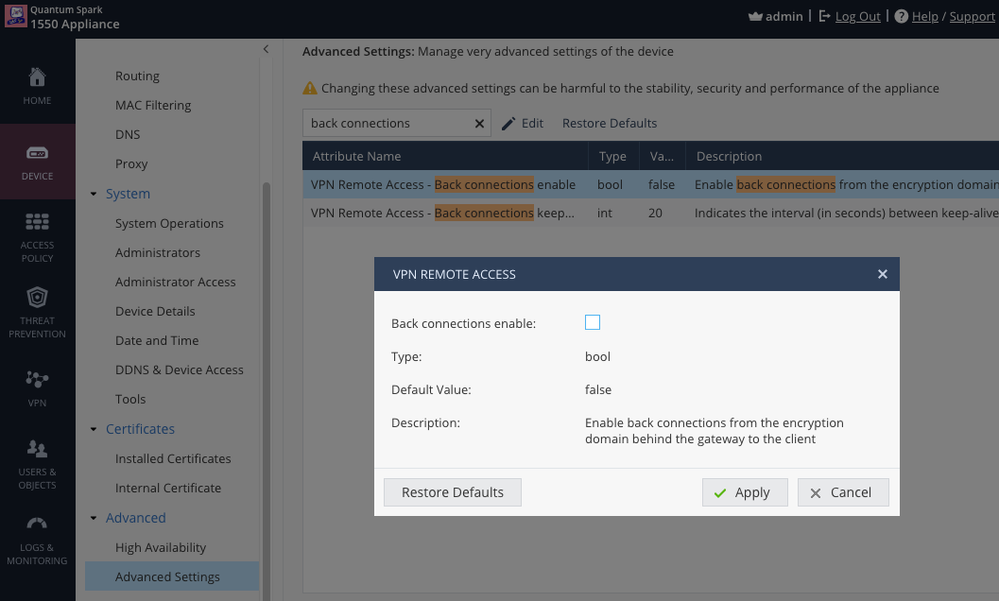
You need to additionally enable Back Connections in Advanced Settings:
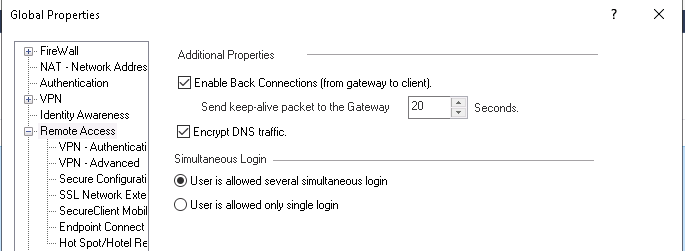
For a centrally managed SMB appliance (or for non-SMB appliances), this is the correct setting in Global Properties to allow connections initiated from the LAN to Remote Access VPN clients:
You can pit Office Mode IP for a specific user, and then yes, you can do what you need
OK i put in office mode, i edited file ipassignement.conf and when i connect i receive correct ip address. Do i need to make something other because still not working.
Sorry for newbie question i'm following the user manual.
You need to additionally enable Back Connections in Advanced Settings:
Hi, first thank for your answer.
Yes i had already create outgoing roule, i attach screenshot. I tried also with Any instead of Lan Networks.
However i don't rebooted checkpoint after put new ipaggnignement,conf
All work fine user always receive the same ip.
Maybe something wrong on file ?
I had put
##############################################################################################
### Gateway Type IP Address User Name ###
### ============= ===== ======================================== =======================###
##############################################################################################
*, 172.16.10.5, tamponi
Thank's i tred to activate but nothing.
1) Office per mode use ok
2) Outgoing roule plicy to allow lan to vpn remote access.
3) Enabled back conneccion
i try to enable anti-spoofing on vpn remote access but nothing.
Can you share the policy rule you've created?
Ok.
In the policy, instead of using the Remote Access object, try to use the Office Mode IP/Network.
OK i solved the issue. My configuration work like screenshot.
I don't know why i can't ping my remote notebook also if windows firewall it's down but for example i can access the shared folder.
The real missing puzzle for me it's what you suggest me and i report like solutions, the allow back connection.
The Remote Access object could not be mapping the network correctly, but I'm glad you've worked it out.
Can we move this to Quantum Spark ?
Why?
If this were posted somewhere else, that's probably where I'd move it.
However, this deals with both topics, so I'm inclined to leave it where it is. 🙂
For a centrally managed SMB appliance (or for non-SMB appliances), this is the correct setting in Global Properties to allow connections initiated from the LAN to Remote Access VPN clients:

Tue 03 Nov 2026 @ 06:00 PM (CET)
Under the Hood: How to Secure Agentic AI on AWS with Check PointTue 10 Nov 2026 @ 06:00 PM (IST)
Under the Hood: Introducing Check Point Cloud Firewall as a ServiceTue 10 Nov 2026 @ 08:00 PM (IST)
Check Point Mobile Security | Extending Zero Trust with NetskopeTue 03 Nov 2026 @ 06:00 PM (CET)
Under the Hood: How to Secure Agentic AI on AWS with Check PointTue 10 Nov 2026 @ 06:00 PM (IST)
Under the Hood: Introducing Check Point Cloud Firewall as a ServiceTue 10 Nov 2026 @ 08:00 PM (IST)
Check Point Mobile Security | Extending Zero Trust with NetskopeAbout CheckMates
Learn Check Point
Advanced Learning

WE SECURE YOUR AI TRANSFORMATION