- Products
- Learn
- Local User Groups
- Partners
- More

Stop Babysitting Rules.
Go Agentic
Step Into the Future of
AI-Powered Cyber Security
Bridge the CAASM Gap
with Exposure Management
AI Security Masters E8:
Claude Mythos: New Era in Cyber Security
Call For Papers
Your Expertise. Our Stage
CheckMates Go:
CheckMates Fest
I am working on a R75 and looking to see if there is a way to export the rules for Mobile Access. I used Web Visualization Tool to view and export as xml but the rules we configured for mobile access are not part of that export. I am new to CP and needed to take over this device and would like to be able to view these rules in xml or html format. Anyway to do this?
Mobile Access Rules are in a separate database that's not covered by the Web Visualization Tool.
As far as I know there is no way to export these, particularly from R75.
I did notice these lines in the cvpnd.c file.
:useLocalSwsPolicyFlag (0)
:swsLocalPolicyFilePath ("$CVPNDIR/htdocs/SNX/CSHELL/CPSWS_LOCAL.xml"
I see that this is set to 0 so apprently not enabled as this file does not exist. If this was enabled what would be available in this file?
This is related to SecureWorkspace and not the Mobile Access ruleset.
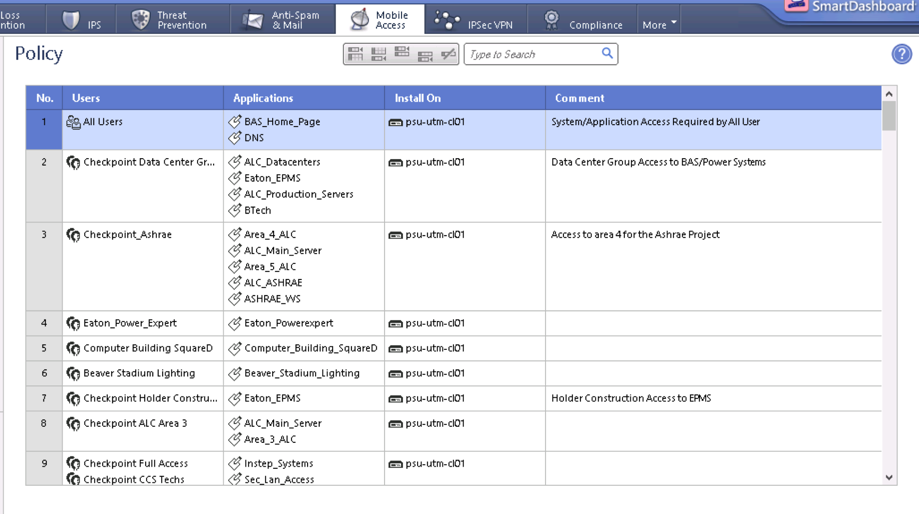
One more question, I can see the policy via the Smart Dashboard but I cannot figure out how to see the users or application details. Is there anyway through the dashboard to see the actual details of the objects?
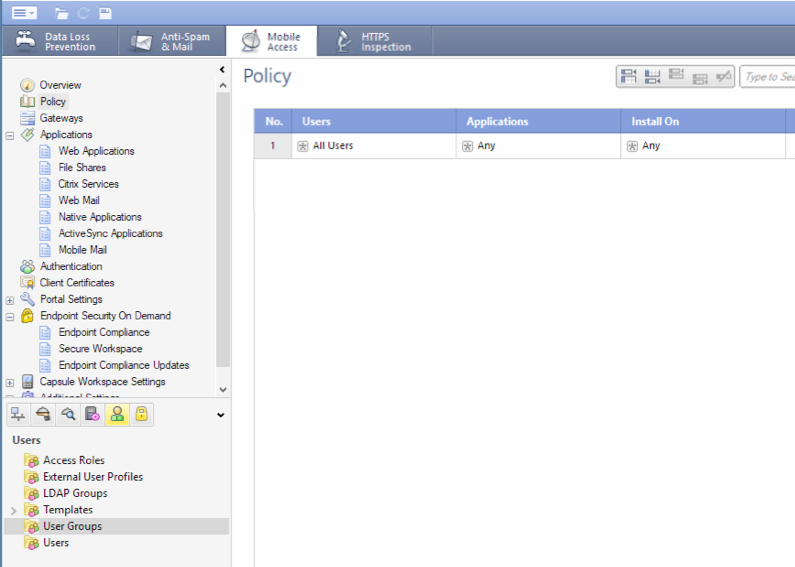
Screen shot:

There should be a section called Applications, to the left of the rulebase.
Likewise, the User Groups are below that.
It's possible these are in slightly different locations in earlier releases.

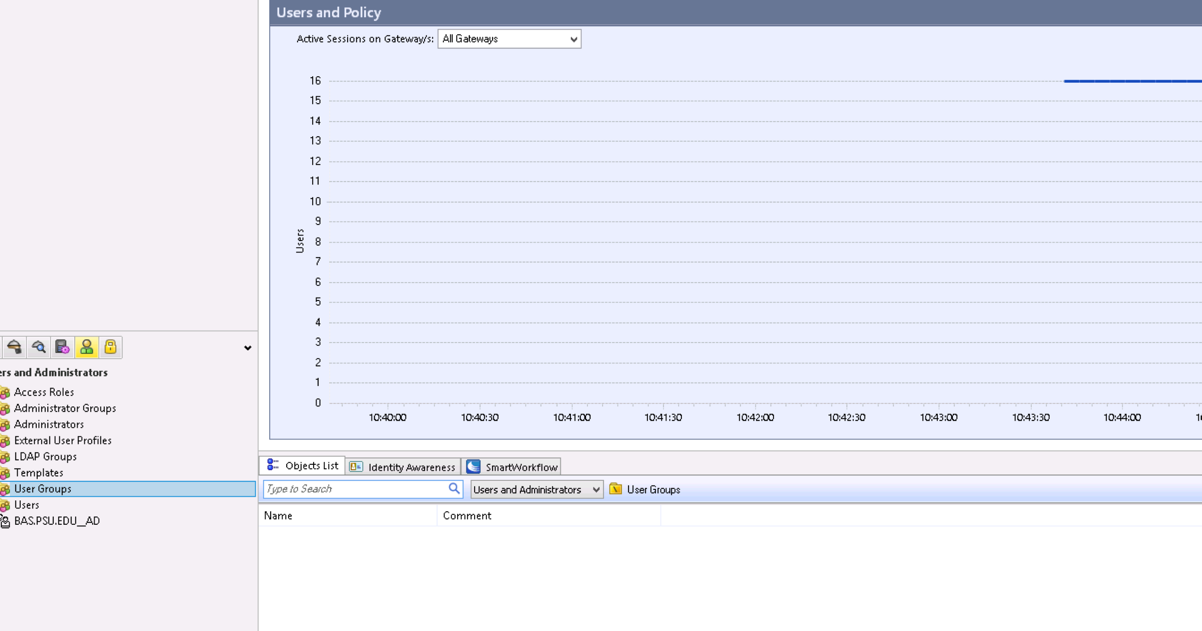
Hmm, when I take a look at the same screen as your example I have nothing listed...

Is there anywhere else to see these user groups?
They may be listed in LDAP Groups or Access Roles, depending on how it was set up.
Is there any way to export mobile access policy from R80.10?
Legacy MAB Rules? No. If you use a unified policy, MAB Rules can be exported the same as regular Access Policy rules.
Hello @PhoneBoy ,
Today is there one way to export this rules ? Over API or directly on management?
Legacy MAB configuration does not have any API support or ability to export rules that I'm aware of.
If you are using the Unified Policy mode, then those rules can be exported through the Management API like any other.
My customer need transfer rules of MAB to unified. There is one way to do this ? Or only get one-by-one rule and reply on the unified.
There are no automated tools to convert from the legacy MAB policy to a Unified Policy.
It needs to be done by hand.
you can run: (echo localhost; echo u; echo admin; echo "<admin_password>"; echo "-t connectra_policy -pf"; echo "-q") | queryDB_util
This will dump it out in this format which you can then go through and extract relevant info:
Q u e r y i n g D B
=====================
Object Name: connectra_authorization_policy
Table Name: connectra_policy
Fields Details
--------------
connectra_authorization_rules: (
0: (
applications: Name: World_Clock (Table: network_applications)
comment: Rule created automatically by Mobile Access wizard.
install_on: Name: Any (Table: globals)
user_groups: Name: grp_usertest (Table: users)
)
)
A total of 1 objects match the query.
R82 has API support for this.
you can run: (echo localhost; echo u; echo admin; echo "<admin_password>"; echo "-t connectra_policy -pf"; echo "-q") | queryDB_util
This will dump it out in this format which you can then go through and extract relevant info:
Q u e r y i n g D B
=====================
Object Name: connectra_authorization_policy
Table Name: connectra_policy
Fields Details
--------------
connectra_authorization_rules: (
0: (
applications: Name: World_Clock (Table: network_applications)
comment: Rule created automatically by Mobile Access wizard.
install_on: Name: Any (Table: globals)
user_groups: Name: grp_usertest (Table: users)
)
)
A total of 1 objects match the query.
Leaderboard
Epsum factorial non deposit quid pro quo hic escorol.
| User | Count |
|---|---|
| 3 | |
| 2 | |
| 1 | |
| 1 | |
| 1 | |
| 1 | |
| 1 |
Thu 04 Jun 2026 @ 02:00 PM (CEST)
Deep Dive Webinar: New CloudGuard GWLB Deployment Without NAT Gateways - EuropeThu 04 Jun 2026 @ 07:00 PM (IDT)
Deep Dive Webinar: New CloudGuard GWLB Deployment Without NAT Gateways - AmericaThu 04 Jun 2026 @ 10:00 AM (PDT)
AI Security Masters E9: READY OR NOT: Securing the AI Enterprise 1/5 - AI Agent SecurityWed 10 Jun 2026 @ 01:00 PM (EDT)
Deep Dive: When the Agents Attack: A Live Look at Agentic Exposure ValidationThu 11 Jun 2026 @ 11:00 AM (EDT)
Tips and Tricks 2026 #8: Say Yes to AI Without Saying Yes to RiskThu 04 Jun 2026 @ 02:00 PM (CEST)
Deep Dive Webinar: New CloudGuard GWLB Deployment Without NAT Gateways - EuropeThu 04 Jun 2026 @ 07:00 PM (IDT)
Deep Dive Webinar: New CloudGuard GWLB Deployment Without NAT Gateways - AmericaThu 04 Jun 2026 @ 10:00 AM (PDT)
AI Security Masters E9: READY OR NOT: Securing the AI Enterprise 1/5 - AI Agent SecurityWed 10 Jun 2026 @ 01:00 PM (EDT)
Deep Dive: When the Agents Attack: A Live Look at Agentic Exposure ValidationThu 11 Jun 2026 @ 11:00 AM (EDT)
Tips and Tricks 2026 #8: Say Yes to AI Without Saying Yes to RiskFri 12 Jun 2026 @ 10:00 AM (CEST)
CheckMates Live Netherlands - Sessie 47: Continuous Threat Exposure ManagementAbout CheckMates
Learn Check Point
Advanced Learning
YOU DESERVE THE BEST SECURITY