- Products
- Learn
- Local User Groups
- Partners
- More

What's New in R82.10?
Watch HereWhen the Agents Attack
A Live Look at Agentic Exposure Validation
AI Security Masters E8:
Claude Mythos: New Era in Cyber Security
CheckMates Go:
CheckMates Fest
I see the place to set the mail message in the thresholds but where do I create and test the mail settings? We have reporting being emailed weekly but how do I set these alerts upon disconnect, issues, etc in Monitor? Thanks!
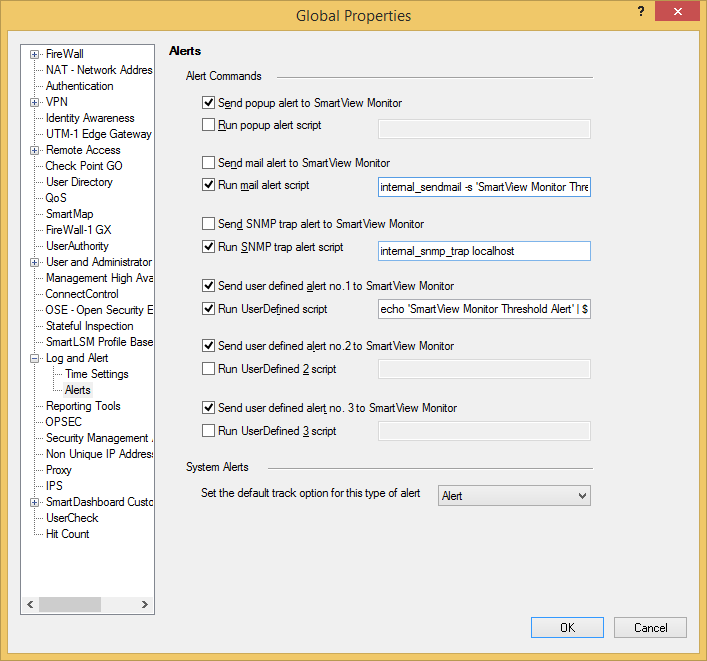
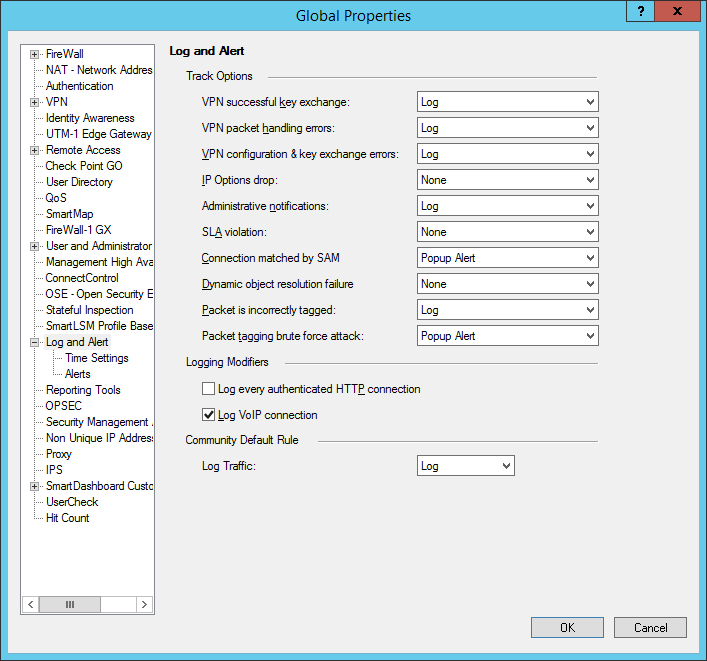
You can easily configure your mail settings within SmartDashboard > Policy > Global Properties > Log and Alert > Alerts.

You can either use the integrated mail alert: internal_sendmail -s 'SmartView Monitor Threshold Alert' -t MAILSERVER -f SENDER_EMAIL_ADDRESS RECEIVER_EMAIL_ADDRESS
or configure a user defined alert: echo 'SmartView Monitor Threshold Alert' | $FWDIR/bin/sendmail -s 'Subject' -t MAILSERVER -f SENDER_EMAIL_ADDRESS RECEIVER_EMAIL_ADDRESS
You can easily configure your mail settings within SmartDashboard > Policy > Global Properties > Log and Alert > Alerts.

You can either use the integrated mail alert: internal_sendmail -s 'SmartView Monitor Threshold Alert' -t MAILSERVER -f SENDER_EMAIL_ADDRESS RECEIVER_EMAIL_ADDRESS
or configure a user defined alert: echo 'SmartView Monitor Threshold Alert' | $FWDIR/bin/sendmail -s 'Subject' -t MAILSERVER -f SENDER_EMAIL_ADDRESS RECEIVER_EMAIL_ADDRESS
So within SmartDashboard, when I enter that internal_sendmail in the Run mail alert script, what exactly does that do for me? Is that only for Monitor? Also, what is the Send mail alert to SmartView Monitor option there?
I also check my current settings and it shows 'internal_sendmail -s alert -t mailer root' in that field. Above in the Log and Alert section there is also an option to set a Mail Alert...does this mean it will use these same settings?

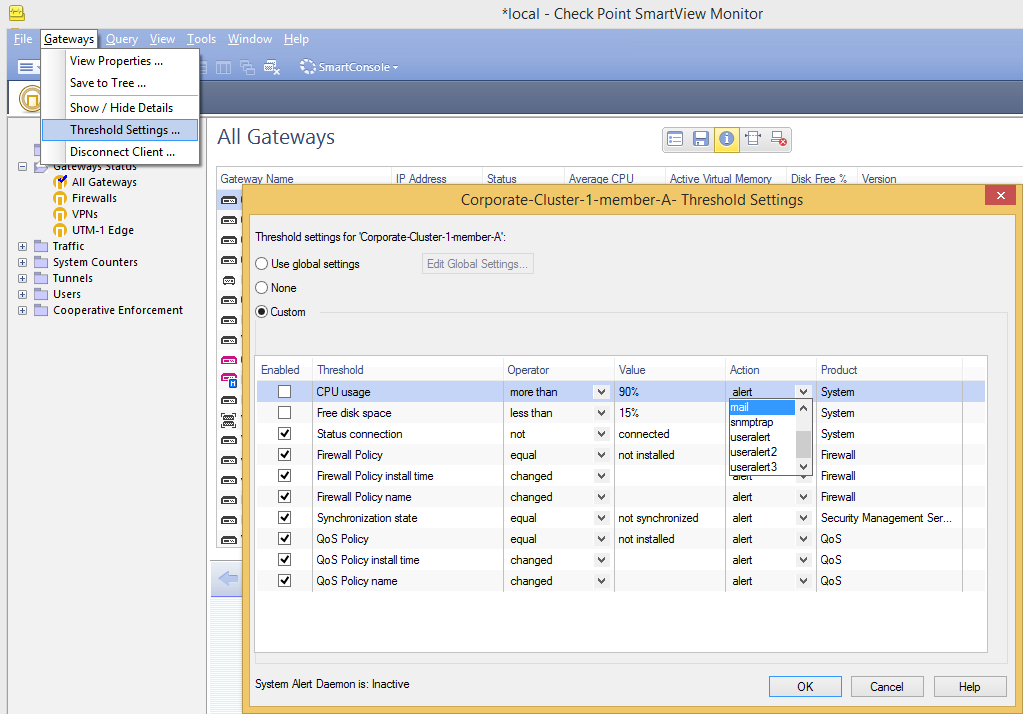
Everytime you see a 'Mail' Alert available as action it triggers the action defined in 'Run mail alert script'.
'User Alert' triggers 'Run UserDefined script no.1'.
'User Alert 2 ' triggers 'Run UserDefined script no.2'.
'User Alert 3' triggers 'Run UserDefined script no.3'.

You need to adjust your current default settings to meet your actual requirements and environment for mail server, sender and reciepent email address. I provided you with some examples in my last reply.
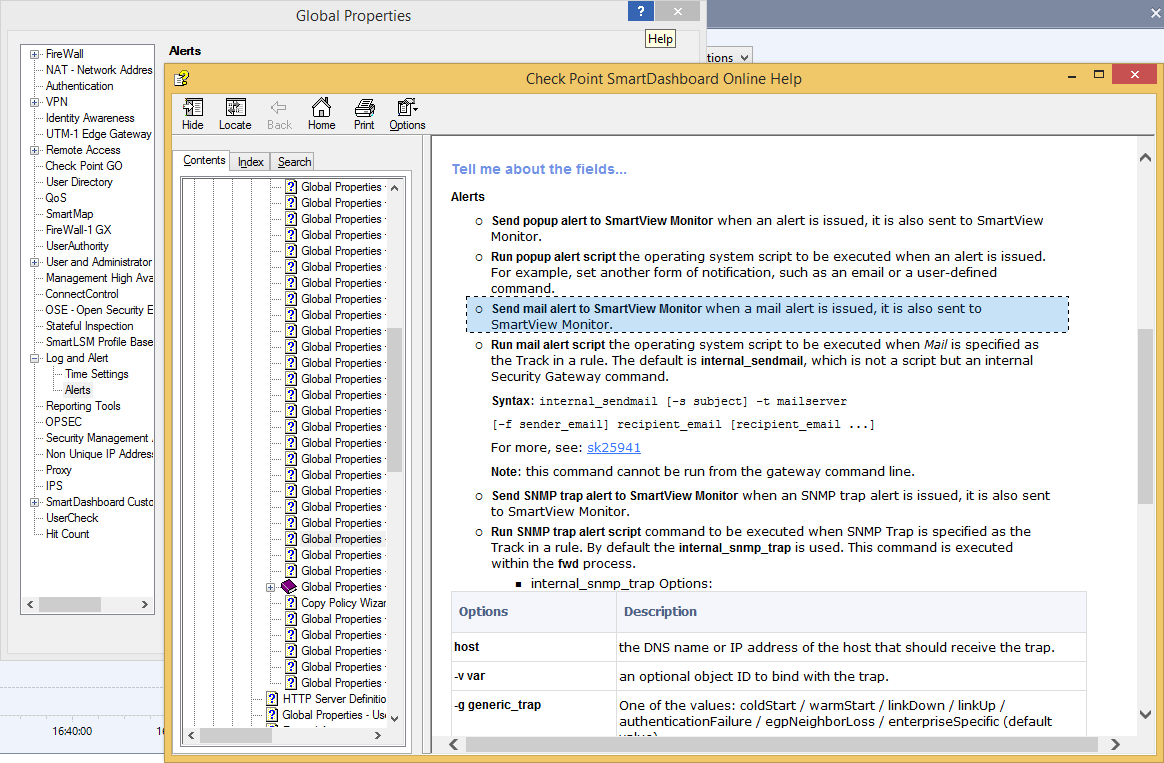
The 'Send mail alert to SmartView Monitor' option is described in Check Points integrated Help as shown below.

We added the Global Properties then restarted the alert daemon and the alerts started working. Thanks for the information!
If anyone from CP is listening, it would be nice to have that message parsed better and the ability to add details, 'Policy Installed - FW1', 'Device Disconnected - FW3', etc. to the subject line of the message. Thanks again!
I totally agree that the email recieved from a treshold could be more informative in the subject line. Now you get a bunch of information and have to look closer to see what occured with the same subject for different thresholds.
Hi sir danny i have a question regarding to the email sender. What email address will i put there? Is there a configuration in the firewall for its email address to be defined as the sender email address?
Hi,
For the -f SENDER_EMAIL_ADDRESS you can put whatever you want in the Global properties. Forexample [email protected]
Leaderboard
Epsum factorial non deposit quid pro quo hic escorol.
| User | Count |
|---|---|
| 66 | |
| 22 | |
| 7 | |
| 6 | |
| 5 | |
| 4 | |
| 4 | |
| 3 | |
| 3 | |
| 2 |
Tue 07 Jul 2026 @ 03:00 AM (IDT)
Check Point Cloud Firewall - The Cloud Firewall with near 100% Zero Day Prevention built in (ANZ)Tue 07 Jul 2026 @ 05:00 AM (IDT)
Check Point Cloud Firewall – The Cloud Firewall with near 100% Zero-Day Prevention Build In (SEAK)Tue 07 Jul 2026 @ 07:30 AM (IDT)
Check Point Cloud Firewall - The Cloud Firewall with near 100% Zero Day Prevention built in (IST)Thu 09 Jul 2026 @ 10:00 AM (CEST)
Schutz souveräner Workloads: Check Point & die AWS European Sovereign CloudThu 09 Jul 2026 @ 11:00 AM (CEST)
The Cloud Architects Series: Check Point Edge Protection SD-WAN & SASEThu 09 Jul 2026 @ 11:00 AM (EDT)
Tips and Tricks 2026 #9 - What's New with Check Point Email SecurityTue 07 Jul 2026 @ 03:00 AM (IDT)
Check Point Cloud Firewall - The Cloud Firewall with near 100% Zero Day Prevention built in (ANZ)Tue 07 Jul 2026 @ 05:00 AM (IDT)
Check Point Cloud Firewall – The Cloud Firewall with near 100% Zero-Day Prevention Build In (SEAK)Tue 07 Jul 2026 @ 07:30 AM (IDT)
Check Point Cloud Firewall - The Cloud Firewall with near 100% Zero Day Prevention built in (IST)Thu 09 Jul 2026 @ 11:00 AM (EDT)
Tips and Tricks 2026 #9 - What's New with Check Point Email SecurityFri 10 Jul 2026 @ 11:00 AM (IDT)
CheckMates Live Netherlands - Sessie 48: Nieuwe Check Point Workspace SecurityTue 14 Jul 2026 @ 10:00 AM (PDT)
AI Security Masters E11: READY OR NOT: Securing the AI Enterprise 3/5 - AI Workforce SecurityAbout CheckMates
Learn Check Point
Advanced Learning
YOU DESERVE THE BEST SECURITY