- Products
- Learn
- Local User Groups
- Partners
- More
MVP 2026: Submissions
Are Now Open!
What's New in R82.10?
10 December @ 5pm CET / 11am ET
Announcing Quantum R82.10!
Learn MoreOverlap in Security Validation
Help us to understand your needs better
CheckMates Go:
Maestro Madness
Well, I have done it:)
Using recovery procedure, created and promoted the new Primary Management server from "migrate export" created on Secondary /Active.
Cleaned-up all of the remnants of the old Primary in SmartConsole and policies.
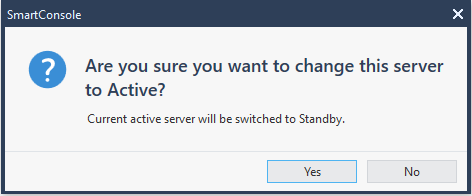
At the end, old primary was still visible in Management HA, so I've decided to toggle the only live server to "Standby" and to "Active" again, figuring that since it is the only one running, there is enough intelligence in the process not to lock myself out.
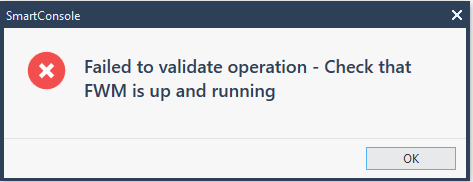
Well, it did set the server to Standby, but I am now stuck trying to get it to Active state:
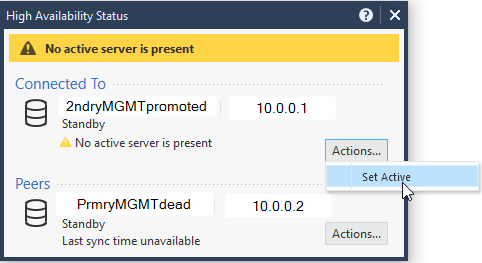
...as my connectivity to this server via SmartConsole is in a Read Only mode now.
2ndryMGMTpromoted> expert
Enter expert password:
Warning! All configurations should be done through clish
You are in expert mode now.
[Expert@2ndryMGMTpromoted:0]# grep Primary $CPDIR//registry/HKLM_registry.data
:Primary ("[4]1")
[Expert@2ndryMGMTpromoted:0]# cpstat mg
Product Name: Check Point Security Management Server
Major version: 6
Minor version: 0
Build number: 994000034
Is started: 1
Active status: standby
Status: OK
Connected clients
----------------------------------------------
|Client type|Administrator|Host|Database lock|
----------------------------------------------
----------------------------------------------
[Expert@2ndryMGMTpromoted:0]#
[Expert@2ndryMGMTpromoted:0]# api status
API Settings:
---------------------
Accessibility: Require ip 127.0.0.1
Automatic Start: Enabled
Processes:
Name State PID More Information
-------------------------------------------------
API Started 20406
CPM Started 9010 Check Point Security Management Server is running and ready
FWM Started 8470
APACHE Started 7946
Port Details:
-------------------
JETTY Internal Port: 50276
APACHE Gaia Port: 4434 (a non-default port)
When running mgmt_cli commands add '--port 4434'
When using web-services, add port 4434 to the URL
Profile:
------------
Machine profile: Medium env resources profile
CPM heap size:
API heap size:
--------------------------------------------
Overall API Status: Started
--------------------------------------------
API readiness test SUCCESSFUL. The server is up and ready to receive connections
Notes:
------------
To collect troubleshooting data, please run 'api status -s <comment>'
[Expert@2ndryMGMTpromoted:0]#
For MDS, there is an option to force Standby to become active:
mgmt_cli make-server-active force true --domain <domain_name> --user <user_name> --password <password>
I cannot find corresponding option for Management server.
Can someone recommend a way out of this situation?
No TAC suggestions please: this is a lab environment.
Try:
Security Management R80.40 Administration Guide p.319:
To promote a Secondary Management Server to become the Primary Management Server
Before you start - make sure that the primary server is offline.
1. Set the Secondary server to Active.
2. On the Secondary Management Server that you will promote, run:
#$FWDIR/bin/promote_util
#cpstop
3. Remove the $FWDIR/conf/mgha* files. They contain information about the current Secondary
settings. These files will be recreated when you start the Check Point services.
4. Make sure you have a mgmtha license on the newly promoted server.
Note - All licenses must have the IP address of the promoted Security Management Server.
5. Run cpstart on the promoted server.
@G_W_Albrecht , the promotion part has happened earlier in the process:
"Using recovery procedure, created and promoted the new Primary Management server from "migrate export" created on Secondary /Active."
The "recovery procedure" I am referring to is the one you are describing.
It's what happened afterwards that is a problem: I was able to toggle the only operational server from "Active" to "Standby" and cannot flip it back.
It is still a promoted primary that I cannot force to become active.
Try:
Thank you!
This did the trick:)
This is from sk34495: Changing the HA status of the Management station from command line 8)
Thanks!
I have no idea how I've missed that one: I've tried ~20 different queries.
The only thing that comes to mind is that they call SMS "Management Station" instead of Management Server, which I have always had problems with.
Going in my toolbox now:)
The cpprod_util is not a command used very frequently and poorly documented, too.
That's a shame, about it being poorly documented: I've just listed all the options it allows to be set and that's quite a list.
I also know this and i can see what a lot of the Get params mean. But a lot of what we see remains rather misterious:
Usage: cpprod_util [-e effective_version] funcname <arg>
Some of the functions require additional parameter(s),
some return integer char* or return 0/1 in status
Leaderboard
Epsum factorial non deposit quid pro quo hic escorol.
| User | Count |
|---|---|
| 21 | |
| 15 | |
| 7 | |
| 6 | |
| 5 | |
| 5 | |
| 4 | |
| 4 | |
| 4 | |
| 4 |
Fri 12 Dec 2025 @ 10:00 AM (CET)
Check Mates Live Netherlands: #41 AI & Multi Context ProtocolTue 16 Dec 2025 @ 05:00 PM (CET)
Under the Hood: CloudGuard Network Security for Oracle Cloud - Config and Autoscaling!Fri 12 Dec 2025 @ 10:00 AM (CET)
Check Mates Live Netherlands: #41 AI & Multi Context ProtocolTue 16 Dec 2025 @ 05:00 PM (CET)
Under the Hood: CloudGuard Network Security for Oracle Cloud - Config and Autoscaling!About CheckMates
Learn Check Point
Advanced Learning
YOU DESERVE THE BEST SECURITY