- Products
- Learn
- Local User Groups
- Partners
- More

MVP 2026: Submissions
Are Now Open!
What's New in R82.10?
Watch NowOverlap in Security Validation
Help us to understand your needs better
CheckMates Go:
Maestro Madness
Is there a way to not accelerate service on SecureXL on VSX. The issue is I have a admin in VM team that kick's
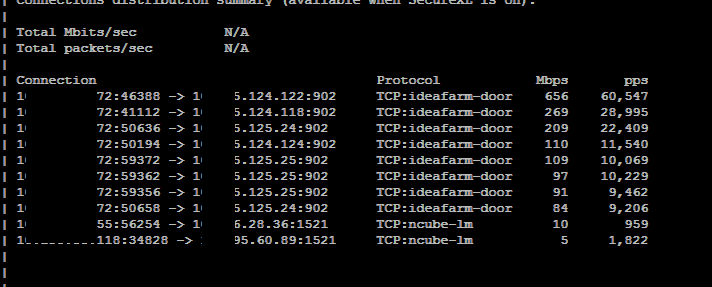
off replication jobs(8-10 of them) and it pumping between 100 to 400 Mbps on service port ideafarm-door (902), which
seems to stay with FWK1-DEV. When I push policy to that device it fails, because it times out. So I have to reach
out to the admin to pause his jobs, so I can push policy. Everything else work fine. Is this VSX bug?


Firstly, yes, you can disable SecureXL on per VS basis using CLI "fwaccell off" command from a VS content. However, this will only add to your current issue, instead of resolving it.
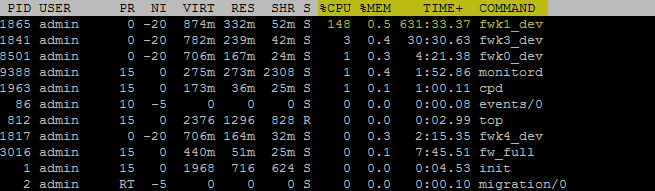
Hi. It's not a bug, you just need to tweak CoreXL and SXL to meet traffic requirements. It could well be that system will be underpowered to deal with such traffic volume. Therefore, can you share top command output showing all 16 individual core utilisation when it happens? Just to see which cores are maxed out.
As Valeri said SXL is actually your friend in high volume traffic, it should help free up CPU usage.
Could it be an interface buffer size issue?
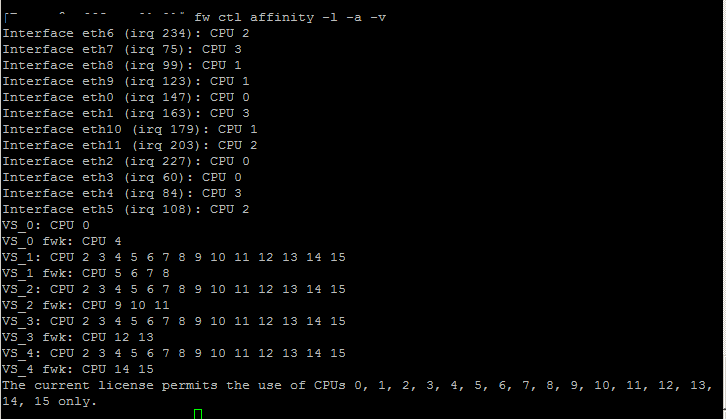
Don't think so but can't tell from logs provided. CoreXL allocation is not exactly right as cores 2 and 3 seems to be used for SXL and generic firewall tasks (except fwk). We need to see detailed CPU usage to make correct call
fwk1_dev is the combination of the 4 cores allocated to this vs
while in top, press shift+h to show the individual threads (worker cores)
148% means 1.5 of the 4 assigned cores being used
Check Point support conclusion is related MTU size on vs 1 interfaces. Where running 10g interface with MTU size 9000,according,to CP they our working
on Hotfix." The recommended hotfix was not yet ported to Take_317, the latest version was for Take_302. I tested this version and it is not compatible
with 317"
SecureXL "fwaccel off" does not have to be disabled on R80.20 to run "fw monitor". This is good for performance, so "fw monitor" does not affect performance any more.
More see here: R80.x Performance Tuning and Debug Tips – fw monitor
Regards
Heiko
Leaderboard
Epsum factorial non deposit quid pro quo hic escorol.
| User | Count |
|---|---|
| 12 | |
| 10 | |
| 9 | |
| 8 | |
| 6 | |
| 3 | |
| 2 | |
| 2 | |
| 2 | |
| 1 |
Tue 16 Dec 2025 @ 05:00 PM (CET)
Under the Hood: CloudGuard Network Security for Oracle Cloud - Config and Autoscaling!Thu 18 Dec 2025 @ 10:00 AM (CET)
Cloud Architect Series - Building a Hybrid Mesh Security Strategy across cloudsTue 16 Dec 2025 @ 05:00 PM (CET)
Under the Hood: CloudGuard Network Security for Oracle Cloud - Config and Autoscaling!Thu 18 Dec 2025 @ 10:00 AM (CET)
Cloud Architect Series - Building a Hybrid Mesh Security Strategy across cloudsAbout CheckMates
Learn Check Point
Advanced Learning
YOU DESERVE THE BEST SECURITY