- Products
- Learn
- Local User Groups
- Partners
- More

On-Premise SD-WAN Management
Register HereWhat's New in R82.10?
Watch Here AI Security Masters E8:
Claude Mythos: New Era in Cyber Security
CheckMates Go:
The Moment Before
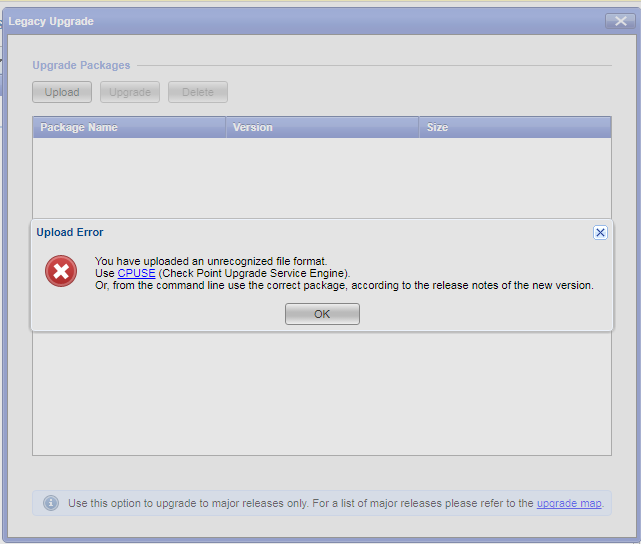
Hello. We have issue with upgrade of our software security gateways from 77.30 to 80.10.
I tried to make uprade from CUPSE, Smart Update and from CLI. I have an error 
However it is file from official checkpoint site, md5 hash is right.
How can I upgrade the sistem with some custom way?
Hello Sergey,
I solved this same problem by updating CPUSE Deployment Agent to the latest build and installing the latest Jumbo Hotfix Accumulator for R77.30.
If the Deployment Agent doesn't automatically upgrade when you go to the page in Gaia Web Portal, try to do it manually in CLI: sk92449
Hi Sergey,
I asked our Support to contact you
Best regards
Eyal Rashelbach
R80 Desk Manager | Solution Center | Check Point Software Technologies
Sergey,
I only had bad experiences with such an upgrade (R77.30 to R80.x).
First make sure that your appliance suports R80.10, make snapshot and backup just in case, save show configuration from gateway, fresh install R80.10, use the same SIC as before, paste show configuration, install policy.
Regards,
Is there any way to upgrade without fresh install?
We have some backup scripts on OS, so we don’t want to lose it during fresh installation.
I would recommend engaging with TAC to troubleshoot what is going on in this case.
Hello Sergey,
I solved this same problem by updating CPUSE Deployment Agent to the latest build and installing the latest Jumbo Hotfix Accumulator for R77.30.
If the Deployment Agent doesn't automatically upgrade when you go to the page in Gaia Web Portal, try to do it manually in CLI: sk92449
Thank you. Everything works fine after Deployment Agent upgrade.
Great - and with most updates/upgrades moving to CPUSE - if you have a configuration check script, I would recommend making sure your Auto-update is enabled on the Deployment Agent.
clish -c "show installer policy periodically-self-update"
And ensure that is set to "on"
You can also use
cpvinfo /opt/CPda/bin/DAService | grep Build | grep -Po "[0-9]+"
To look at what version of Deployment Agent you're running.
Leaderboard
Epsum factorial non deposit quid pro quo hic escorol.
| User | Count |
|---|---|
| 12 | |
| 5 | |
| 4 | |
| 3 | |
| 3 | |
| 3 | |
| 2 | |
| 2 | |
| 1 | |
| 1 |
Tue 14 Jul 2026 @ 10:00 AM (PDT)
AI Security Masters E11: READY OR NOT: Securing the AI Enterprise 3/5 - AI Workforce SecurityThu 30 Jul 2026 @ 10:00 AM (PDT)
AI Security Masters E12: READY OR NOT: Securing the AI Enterprise 4/5 - AI GatewayThu 20 Aug 2026 @ 10:00 AM (PDT)
AI Security Masters E13: READY OR NOT: Securing the AI Ent 5/5 - AI Research & Threat LandscapeTue 14 Jul 2026 @ 10:00 AM (PDT)
AI Security Masters E11: READY OR NOT: Securing the AI Enterprise 3/5 - AI Workforce SecurityThu 30 Jul 2026 @ 10:00 AM (PDT)
AI Security Masters E12: READY OR NOT: Securing the AI Enterprise 4/5 - AI GatewayThu 20 Aug 2026 @ 10:00 AM (PDT)
AI Security Masters E13: READY OR NOT: Securing the AI Ent 5/5 - AI Research & Threat LandscapeAbout CheckMates
Learn Check Point
Advanced Learning
YOU DESERVE THE BEST SECURITY