- Products
- Learn
- Local User Groups
- Partners
- More

MVP 2026: Submissions
Are Now Open!
What's New in R82.10?
10 December @ 5pm CET / 11am ET
Announcing Quantum R82.10!
Learn MoreOverlap in Security Validation
Help us to understand your needs better
CheckMates Go:
Maestro Madness
OS: R80.30
Type of Connection: Mobile Access
VPN Application: Capsule VPN (Android)
Target Application to Work: MS PowerApps
We have customized PowerApps project deployed/installed in tablet of our user in China. As we all know, even Microsoft apps are having problems when working inside China because of internet restriction. The PowerApps is working normally as tested out of China, what we did is we installed Capsule VPN to subject tablet and connect to our Headoffice.
The VPN tunnel established successfully, but PowerApps is still having problem syncing the data from tablet to server.
We want to route internet traffic of tablet after it successfully connect the VPN, is this possible? If yes, any lead/ ideas how to do? Also, just to add we have Proxy server in HQ and we're thinking of using it once the VPN has been established, not sure how to apply this in specific application in PowerApps or how the Android will use proxy once VPN is connected.
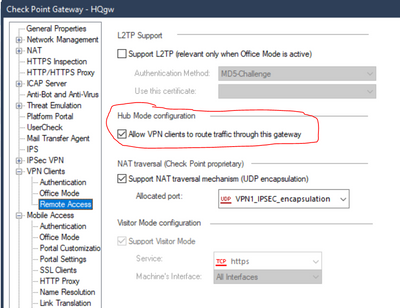
I believe that you can still enable Hub Mode for the Capsule VPN Clients.
Global Properties / Remote Access / SecureClient Mobile
Security Settings - Route all traffic to gateway
Set to Yes
Also set this under Endpoint Connect as well.
Make sure that set NAT on the Office Mode range so that when connects to Internet that is NATed.
That should by my understanding have the VPN Client send the traffic over the VPN tunnel
Theo,
you can route all traffic via VPN to your central gateway:
As @mdjmcnally mentioned, you have to enable for this for the different clients, but I think you have to have to enable this here for the capsule VPN clients.
Wolfgang
I have a question. Is there a similar setting in IPSEC VPN to allow users in the branch office to access the internet from Check Point in HQ?
Yes, it’s in the relevant VPN Community object.
Should be configured as a Star with VPN Routing configured with “To the center or through the center to other satellites, to the internet, and other VPN targets.”
See also: https://support.checkpoint.com/results/sk/sk182072
I guess we cannot do that in mesh topology.
In a full mesh community, correct.
Multiple VPN communities may be required here to achieve the desired result.
Leaderboard
Epsum factorial non deposit quid pro quo hic escorol.
| User | Count |
|---|---|
| 20 | |
| 20 | |
| 8 | |
| 7 | |
| 7 | |
| 4 | |
| 4 | |
| 3 | |
| 2 | |
| 2 |
Fri 12 Dec 2025 @ 10:00 AM (CET)
Check Mates Live Netherlands: #41 AI & Multi Context ProtocolTue 16 Dec 2025 @ 05:00 PM (CET)
Under the Hood: CloudGuard Network Security for Oracle Cloud - Config and Autoscaling!Fri 12 Dec 2025 @ 10:00 AM (CET)
Check Mates Live Netherlands: #41 AI & Multi Context ProtocolTue 16 Dec 2025 @ 05:00 PM (CET)
Under the Hood: CloudGuard Network Security for Oracle Cloud - Config and Autoscaling!Thu 18 Dec 2025 @ 10:00 AM (CET)
Cloud Architect Series - Building a Hybrid Mesh Security Strategy across cloudsAbout CheckMates
Learn Check Point
Advanced Learning
YOU DESERVE THE BEST SECURITY