- Products
- Learn
- Local User Groups
- Partners
- More

On-Premise SD-WAN Management
Register HereWhat's New in R82.10?
Watch Here AI Security Masters E8:
Claude Mythos: New Era in Cyber Security
CheckMates Go:
The Moment Before
Hi, I need to prevent to start the client when I turn on my mac. I've already tried all the proposed solutions found on Google but they are not working.
It's incredible that there is a deamon that boot automatically on the start. Please give me a solution because I have serious problems with other working tools.
I've tried to modify the scripts /Library/LaunchDaemons/com.checkpoint.epc.service.plist and /Library/LaunchAgents/com.checkpoint.eps.gui.plist by putting
<key>RunAtLoad</key>
<false/>
but it doesn't work on mac os Catalina.
Please give me a solution! Thank you
I presume you have taken it out of your login options under your User account, right?
Also, you checked /Library/LaunchAgents ?
I checked both /Library/LaunchDaemons/com.checkpoint.epc.service.plist and /Library/LaunchAgents/com.checkpoint.eps.gui.plist
Pretty sure it’s the kernel module that’s blocking traffic, not a user process.
This was discussed here: https://community.checkpoint.com/t5/Remote-Access-VPN/MacOS-EPS-Standalone-Client-VPN-client-Block-A...
You cannot do that. Some essential client components are loaded with system, not user, permissions. However, you can offload and re-load the client with cpstop.sh and cpstart.sh scripts, ran by sudo. Of course, you should have full admin permissions to do so.
Important: this is highly not recommended, as unloading the client leaves you completely unprotected.
Hi, I've to use the client for only connecting to a customer vpn. In my opinion, this type of approach is too much aggressive, I should have the possibility to load and unload the client in an easy way.
About the scripts that you mentioned (cpstart.sh nad cpstop.sh), where I can find them?
Really there isn't a more user friendly way to launch the client only when I need?
Thank you.
We do not have lightweight VPN only client for Mac, AFAIK. EPS package includes FDE, FW, malware protection, emulation, anti-ransomware, and more. Most of this components require system level access.
You may want to try SNX/Mobile Portal option instead.
The mentioned scripts and more, they are under Library, Application Support, in the client package folder. If you do not know where it is, you probably should not poke around.
Once more, I emphasise, off-loading and re-loading components is a very bad security practice, and I would urge you not to do that on production machines.
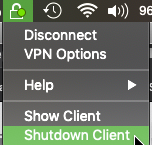
The Shutdown Client command from the Menu does not help ?
It will unload it until next reboot...
As I noted in the thread I linked, the Mac VPN client is intended—and licensed—as a full Endpoint client.
This Desktop Firewall is a mandatory component of this that cannot be removed.
The only other option on the Mac without the firewall is SNX + Mobile Access Blade or to manually run the stop/start script referenced.
Leaderboard
Epsum factorial non deposit quid pro quo hic escorol.
| User | Count |
|---|---|
| 12 | |
| 6 | |
| 4 | |
| 3 | |
| 3 | |
| 3 | |
| 3 | |
| 2 | |
| 2 | |
| 1 |
Tue 14 Jul 2026 @ 10:00 AM (PDT)
AI Security Masters E11: READY OR NOT: Securing the AI Enterprise 3/5 - AI Workforce SecurityThu 30 Jul 2026 @ 10:00 AM (PDT)
AI Security Masters E12: READY OR NOT: Securing the AI Enterprise 4/5 - AI GatewayThu 20 Aug 2026 @ 10:00 AM (PDT)
AI Security Masters E13: READY OR NOT: Securing the AI Ent 5/5 - AI Research & Threat LandscapeTue 14 Jul 2026 @ 10:00 AM (PDT)
AI Security Masters E11: READY OR NOT: Securing the AI Enterprise 3/5 - AI Workforce SecurityThu 30 Jul 2026 @ 10:00 AM (PDT)
AI Security Masters E12: READY OR NOT: Securing the AI Enterprise 4/5 - AI GatewayThu 20 Aug 2026 @ 10:00 AM (PDT)
AI Security Masters E13: READY OR NOT: Securing the AI Ent 5/5 - AI Research & Threat LandscapeAbout CheckMates
Learn Check Point
Advanced Learning
YOU DESERVE THE BEST SECURITY