- Products
- Learn
- Local User Groups
- Partners
- More

Scaling Check Point Automation with Arodonata
7 October @ 5pm CET / 11am EDT
What's New in Check Point SASE
The State of Ransomware Q2 2026:
This Quarter's Trends, and Their Impact on Your Defenses
AI Security Masters
Implementing the AI Security Trifecta
CheckMates Go:
Half is Not Enough
Hi Team
I face an issue with the import database field hope everyone can help me with this error
->> Explain: database export from smart-1 R80.30 import to the new SMS VM R80.40
-> >I had followed the sk163805 but it still error
->> Error Message:
[Expert@CP-SMS:0]# ./migrate import /var/log/Migrate_Export.tgz
The import operation will eventually stop all Check Point services (cpstop).
Do you want to continue? (y/n) [n]? y
Extracting the database...
Database export was done with migration tools for different version.
You must export and import database with migration tools for version
installed on destination machine.
Execution finished with errors. See log file '/opt/CPshrd-R80.40/log/migrate-2021.08.16_17.22.17.log' for further details
[Expert@CP-SMS:0]#
Hi Team
I face an issue with the import database field hope everyone can help me with this error
->> Explain: database export from smart-1 R80.30 import to the new SMS VM R80.40
-> >I had followed the sk163805 but it still error
->> Error Message:
[Expert@CP-SMS:0]# ./migrate import /var/log/Migrate_Export.tgz
The import operation will eventually stop all Check Point services (cpstop).
Do you want to continue? (y/n) [n]? y
Extracting the database...
Database export was done with migration tools for different version.
You must export and import database with migration tools for version
installed on destination machine.
Execution finished with errors. See log file '/opt/CPshrd-R80.40/log/migrate-2021.08.16_17.22.17.log' for further details
[Expert@CP-SMS:0]#
Hi Team
I face an issue with the import database field hope everyone can help me with this error
->> Explain: database export from smart-1 R80.30 import to the new SMS VM R80.40
-> >I had followed the sk163805 but it still error
->> Error Message:
[Expert@CP-SMS:0]# ./migrate import /var/log/Migrate_Export.tgz
The import operation will eventually stop all Check Point services (cpstop).
Do you want to continue? (y/n) [n]? y
Extracting the database...
Database export was done with migration tools for different version.
You must export and import database with migration tools for version
installed on destination machine.
Execution finished with errors. See log file '/opt/CPshrd-R80.40/log/migrate-2021.08.16_17.22.17.log' for further details
[Expert@CP-SMS:0]#
This is legacy - try using migrate_server as suggested in Installation and Upgrade Guide R80.40 p.437ff !
Short overview:
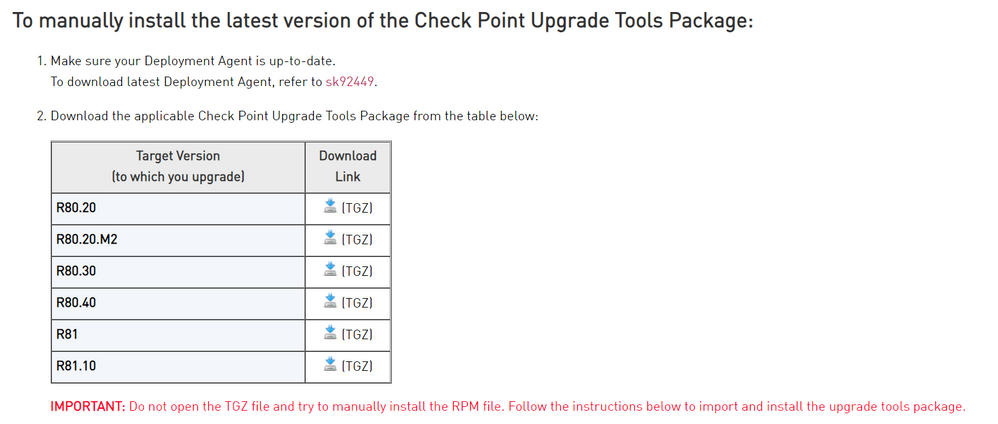
- install R80.40 Upgrade Tools on both units from here sk135172: Upgrade Tools package for upgrade from R80.20 and higher
- on R80.30, perform migrate_server export -skip_upgrade_tools_check -v R80.40 <Path of the Export TGZ file>Export_for_Upgrade_to_R8040.tgz
- on R80.40, performmigrate_server import -skip_upgrade_tools_check -v R80.40 <Path of the Export TGZ file>Export_for_Upgrade_to_R8040.tgz
Refer further to sk163814 - Security Management Upgrade troubleshooting (new upgrade process)
sk163805 is not valid for R80.40 import afaik.
This is legacy - try using migrate_server as suggested in Installation and Upgrade Guide R80.40 p.437ff !
Short overview:
- install R80.40 Upgrade Tools on both units from here sk135172: Upgrade Tools package for upgrade from R80.20 and higher
- on R80.30, perform migrate_server export -skip_upgrade_tools_check -v R80.40 <Path of the Export TGZ file>Export_for_Upgrade_to_R8040.tgz
- on R80.40, performmigrate_server import -skip_upgrade_tools_check -v R80.40 <Path of the Export TGZ file>Export_for_Upgrade_to_R8040.tgz
Refer further to sk163814 - Security Management Upgrade troubleshooting (new upgrade process)
sk163805 is not valid for R80.40 import afaik.
Sorry, Could you help elaborate with all these steps
Seem I do not well understand this.
Sorry, Could you help elaborate with all these steps
Seem I do not well understand this.
migrate_server should check for the latest version and update if appropriate.
sk135172 describes how to update it in the event your management server does not have Internet access.
The steps for installing the latest upgrade tools is described further down in the SK.
migrate_server should check for the latest version and update if appropriate.
sk135172 describes how to update it in the event your management server does not have Internet access.
The steps for installing the latest upgrade tools is described further down in the SK.
Target Version (R80.40) has to be used !
Did the migration succeed ?
Yes, well done.
appreciate your help!
Yes, well done.
appreciate your help!
My pleasure, Kudos appreciated 😉
Even if you use the legacy migration tools, you have to use the version of the tools specific to the version you are importing to.
Which would mean downloading the R80.40 migration tools to your R80.30 management server and using them to create the migrate export.
But, as @G_W_Albrecht suggests, use the newer migration tools.
Even if you use the legacy migration tools, you have to use the version of the tools specific to the version you are importing to.
Which would mean downloading the R80.40 migration tools to your R80.30 management server and using them to create the migrate export.
But, as @G_W_Albrecht suggests, use the newer migration tools.