- Products
- Learn
- Local User Groups
- Partners
- More

Step Into the Future of
AI-Powered Cyber Security
What's New in R82.10?
Register HereWhen the Agents Attack
A Live Look at Agentic Exposure Validation
AI Security Masters E8:
Claude Mythos: New Era in Cyber Security
CheckMates Go:
CheckMates Fest
Smart Event not showing Accepted and the Clean up rule is ANY ANY ALLOW.
In the Event when i select the policy package in the filter, the ACCEPT logs shows 0. I changed the Log to Detailed and Extended and after the Accept log was available but when expanding the logs again it shows only DETECT logs.
Please any one help on this issue.
What Phoneboy suggested is the older but possible option to correlate FW logs into Correlated Events that the SME will show (should work).
the better R80.10 & above alternative option is to generate a 'Session' log from your FW Rulebase policy, as All Session logs are indexed & shown by the SME.
using this method, you can decide which rules specifically to log into Session logs to also get indexed & shown by the SME.
How-To: Relevant rule > Track > R-Click > More > Activate log 'per Session'.
I'd advise to disable the 1st suggested option of activating Consolidated FW Sessions, if you decide on the 2nd Rulebase 'per Session' option, as it only puts an unnecessary load on your SME server to consolidate All FW logs into correlated events.
Is the above solution works for Rule Name and Rule Number Filter as am not able to filter with these two option.
You need to ensure Firewall Sessions are correlated (they are not by default).
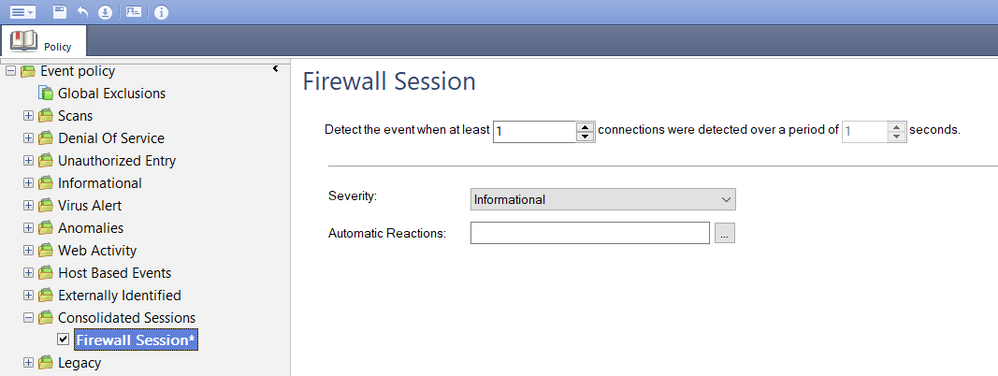
Click on Logs and Monitor > New Tab > SmartEvent Settings and Policy and enable Firewall Sessions as shown.
Push the Event Policy afterwords.
Hello,
I did it as per screenshot, however I don't see any events from firewall blade. Am I missing something more?
Does this setting have any effect if enabling in a completely R80 environment? Is it possible, in all R80 environment, to have Firewall logs with type:Control processed by SmartEvent?
What are you hoping to get out of those logs in particular?
Yes, the only way they'd get processed by SmartEvent is if that option is enabled.
For example, I would like to trigger a correlated event when there is a cluster failover (those logs have type=control).
What Phoneboy suggested is the older but possible option to correlate FW logs into Correlated Events that the SME will show (should work).
the better R80.10 & above alternative option is to generate a 'Session' log from your FW Rulebase policy, as All Session logs are indexed & shown by the SME.
using this method, you can decide which rules specifically to log into Session logs to also get indexed & shown by the SME.
How-To: Relevant rule > Track > R-Click > More > Activate log 'per Session'.
I'd advise to disable the 1st suggested option of activating Consolidated FW Sessions, if you decide on the 2nd Rulebase 'per Session' option, as it only puts an unnecessary load on your SME server to consolidate All FW logs into correlated events.
Very nice! This is exactly what I wanted. Now in SmartEvent I can see statistics of how many connections were made and how much data was transferred. Thanks!
Leaderboard
Epsum factorial non deposit quid pro quo hic escorol.
| User | Count |
|---|---|
| 27 | |
| 12 | |
| 6 | |
| 5 | |
| 5 | |
| 5 | |
| 5 | |
| 4 | |
| 4 | |
| 3 |
Tue 16 Jun 2026 @ 05:00 PM (CEST)
Under the Hood: Check Point SASE | Internet Access Optimization & Performance TuningThu 18 Jun 2026 @ 10:00 AM (CEST)
The Cloud Architects Series: Check Point WAF - The Next Generation of AI powered protectionTue 23 Jun 2026 @ 05:00 PM (CEST)
Under the Hood: Check Point Cloud Firewall | Securing all of your clouds: Art of the possibleTue 16 Jun 2026 @ 05:00 PM (CEST)
Under the Hood: Check Point SASE | Internet Access Optimization & Performance TuningThu 18 Jun 2026 @ 10:00 AM (CEST)
The Cloud Architects Series: Check Point WAF - The Next Generation of AI powered protectionTue 23 Jun 2026 @ 05:00 PM (CEST)
Under the Hood: Check Point Cloud Firewall | Securing all of your clouds: Art of the possibleThu 25 Jun 2026 @ 10:00 AM (PDT)
AI Security Masters E10: READY OR NOT: Securing the AI Enterprise 2/5 - AI Red TeamingAbout CheckMates
Learn Check Point
Advanced Learning
YOU DESERVE THE BEST SECURITY