- Products
- Learn
- Local User Groups
- Partners
- More

AI Security Masters E7:
How CPR Broke ChatGPT's Isolation and What It Means for You
Blueprint Architecture for Securing
The AI Factory & AI Data Center
Call For Papers
Your Expertise. Our Stage
Good, Better, Best:
Prioritizing Defenses Against Credential Abuse
Ink Dragon: A Major Nation-State Campaign
Watch HereCheckMates Go:
CheckMates Fest
Hello,
I am currently generating some reports and I have to add a filter on a chart and not on the whole document.
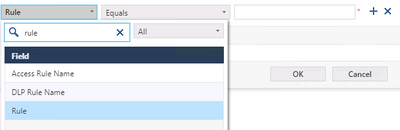
I need to filter the chart on a rule but I am not able to find the good value for the following field.
When I choose "access rule name" and I put the name it doesn't work.
Does it also work with layer rules ?
Thank you in advance for your help.
Did you try putting the value in quotes?
Yes, with "" and '' .
I also tried with rule "UID" 'UID' but nothing
What precise rule(s) are you trying to get the name of?
What blades are active in that policy?
I suspect it's because the relevant log entries are not indexed.
You entered a rule number and it didn't filter properly?
Are you using JHF? I think we had some issue with those field which were fixed for R80.40 in the JHF.
I have a specific rule (network and application) name and I would like to add a chart in a report with the output of this rule.
I did with the name, UID and it did not work.
It says "no data found" but when I click on the rule I can see hit counts and logs on the logs pane.
The version of the SmartEvent is R80.40 JHF 83.
There have been several GA JHF since then, the most recent one being 154, and there are several SmartEvent fixes.
If the issue still exists after upgrading to the latest GA JHF, open a TAC case.
For rule number with internal layer try * after the number.
For example, rule name with inter layer is 5, try Rule Equals 5*
Hello,
Thanks for your answer !
The issue is that I have multiple policy packages so it will not be relevant if I enter a rule number.
Kind regards,
From tests in my lab if you do rule number with * it would be relevant only if the other policies has inline layer as well, and if they have this could be solved by adding another filter "Policy Name" Equals "<Policy Name>".
Leaderboard
Epsum factorial non deposit quid pro quo hic escorol.
| User | Count |
|---|---|
| 66 | |
| 19 | |
| 13 | |
| 12 | |
| 11 | |
| 9 | |
| 9 | |
| 7 | |
| 7 | |
| 7 |
Tue 28 Apr 2026 @ 06:00 PM (IDT)
Under the Hood: Securing your GenAI-enabled Web Applications with Check Point WAFThu 30 Apr 2026 @ 03:00 PM (PDT)
Hillsboro, OR: Securing The AI Transformation and Exposure ManagementTue 28 Apr 2026 @ 06:00 PM (IDT)
Under the Hood: Securing your GenAI-enabled Web Applications with Check Point WAFTue 12 May 2026 @ 10:00 AM (CEST)
The Cloud Architects Series: Check Point Cloud Firewall delivered as a serviceThu 30 Apr 2026 @ 03:00 PM (PDT)
Hillsboro, OR: Securing The AI Transformation and Exposure ManagementAbout CheckMates
Learn Check Point
Advanced Learning
YOU DESERVE THE BEST SECURITY