Create a Post
cancel
Showing results for 
Search instead for 
Did you mean: 
This widget could not be displayed.
7 Replies
This widget could not be displayed.

Hello
I have a problem with Checkpoint Firewall (R81.10).

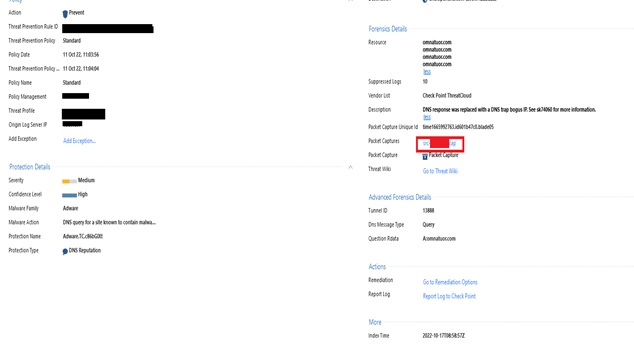
When I'm trying to check the monitoring in the Logs section/ When I click on Packet Captures, which I made to open with Wireshark, the message "the file "time1665992763.cap" does not exist.

Please help me...

Enes.


Problem with Packet Captures

Problem with Packet Captures

Problem with Packet Captures

Problem with Packet Captures

Hello
I have a problem with Checkpoint Firewall (R81.10).

When I'm trying to check the monitoring in the Logs section/ When I click on Packet Captures, which I made to open with Wireshark, the message "the file "time1665992763.cap" does not exist.

Please help me...

Enes.


Hello
I have a problem with Checkpoint Firewall (R81.10).

When I'm trying to check the monitoring in the Logs section/ When I click on Packet Captures, which I made to open with Wireshark, the message "the file "time1665992763.cap" does not exist.

Please help me...

Enes.


Hello
I have a problem with Checkpoint Firewall (R81.10).

When I'm trying to check the monitoring in the Logs section/ When I click on Packet Captures, which I made to open with Wireshark, the message "the file "time1665992763.cap" does not exist.

Please help me...

Enes.


Hello
I have a problem with Checkpoint Firewall (R81.10).

When I'm trying to check the monitoring in the Logs section/ When I click on Packet Captures, which I made to open with Wireshark, the message "the file "time1665992763.cap" does not exist.

Please help me...

Enes.


0 Kudos
0 Kudos
0 Kudos
0 Kudos
_Val_
Admin
Admin
_Val_
Admin
Admin
_Val_
Admin
Admin
_Val_
Admin
Admin

This is odd, it should actually allow you download. Please check if the file mentioned in the logs actually exists on the log server. Look into sk120773 for the location, then search by name. In case of the old captures, they may be cleaned already.

If the file does exist, but you cannot query it from the SmartConsole, please open a TAC case

This is odd, it should actually allow you download. Please check if the file mentioned in the logs actually exists on the log server. Look into sk120773 for the location, then search by name. In case of the old captures, they may be cleaned already.

If the file does exist, but you cannot query it from the SmartConsole, please open a TAC case

This is odd, it should actually allow you download. Please check if the file mentioned in the logs actually exists on the log server. Look into sk120773 for the location, then search by name. In case of the old captures, they may be cleaned already.

If the file does exist, but you cannot query it from the SmartConsole, please open a TAC case

This is odd, it should actually allow you download. Please check if the file mentioned in the logs actually exists on the log server. Look into sk120773 for the location, then search by name. In case of the old captures, they may be cleaned already.

If the file does exist, but you cannot query it from the SmartConsole, please open a TAC case

0 Kudos
0 Kudos
0 Kudos
0 Kudos
Timothy_Hall
MVP Gold
MVP Gold
Timothy_Hall
MVP Gold
MVP Gold
Timothy_Hall
MVP Gold
MVP Gold
Timothy_Hall
MVP Gold
MVP Gold

It is possible that only one packet capture (the latest one) is available for that particular protection and the old one you are attempting to access has rolled off.  How many subsequent packet captures for the same protection are going to be saved will vary depending upon whether the packet capture was taken for an IPS ThreatCloud Protection, a Core Protection/Activation, or an Inspection Setting and whether the capture was called for in the Track column of the Threat Prevention policy, the settings of the protection itself, or no capture was called for in the configuration at all but the firewall automatically saved a packet capture upon the latest triggering of that protection by default, but older ones for that protection are not retained.

In some cases a packet capture will not be available in the logs when it seems there should be; this can be caused in the following situations stated in the R81 Known Limitations:

• The detection occurred in the Check Point ThreatCloud (i.e. not locally on the gateway due to its own cache)
• The DeepScan engine portion of the firewall made the determination
• The connection was SSL/HTTPS encrypted by the firewall

What is the specific protection name, and do you have a packet capture set in the Track field of the TP rule matching the protection, the "capture packets" checkbox set on the protection itself, or both?

New Book: "Max Power 2026" Coming Soon
Check Point Firewall Performance Optimization

It is possible that only one packet capture (the latest one) is available for that particular protection and the old one you are attempting to access has rolled off.  How many subsequent packet captures for the same protection are going to be saved will vary depending upon whether the packet capture was taken for an IPS ThreatCloud Protection, a Core Protection/Activation, or an Inspection Setting and whether the capture was called for in the Track column of the Threat Prevention policy, the settings of the protection itself, or no capture was called for in the configuration at all but the firewall automatically saved a packet capture upon the latest triggering of that protection by default, but older ones for that protection are not retained.

In some cases a packet capture will not be available in the logs when it seems there should be; this can be caused in the following situations stated in the R81 Known Limitations:

• The detection occurred in the Check Point ThreatCloud (i.e. not locally on the gateway due to its own cache)
• The DeepScan engine portion of the firewall made the determination
• The connection was SSL/HTTPS encrypted by the firewall

What is the specific protection name, and do you have a packet capture set in the Track field of the TP rule matching the protection, the "capture packets" checkbox set on the protection itself, or both?

New Book: "Max Power 2026" Coming Soon
Check Point Firewall Performance Optimization

It is possible that only one packet capture (the latest one) is available for that particular protection and the old one you are attempting to access has rolled off.  How many subsequent packet captures for the same protection are going to be saved will vary depending upon whether the packet capture was taken for an IPS ThreatCloud Protection, a Core Protection/Activation, or an Inspection Setting and whether the capture was called for in the Track column of the Threat Prevention policy, the settings of the protection itself, or no capture was called for in the configuration at all but the firewall automatically saved a packet capture upon the latest triggering of that protection by default, but older ones for that protection are not retained.

In some cases a packet capture will not be available in the logs when it seems there should be; this can be caused in the following situations stated in the R81 Known Limitations:

• The detection occurred in the Check Point ThreatCloud (i.e. not locally on the gateway due to its own cache)
• The DeepScan engine portion of the firewall made the determination
• The connection was SSL/HTTPS encrypted by the firewall

What is the specific protection name, and do you have a packet capture set in the Track field of the TP rule matching the protection, the "capture packets" checkbox set on the protection itself, or both?

New Book: "Max Power 2026" Coming Soon
Check Point Firewall Performance Optimization

It is possible that only one packet capture (the latest one) is available for that particular protection and the old one you are attempting to access has rolled off.  How many subsequent packet captures for the same protection are going to be saved will vary depending upon whether the packet capture was taken for an IPS ThreatCloud Protection, a Core Protection/Activation, or an Inspection Setting and whether the capture was called for in the Track column of the Threat Prevention policy, the settings of the protection itself, or no capture was called for in the configuration at all but the firewall automatically saved a packet capture upon the latest triggering of that protection by default, but older ones for that protection are not retained.

In some cases a packet capture will not be available in the logs when it seems there should be; this can be caused in the following situations stated in the R81 Known Limitations:

• The detection occurred in the Check Point ThreatCloud (i.e. not locally on the gateway due to its own cache)
• The DeepScan engine portion of the firewall made the determination
• The connection was SSL/HTTPS encrypted by the firewall

What is the specific protection name, and do you have a packet capture set in the Track field of the TP rule matching the protection, the "capture packets" checkbox set on the protection itself, or both?

New Book: "Max Power 2026" Coming Soon
Check Point Firewall Performance Optimization
0 Kudos
0 Kudos
0 Kudos
0 Kudos
Enes_Morina
Explorer
Enes_Morina
Explorer
Enes_Morina
Explorer
Enes_Morina
Explorer

We have the version of protection within our infrastructure on premises , we do not have it in the cloud.

Thank you for your reply...

We have the version of protection within our infrastructure on premises , we do not have it in the cloud.

Thank you for your reply...

We have the version of protection within our infrastructure on premises , we do not have it in the cloud.

Thank you for your reply...

We have the version of protection within our infrastructure on premises , we do not have it in the cloud.

Thank you for your reply...

0 Kudos
0 Kudos
0 Kudos
0 Kudos
Alexander_Wilke
Advisor
Alexander_Wilke
Advisor
Alexander_Wilke
Advisor
Alexander_Wilke
Advisor

If you have MDPS configured on the gateway you are not able to download captures from SmartConsole.

This is a bug and not solved.

If you have MDPS configured on the gateway you are not able to download captures from SmartConsole.

This is a bug and not solved.

If you have MDPS configured on the gateway you are not able to download captures from SmartConsole.

This is a bug and not solved.

If you have MDPS configured on the gateway you are not able to download captures from SmartConsole.

This is a bug and not solved.

0 Kudos
0 Kudos
0 Kudos
0 Kudos