- Products
- Learn
- Local User Groups
- Partners
- More

Call For Papers
Your Expertise, Our Stage
Ink Dragon: A Major Nation-State Campaign
Watch HereAI Security Masters E5:
Powering Prevention: The AI Driving Check Point’s ThreatCloud
The Great Exposure Reset
AI Security Masters E4:
Introducing Cyata, Securing the Agentic AI Era
CheckMates Go:
CheckMates Fest
Hi,
I have installed a new log-server with R80.10 and smartevent and correlation unit on it.
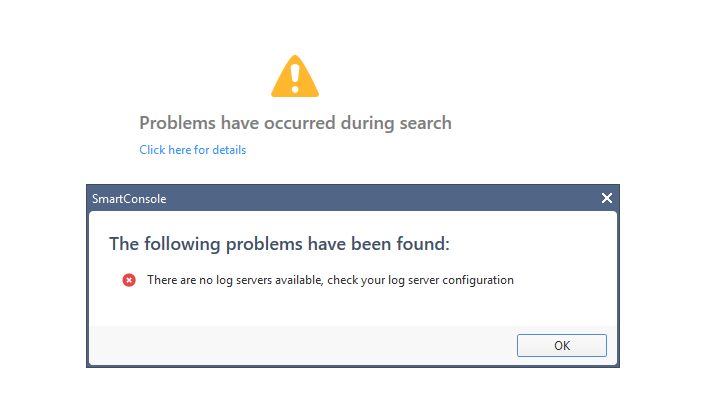
We are running a management HA. Added the log server to the management. SIC is working everything looks fine. Log server is receiving logs (check with Smartview Tracker). But if we use SmartConsole and go to the TAB Logging & Monitoring we get an error:

I followed serveral SK's (40090 and 121054) Also created an SR with TAC. We tried several things Check Point asked. Clear the indexer cache files, restarted, etc.. unfortunately without succes. We just uploaded the output of a script provided by Check Point.
Is there anyone who has an idea of what this can be?
Thx in advance!
Best Regards,
Maarten Lutterman
Hi Maximilian,
The problem described above was fixed by enabling log & monitor on the management and not only on the log server.
It adds the log server to a specific file that it's allowed to read the log from the log server and that it's assigned as a log server.
Best Regards,
Maarten
Possibly this is too much basic, but it is sometimes helpful: Have you already tried "Install database"?
Yes, already did that ![]()
Just got off with CP TAC and the final conclusion is to re-install the logserver.
Oh
keep us updated if the re-installation fixed your issue

Unfortunately the Re-installation did not fix the issue apparently the error is on the management and not on the log server.
If we do a debug of RFL we see the following appear the moment we refresh in SmartConsole:
2018-05-29 19:47:03,364 ERROR [pool-1-thread-7] com.checkpoint.rfl.solr.monitoring.ServerConnectivityTask.printPingErrorMessage:28 - ping failed for server. ObjID: [ab6c901d-b6c2-420b-b723-157aad7dec86^], IP Address: [X.X.X.X], Port: [8211], Local IP: [false], Connecting IP Address: [X.X.X.X], Enable SSL: [true], Enable Remote SSL: [true], SmartEvent: [false], Primary Management: [false]
org.apache.solr.client.solrj.impl.HttpSolrServer$RemoteSolrException: Expected mime type application/octet-stream but got text/html. ^html^
^head^
^meta http-equiv=^Content-Type^ content=^text/html^charset=ISO-8859-1^/^
^title^Error 403 Forbidden^/title^
^/head^
^body^
^h2^HTTP ERROR: 403^/h2^
^p^Problem accessing /solr/template/admin/ping. Reason:
^pre^ Forbidden^/pre^^/p^
^hr /^^i^^small^Powered by Jetty://^/small^^/i^
Has anyone got a clue what this can be? i'm pretty much out of options. restarted the RFLserver and cleared the FetchedFiles and the directory CpmiLocal... all without succes. TAC is still investigating.
Let me know!
Hi,
I would like to add that for this problem (for who i am the case owner right now), i just had a chat with support that mentioned the following script:
/opt/CPrt-R80/scripts/doctor-log.sh
Run this script and it analyzes and collects all the information needed for support to analyze possible logging issues. You can find the collected logs in the directory /tmp/sme-diag/results.
Gives you really a great bunch of information.
Kind regards,
Jelle
Hello Maarten,
I have the same issue since I have installed the upgrade to R80.10.
Have you found a solution for the problem ?
Would be great if you can give me any hints.
Kind regards,
Max
Hi Maximilian,
The problem described above was fixed by enabling log & monitor on the management and not only on the log server.
It adds the log server to a specific file that it's allowed to read the log from the log server and that it's assigned as a log server.
Best Regards,
Maarten
Hi Maarten,
thank you a lot. Works as expected now.
Best regards,
Max
Hi Maarten,
Can you please let me know where you enabled log & monitor on management.
We are able to see logs on CLM but customer want to use one smart console to manage both security policies and view latest logs. In one of enviorment, through CMA we can see the logs even the target log server is defined as CLM in firewall object.
Leaderboard
Epsum factorial non deposit quid pro quo hic escorol.
| User | Count |
|---|---|
| 35 | |
| 22 | |
| 17 | |
| 12 | |
| 9 | |
| 9 | |
| 8 | |
| 8 | |
| 8 | |
| 7 |
Tue 17 Mar 2026 @ 03:00 PM (CET)
From SASE to Hybrid Mesh: Securing Enterprise AI at Scale - EMEATue 17 Mar 2026 @ 02:00 PM (EDT)
From SASE to Hybrid Mesh: Securing Enterprise AI at Scale - AMERWed 18 Mar 2026 @ 10:00 AM (CET)
The Cloud Architects Series: An introduction to Check Point Hybrid Mesh in 2026 - In Seven LanguagesThu 19 Mar 2026 @ 11:00 AM (EDT)
Tips and Tricks 2026 #2: AI Security Challenges and SolutionsTue 17 Mar 2026 @ 03:00 PM (CET)
From SASE to Hybrid Mesh: Securing Enterprise AI at Scale - EMEATue 17 Mar 2026 @ 02:00 PM (EDT)
From SASE to Hybrid Mesh: Securing Enterprise AI at Scale - AMERWed 18 Mar 2026 @ 10:00 AM (CET)
The Cloud Architects Series: An introduction to Check Point Hybrid Mesh in 2026 - In Seven LanguagesThu 19 Mar 2026 @ 11:00 AM (EDT)
Tips and Tricks 2026 #2: AI Security Challenges and SolutionsTue 24 Mar 2026 @ 04:00 PM (CET)
Maestro Masters EMEA: Hyperscale Firewall Architectures and OptimizationTue 24 Mar 2026 @ 06:00 PM (COT)
San Pedro Sula: Spark Firewall y AI-Powered Security ManagementThu 26 Mar 2026 @ 06:00 PM (COT)
Tegucigalpa: Spark Firewall y AI-Powered Security ManagementAbout CheckMates
Learn Check Point
Advanced Learning
YOU DESERVE THE BEST SECURITY