- Products
- Learn
- Local User Groups
- Partners
- More

What's New in R82.10?
Watch HereWhen the Agents Attack
A Live Look at Agentic Exposure Validation
AI Security Masters E8:
Claude Mythos: New Era in Cyber Security
CheckMates Go:
CheckMates Fest
Hi all.
I received a TE250X and some FWs. I looked at the installed software - it was very old (on the sandbox - "This is Check Point's software version R81 - Build 959"). I decided to do a reinstall. I took the current software - “Check Point R81.20 Gaia Fresh Install Take 634 (ISO)” and a fresh “ISOmorphic Tool version 1.1.0 build 207 (sk65205)”.
FW flashed without problems.
With sandbax I had a problem. When selecting “2 - Check Point appliance (any model)”, I get error:
Setup has detected the following appliance model: ¦
¦ TT-25-00. ¦
¦ ¦
¦ This model is not supported by this version. ¦
¦ Please contact Check Point support. ¦
¦ ¦
¦ Click Cancel to abort, or Ok to install as open server.
I checked that according to sk65205, the “BIOS” profile was selected in ISOmorphic.
Please tell me what I am doing wrong.
The problem is solved, the issue is closed. Thanks to all who responded here, as well as to my colleague Alex O.
There are many places where it has been said that you should use USB 2.0, for example here.
My solution:
1. stay strong (I tried 7 flash drives with R82 installing normally - I think it's some problem of old kernel in R81).
2. TE250XN requires a special R81.
3. use a Transcend USB 3.0 8GB JF780 flash drive.
Or wait for R82 release and use it, at least it installs normally.
This one you did right?
smart1 - only for installing on Smart-1 appliance and Threat Emulation appliances TE100X / TE250X / TE1000X / TE2000X
Please double check, is it TE250X or TE250XN? I think TT-25 may be the XN model, which only supports R81.
See: https://support.checkpoint.com/results/sk/sk173494
Looks like they are supported with R82 though, according to R82 release notes.
Hello.
Yes, my mistake - I have a TE250XN appliance.
The R82 software installed without any problem:
gw-9kdjef> show asset system
Platform: TT-25-00
Model: Check Point TE250XN
CPU Model: Intel(R) Xeon(R) Silver 4216 CPU
CPU Frequency: 2100.000 Mhz
Number of Cores: 32
CPU Hyperthreading: Enabled
gw-9kdjef>
But at the moment R82 is not recommended, so I have R81.20 on my SMC.
I took a special soft R81 for TE250XN - it doesn't fit, it asks to select a disk for installation:
+-----------------+ No driver found +------------------+
| |
| Unable to find any devices of the type |
| needed for this installation type. |
| Would you like to manually select your |
| driver or use a driver disk? |
| |
| +---------------+ +-------------------+ +------+ |
| | Select driver | | Use a driver disk | | Back | |
| +---------------+ +-------------------+ +------+ |
| |
| |
+------------------------------------------------------+
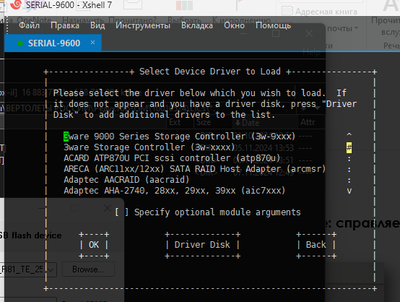
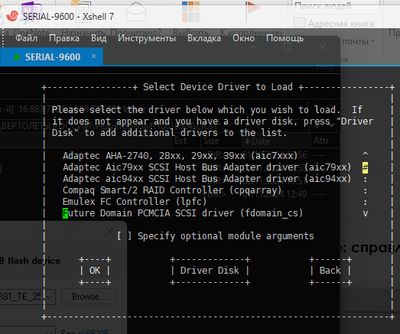
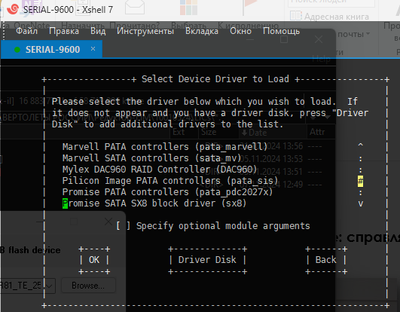
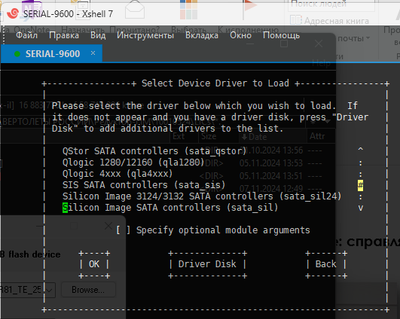
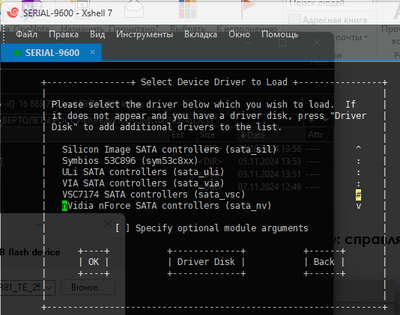
And this selection:
Think, may be this helps me. But not (try 5 flash drives). Every time I see:
+-----------------+ No driver found +------------------+
| |
| Unable to find any devices of the type |
| needed for this installation type. |
| Would you like to manually select your |
| driver or use a driver disk? |
| |
| +---------------+ +-------------------+ +------+ |
| | Select driver | | Use a driver disk | | Back | |
| +---------------+ +-------------------+ +------+ |
| |
| |
+------------------------------------------------------+
The problem is solved, the issue is closed. Thanks to all who responded here, as well as to my colleague Alex O.
There are many places where it has been said that you should use USB 2.0, for example here.
My solution:
1. stay strong (I tried 7 flash drives with R82 installing normally - I think it's some problem of old kernel in R81).
2. TE250XN requires a special R81.
3. use a Transcend USB 3.0 8GB JF780 flash drive.
Or wait for R82 release and use it, at least it installs normally.
Leaderboard
Epsum factorial non deposit quid pro quo hic escorol.
| User | Count |
|---|---|
| 66 | |
| 22 | |
| 8 | |
| 6 | |
| 5 | |
| 4 | |
| 4 | |
| 4 | |
| 2 | |
| 2 |
Thu 02 Jul 2026 @ 06:00 PM (CST)
Revolucionando la Seguridad con IA Generativa: Prevención Inteligente en Tiempo RealThu 09 Jul 2026 @ 10:00 AM (CEST)
Schutz souveräner Workloads: Check Point & die AWS European Sovereign CloudThu 09 Jul 2026 @ 11:00 AM (CEST)
The Cloud Architects Series: Check Point Edge Protection SD-WAN & SASEFri 10 Jul 2026 @ 11:00 AM (IDT)
CheckMates Live Netherlands - Sessie 48: Nieuwe Check Point Workspace SecurityTue 14 Jul 2026 @ 10:00 AM (PDT)
AI Security Masters E11: READY OR NOT: Securing the AI Enterprise 3/5 - AI Workforce SecurityThu 30 Jul 2026 @ 10:00 AM (PDT)
AI Security Masters E12: READY OR NOT: Securing the AI Enterprise 4/5 - AI GatewayFri 10 Jul 2026 @ 11:00 AM (IDT)
CheckMates Live Netherlands - Sessie 48: Nieuwe Check Point Workspace SecurityTue 14 Jul 2026 @ 10:00 AM (PDT)
AI Security Masters E11: READY OR NOT: Securing the AI Enterprise 3/5 - AI Workforce SecurityThu 30 Jul 2026 @ 10:00 AM (PDT)
AI Security Masters E12: READY OR NOT: Securing the AI Enterprise 4/5 - AI GatewayThu 20 Aug 2026 @ 10:00 AM (PDT)
AI Security Masters E13: READY OR NOT: Securing the AI Ent 5/5 - AI Research & Threat LandscapeThu 02 Jul 2026 @ 06:00 PM (CST)
Revolucionando la Seguridad con IA Generativa: Prevención Inteligente en Tiempo RealAbout CheckMates
Learn Check Point
Advanced Learning
YOU DESERVE THE BEST SECURITY