- Products
- Learn
- Local User Groups
- Partners
- More

Simplify Admin Operations with R82.20
Wed, 19 August @ 5pm CET/11am EDT
The industry's first AI Network Firewall
Securing AI traffic, everywhere
The State of Ransomware Q2 2026:
This Quarter's Trends, and Their Impact on Your Defenses
READY OR NOT: Securing the AI Enterprise
AI Research & Threat Landscape
CheckMates Go:
No Attack Required
Hi All,
I'm looking for a way within R80.10 to see a timestamp for when the last Threat Prevention (but more specifically, IPS) policy was installed. I know I can see firewall through fw stat. IPS stat only shows me that it is enabled and the signature update number which doesn't help for my use case. Is there a way to see when IPS or Threat Prevention policy was installed last? Thanks!
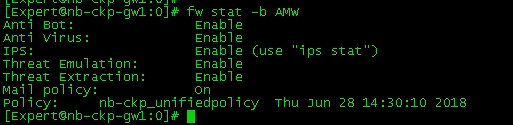
There is in an easy way:
# fw stat -b AMW

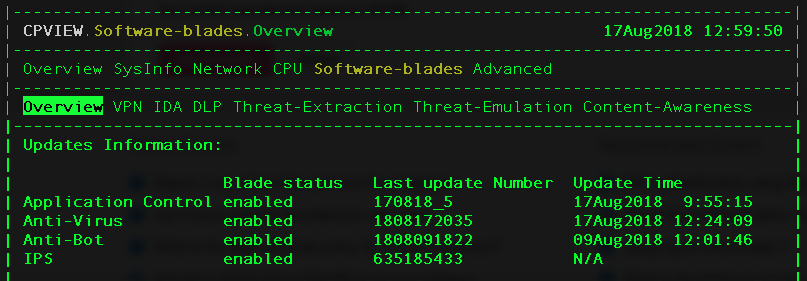
This is the information from cpview:

So to compare, the fw stat -b AMW shows the "Threat Prevention Policy Install Time", but in cpview you see the Online Updates of the services updating automatically.
There is not something like "IPS Policy" as you call it. IPS Signatures are applied via Threat Prevent Policy, but Core-Protections and Inspection-Setttings are applied via Access Policy. So both are relevant for you!
You can check this in installation history under Threat Tools in Threat Prevention policy.
Thanks for the reply. I should've mentioned I need a way to verify this from the gateway.
Why?
The Check Point way is to use the centralized management for that.
MGMT also has this with REST API.
Think of it as a troubleshooting/trust but verify step ![]()
Exactly! I need a way to verify outside of the management what policy is running on the gateway.
If it is the Check Point way, then why did Check Point build a command to view the firewall policy name and install time into the gateway?
It looks like cpstat will show this.
However, on my gateway (R80.10), the "update time" is N/A...

I also checked with cpstat -f ips blades (which should theoretically also show it) but I get an error on my system.
Maybe it works for you, though?
My gateway shows the same behavior, NA in CPVIEW and cpstat -f ips blades gives me an invalid flavour error. Works if I do cpstat -f fw blades but for some reason doesn't recognize the ips flavour.
'ips stat' will also show the IPS version installed on the gateway.
When I run ips stat it only shows me that IPS is enabled and the signature being used. No timestamp of install time
Correct. Like I mentioned before, it will show the IPS version, which you could match to management.
So the problem is this shows me the current version of the signature database. I need to see the last time the policy was installed. So for example, if I go make a change within my IPS policy, say setting a signature from detect to prevent, or even changing the complete profile from strict to optimized it still shows me the same IPS signature database version. I need a way to show when the last policy was installed. I know it seems overly picky but I need to be able to show a reference for the IPS policy was last installed.
I understand what you are trying to do. While I agree with others that SmartConsole would be best for getting this data or using the API to track this, I get there should be a way from the CLI. This is in no way an approved or verified method and please use at your own risk. The following command seems to return the date/time of the last IPS install.
ls -l /var/opt/CPsuite-R80/fw1/state/<gw_or_cluster_name>/AMW/* | grep IPS | awk '{print $6" "$7" "$8}'
There is in an easy way:
# fw stat -b AMW

This is the information from cpview:

So to compare, the fw stat -b AMW shows the "Threat Prevention Policy Install Time", but in cpview you see the Online Updates of the services updating automatically.
There is not something like "IPS Policy" as you call it. IPS Signatures are applied via Threat Prevent Policy, but Core-Protections and Inspection-Setttings are applied via Access Policy. So both are relevant for you!
Hi Norbert,
Thanks for the reply, that was exactly what I needed! Just tested it out and it shows the Threat Prevention policy install separate from the Firewall policy install.
Hi All.
Please advise do I need read/write account to run such command or I could do it with read-only?
Thank you.
Leaderboard
Epsum factorial non deposit quid pro quo hic escorol.
| User | Count |
|---|---|
| 156 | |
| 103 | |
| 15 | |
| 12 | |
| 12 | |
| 9 | |
| 8 | |
| 6 | |
| 6 | |
| 6 |
Tue 11 Aug 2026 @ 11:00 AM (EDT)
Beyond Phishing: Securing Email Against SaaS and AI-Driven ThreatsThu 20 Aug 2026 @ 08:30 AM (COT)
Medellin: Workspace Evolution: Hybrid Mesh Management - Visibilidad, Automatización e IATue 11 Aug 2026 @ 11:00 AM (EDT)
Beyond Phishing: Securing Email Against SaaS and AI-Driven ThreatsThu 20 Aug 2026 @ 10:00 AM (PDT)
AI Security Masters E13: READY OR NOT: Securing the AI Ent 5/5 - AI Research & Threat LandscapeTue 25 Aug 2026 @ 05:00 PM (CEST)
The State of Ransomware Q2 2026: This Quarter's Trends, and Their Impact on Your DefensesThu 20 Aug 2026 @ 08:30 AM (COT)
Medellin: Workspace Evolution: Hybrid Mesh Management - Visibilidad, Automatización e IAThu 20 Aug 2026 @ 06:00 PM (COT)
Medellin: Workspace Intelligence: IA Generativa en Acción para Equipos de SeguridadAbout CheckMates
Learn Check Point
Advanced Learning
YOU DESERVE THE BEST SECURITY