- Products
- Learn
- Local User Groups
- Partners
- More

Step Into the Future of
AI-Powered Cyber Security
The State of Ransomware Q1 2026
Key Trends and Their Impact
AI Security Masters E8:
Claude Mythos: New Era in Cyber Security
Blueprint Architecture for Securing
The AI Factory & AI Data Center
Call For Papers
Your Expertise. Our Stage
CheckMates Go:
CheckMates Fest
This is necessary for integration with the CyberArk PAS. We write a script using the Autolt that starts the SmartDashboard. With the SmartDashboard of the R77.30 version, everything worked fine, but in SmartDashboard R80.10 WPF is used, which is not supported in Autolt. Do we need a more detailed description of these processes?
Therefore, we are looking for a workaround. For example, can we start the SmartDashboard from the cmd with the parameters (username, passwor, IP)?
Hi, if you are writing scripts which start up applications using UI automation such as AutoIt, you can use the named property of the password box "LoginPasswordBox".
Internally we have been using UI automation tools, so we gave constant names to the important elements on the screen for similar purposes.
I haven't tried this script but I googled inside AutoIt and found this example: read text from WPF window - AutoIt General Help and Support - AutoIt Forums
If you use AutoIt to find the element named "LoginPasswordBox", you could potentially control the password value.
Then the next step would be finding the "Login" button by pressing the Enter keyboard key.
Hi Olga Kuts !!
We have the same issue . Have you found a solution ?
Hi!
Unfortunately we didn't find the solution.As we understand, it is impossible for the new console.
hi !! thanks Olga for your quick reply .
We are looking for a solution .Please keep in touch .If you have found any workaround please update us .
As I am working for CyberArk partner, I can tell you that this is not a support topic!
PSM connection components are developed by Professional Services.
At least hopping with TAB / Shift+TAB to fields, deleting with ctrl+a + backspace and entering values should always work.
This might be interesting for you Olga Kuts and Asanka Weerasinghe :
https://community.checkpoint.com/message/38685-cyberark-psm-connection-component-smartconsole-gaia
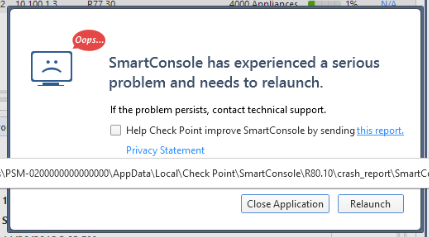
We have automated the checkpoint R80.10 smart console with Cyberark PAS solution .Somehow we manage to automate the login with support of autoIT tool . But as soon as it logged in following error pop-out .
Hope you were also having trouble with onboarding Checkpoint smart console R80.10 and succeed adding it . Could you kindly support us on this ?

Leaderboard
Epsum factorial non deposit quid pro quo hic escorol.
| User | Count |
|---|---|
| 25 | |
| 12 | |
| 11 | |
| 8 | |
| 7 | |
| 7 | |
| 6 | |
| 6 | |
| 6 | |
| 6 |
Tue 12 May 2026 @ 10:00 AM (CEST)
The Cloud Architects Series: Check Point Cloud Firewall delivered as a serviceWed 13 May 2026 @ 11:00 AM (EDT)
TechTalk: The State of Ransomware Q1 2026: Key Trends and Their ImpactThu 14 May 2026 @ 07:00 PM (EEST)
Under the Hood: Presentando Check Point Cloud Firewall como ServicioTue 12 May 2026 @ 10:00 AM (CEST)
The Cloud Architects Series: Check Point Cloud Firewall delivered as a serviceAbout CheckMates
Learn Check Point
Advanced Learning
YOU DESERVE THE BEST SECURITY