- Products
- Learn
- Local User Groups
- Partners
- More

On-Premise SD-WAN Management
Register HereWhat's New in R82.10?
Watch Here AI Security Masters E8:
Claude Mythos: New Era in Cyber Security
CheckMates Go:
The Moment Before
So I've got another issue with the Identity Awareness Agent. This time its the deployment from Microsoft SCCM. SCCM will run the installation as SYSTEM. Installation works, and all seems good. For some reason the MAD service doesn't work as expected. It doesn't provide the computer account to the gateway, and when you try to restart the Check Point Managed Asset Detection service, it crashes and completely stops working. Also the Packet Tagging driver doesn't work properly. It says its enabled, but the packet tagging never happens.
Installing the same packet as Admin manually works perfectly. So is there any work-around for this? Or am I missing something? I would prefer not to have to manually install the agent on every computer. There are just to many to even think about going that way. Our SCCM guy says you can do a really ugly work around and have a admin account run the the installation from SCCM, but this is very much not recommended, and it won't work if you want it installed as a part of the task sequence,
Any tips on how to do this?
I believe a driver has to be installed for packet tagging.
That requires admin, to the best of my knowledge.
Possible @Royi_Priov might have a suggestion.
Can you open SR with TAC for this? I wonder if the MAD process crash due to this fact or is there something else here.
Thank for the replys! I'll open a ticket!
Looks like the issue is only with one of our models. Dell 5290 2-1. @Royi_Priov, do you know if you have a supported devices list?
@PatrikSkoglund wrote:
Looks like the issue is only with one of our models. Dell 5290 2-1. @Royi_Priov, do you know if you have a supported devices list?
No, we don't have, as we are not HW related, only OS related.
Is the OS identical for working and non-working machines?
OK! They are using the same OS, and the same installation package, the only exception is drivers. As the models differ slightly.
The big difference is that the model 5290 2-1 is a tablet model with a detachable keyboard variant.
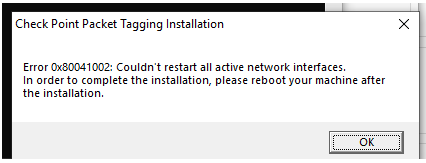
The error we get during the installation is the following:
Unless the OK button is clicked, the installation of the Packet Tagging driver doesn't install on this model. We don't see this error on our other models. The problem here is that our deployment tool(MS SCCM) can't click OK during installation. The issue occurs no matter what user context we use(system, or admin). Have you seen this before?
Patrik
I know this is an older post, but was there a resolution for this? Getting a very similar issue trying to silently install the identity agent. Error code is 0x80041008 in my case though.
We have also a problem installing version R77.10. We had 1803 and no problems at all but now that we are on 1909 there's an error in our SCCM task sequence:
MSI (s) (34:9C) [15:46:43:759]: Executing op: ServiceInstall(Name=MADService,DisplayName=Check Point Managed Asset Detection,ImagePath="C:\Program Files (x86)\CheckPoint\Identity Agent\MADService.exe",ServiceType=16,StartType=2,ErrorControl=1,,Dependencies=[~],,,Password=**********,Description=Identity Agent Managed Asset Detection control service.,,)
Execution command is with PSADT: C:\WINDOWS\system32\msiexec.exe /i "C:\WINDOWS\ccmcache\w\Files\Check_Point_Identity_Agent.msi" REBOOT=ReallySuppress /QN /L*v "C:\WINDOWS\TEMP\OpenSource_Check_Point_Identity_Agent_80.181.0000_Install\Check_Point_Identity_Agent_Install.log
Leaderboard
Epsum factorial non deposit quid pro quo hic escorol.
| User | Count |
|---|---|
| 70 | |
| 23 | |
| 7 | |
| 5 | |
| 4 | |
| 4 | |
| 4 | |
| 3 | |
| 3 | |
| 3 |
Tue 14 Jul 2026 @ 10:00 AM (PDT)
AI Security Masters E11: READY OR NOT: Securing the AI Enterprise 3/5 - AI Workforce SecurityThu 30 Jul 2026 @ 10:00 AM (PDT)
AI Security Masters E12: READY OR NOT: Securing the AI Enterprise 4/5 - AI GatewayThu 20 Aug 2026 @ 10:00 AM (PDT)
AI Security Masters E13: READY OR NOT: Securing the AI Ent 5/5 - AI Research & Threat LandscapeTue 14 Jul 2026 @ 10:00 AM (PDT)
AI Security Masters E11: READY OR NOT: Securing the AI Enterprise 3/5 - AI Workforce SecurityThu 30 Jul 2026 @ 10:00 AM (PDT)
AI Security Masters E12: READY OR NOT: Securing the AI Enterprise 4/5 - AI GatewayThu 20 Aug 2026 @ 10:00 AM (PDT)
AI Security Masters E13: READY OR NOT: Securing the AI Ent 5/5 - AI Research & Threat LandscapeAbout CheckMates
Learn Check Point
Advanced Learning
YOU DESERVE THE BEST SECURITY