- Products
- Learn
- Local User Groups
- Partners
- More

Stop Babysitting Rules.
Go Agentic
Step Into the Future of
AI-Powered Cyber Security
Bridge the CAASM Gap
with Exposure Management
AI Security Masters E8:
Claude Mythos: New Era in Cyber Security
Call For Papers
Your Expertise. Our Stage
CheckMates Go:
CheckMates Fest
How can the mappings in cef be customized according to my requirement? I tried changes in $EXPORTDIR/conf/CefFieldsMapping.xml.
Also I tried changing the target fieldmapping.But the changes do not reflect even after I restart cp_log_export.
What can be the solution to the problem
I would suggest asking TAC !
Is there no provision for customization of mapping than at user level?
Is it only possible to map the logs after arriving at third party application?
For eg: I was trying to rename the field rt as log_ts; and have need to customize some other fields too.
I tried changes in field mapping within targets' field mapping. Also I tried changes at conf cef field mappings but to no avail.
@Dan_Zada any comment here?
Any reply here ?? I am out on a limb here.
It is not that urgent. Its just for educational purpose and interest in the Checkpoint. I can wait, but eager to know why it is not working is all. 😄
Hi @sanchez
My name is Shay and I will try to help you with this case.
A bit information about Log Exporter files:
Under log_exporter main directory ($EXPORTERDIR) you will find conf dir where all configuration files exist.
This files are the default files and should not being changed at all.
The reason is because these files are copied to every new log exporter instance you create.
Once a new log exporter instance is created, a new dir for this exporter is created under $EXPORTERDIR/targets/<exporter_name>.
For each exporter instance, you can find conf directory where all configuration files are copied to (the default files).
Any change should be done on these files (the relevant files) in this specific scope.
Now to your issue 🙂
You want to change the mapping of your exporter in order to add 3 more fields.
Since you are using CEF format, go to your exporter's conf directory ($EXPORTERDIR/targets/<exporter_name>/conf) and look for file named CefFieldsMapping.xml.
Backup this file before any changes.
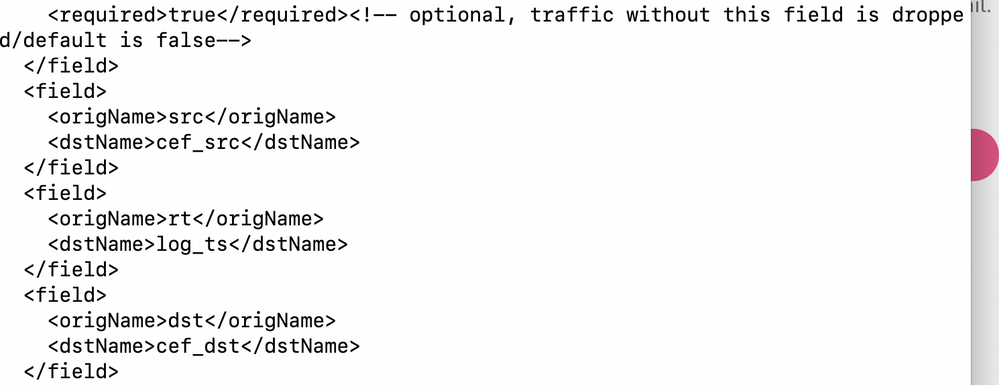
Modify this file by adding the new 3 fields (make sure to add them under <fields> tag):
<field><origName>src</origName><dstName>cef_src</dstName></field>
<field><origName>rt</origName><dstName>log_ts</dstName></field>
<field><origName>dst</origName><dstName>cef_dst</dstName></field>
I'm not sure about rt since rt is already dstName of time field. in case you need to map it, you should do this using time field (an example can be seen on the file itself).
After these changes, you need to restart the exporter in order to reload this configuration by running cp_log_export restart name <exporter_name>
Please let me know if you need any additional help.
Regards,
Shay
Leaderboard
Epsum factorial non deposit quid pro quo hic escorol.
| User | Count |
|---|---|
| 34 | |
| 19 | |
| 10 | |
| 9 | |
| 7 | |
| 7 | |
| 7 | |
| 5 | |
| 5 | |
| 4 |
Tue 02 Jun 2026 @ 10:00 AM (AEST)
The Cloud Architect Series: Check Point WAF. The next generation of AI-Powered Protection - APACTue 02 Jun 2026 @ 06:00 PM (IDT)
Under the Hood | Check Point SASE: Identity Integration & Access Policy Design Best PracticesThu 04 Jun 2026 @ 02:00 PM (CEST)
Deep Dive Webinar: New CloudGuard GWLB Deployment Without NAT Gateways - EuropeTue 02 Jun 2026 @ 10:00 AM (AEST)
The Cloud Architect Series: Check Point WAF. The next generation of AI-Powered Protection - APACTue 02 Jun 2026 @ 06:00 PM (IDT)
Under the Hood | Check Point SASE: Identity Integration & Access Policy Design Best PracticesThu 04 Jun 2026 @ 02:00 PM (CEST)
Deep Dive Webinar: New CloudGuard GWLB Deployment Without NAT Gateways - EuropeThu 04 Jun 2026 @ 07:00 PM (IDT)
Deep Dive Webinar: New CloudGuard GWLB Deployment Without NAT Gateways - AmericaThu 04 Jun 2026 @ 10:00 AM (PDT)
AI Security Masters E9: READY OR NOT: Securing the AI Enterprise 1/5 - AI Agent SecurityAbout CheckMates
Learn Check Point
Advanced Learning
YOU DESERVE THE BEST SECURITY