- Products
- Learn
- Local User Groups
- Partners
- More

Scaling Check Point Automation with Arodonata
7 October @ 5pm CET / 11am EDT
What's New in Check Point SASE
The State of Ransomware Q2 2026:
This Quarter's Trends, and Their Impact on Your Defenses
AI Security Masters
Implementing the AI Security Trifecta
CheckMates Go:
Half is Not Enough
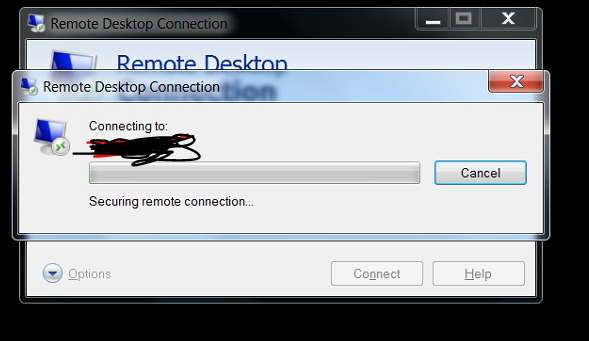
problem with rdp access
hangs on this window for a minute or two and then connects
any ideas what to look for?
happens from every computer on a given vlan to another vlan on the checkpoint gaia appliance
What do you see on a tcpdump between the relevant hosts?
Anything in the logs that might suggest what's going on?
This sounds like a DNS issue of some sort that is unrelated to the firewall.
This Sounds like a
DNS issue or
RDP encryption issue or
RDP authentication (ntlm vs. kerberos) issue.
Anything in in the Windows event logs?
Or old RDP client and new Windows 2012/2016/2019 Server.
Microsoft Troubleshooting RDP Client connection problems:
https://support.microsoft.com/en-us/help/186645/troubleshooting-rdp-client-connection-problems
i've narrowed down the issue :
when you try to connect using mstsc, the application tries to contact microsoft's servers. the hang is caused by the firewall trying to process it (i think)
It looks like it is hitting a UserCheck rule of some sort (e.g. the redirect log entries).
You might want to explicitly allow that traffic or create a REJECT (as opposed to drop) rule for it.
thank you
1. the problem is that this ip is a part of a very large pool. cp recognizes it as windows update in the application layer.
2. why reject vs drop? what's the advantage ?
With a drop, the application will receive no response and may wait for the attempted TCP connection to timeout.
With a reject, the firewall sends a TCP Reset, which will hopefully cause the application to quit trying to reconnect.
so, in general (very interesting information), in what cases should i use drop and what cases should i use reject?
In the vast majority of cases, I would use Drop.
Reject is useful in situations similar to what you describe.
thank you
for the moment, i've created a policy letting me access windows update at the application level, and it looks fine. i'll keep track of it
Hi
the problem seems to be persistent. every few days, some new address pops up
i've came across addresses like : map2.hwcdn.net, and like 3.a.download.windowsupdate.com and so on and so forth
how can i make the proper exclution for all those url's in a wildcard form? i don't mind handling each domain, but dealing with each ip is crazy
thank you
Leaderboard
Epsum factorial non deposit quid pro quo hic escorol.
| User | Count |
|---|---|
| 34 | |
| 8 | |
| 6 | |
| 5 | |
| 5 | |
| 4 | |
| 4 | |
| 4 | |
| 3 | |
| 3 |
Mon 28 Sep 2026 @ 03:00 PM (CEST)
La nouvelle réalité des attaques DDoS: autonomie, échelle et avenir de la défenseThu 01 Oct 2026 @ 05:00 PM (CEST)
Under the Hood: Check Point WAF | Preventing minus-zero-day attacksMon 28 Sep 2026 @ 03:00 PM (CEST)
La nouvelle réalité des attaques DDoS: autonomie, échelle et avenir de la défenseThu 01 Oct 2026 @ 05:00 PM (CEST)
Under the Hood: Check Point WAF | Preventing minus-zero-day attacksAbout CheckMates
Learn Check Point
Advanced Learning
YOU DESERVE THE BEST SECURITY