- Products
- Learn
- Local User Groups
- Partners
- More

What’s New in Device Diagnostics?
Dec 2nd @ 5pm CET / 11am EST
AI Security Masters
Security in the Pace of AI:
From Threat to Force Multiplier
CPX is Back!
Join us in Las Vegas, Vienna, and/or Bangkok!
Check Point Named a Leader
The Forrester Wave:
Enterprise Firewall Solutions, Q4 2026
What’s New in Agentic Network Orchestration
CheckMates Go:
Fun Ding
I've been configuring remote access on VSX R80.40 with the latest GA Take. Both TLS portal and Mobile clients work with username/password, and I've been following the various documentations to configure RADIUS authentication.
However as soon as I try with RADIUS authentication set, it immediately fails with "1st factor RADIUS - Server not responding".
In $FWDIR/log/vpnd.elg, there is the message that no RADIUS servers are responding. The thing is that I don't see any logs or fw monitor which show any RADIUS packets being sent by the VS, a tcpdump on the RADIUS server doesn't either. In terms of connectivity, it's all good, ping from the VS to the RADIUS goes through another VS and there it works.
If I switch back to username/password (provided by Identity Collector), it works immediately.
I'm probably missing something here, any hint would be appreciated.
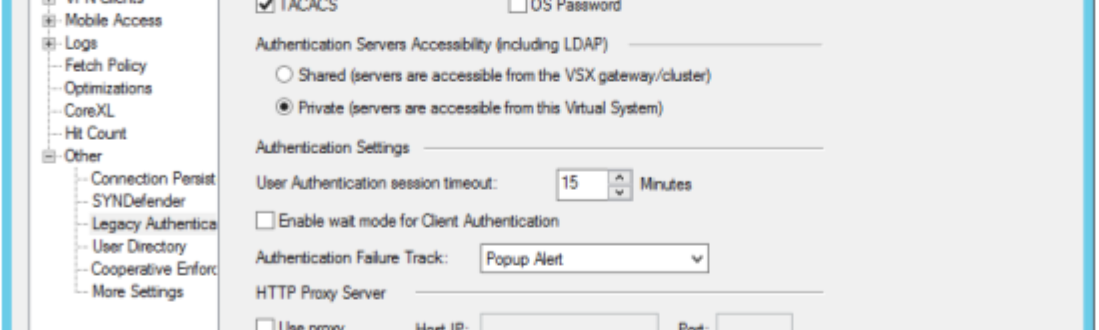
in the settings on the VS firewall object you can choose who goes to the RADIUS server, VS0 (default) or the VS in question where you configured the RADIUS setup
EDIT: added crappy screenshot
VS settings => Other => Legacy Authentication => Shared to Private
@Royi_Priov any suggestions here?
I suggest investigating with TAC.
Thanks, looks like it was it, now to troubleshoot the RADIUS side.
Hello, @Alex-
In VSX, when you need to integrate a RADIUS server for authenticating remote VPN connection users, is this configuration done from the VS CLI that works with the IPsec VPN blade? Or where is the configuration done?
Can the “integration” of a Radius server be done through SmartConsole?
Thank you for your comments.
It's all done in the Smart Console.
Hi Alex
Did you get a solution to it? After legacy authentication change the access request was accepted, but still cannot login. Any ideas?
Leaderboard
Epsum factorial non deposit quid pro quo hic escorol.
| User | Count |
|---|---|
| 17 | |
| 12 | |
| 5 | |
| 5 | |
| 5 | |
| 4 | |
| 3 | |
| 3 | |
| 3 | |
| 3 |
Wed 02 Dec 2026 @ 02:00 PM (CET)
E-Mail-Agent-Hijacking: E-Mail-Sicherheit im Zeitalter der KI neu überdenkenWed 02 Dec 2026 @ 02:00 PM (GMT)
Why Email Agent Hijacking Marks the End of Post-Delivery Email SecurityWed 02 Dec 2026 @ 03:30 PM (GMT)
The New DDoS Reality: Autonomy, Scale, and the Future of DefenseWed 02 Dec 2026 @ 11:00 AM (PST)
Why Email Agent Hijacking Marks the End of Post-Delivery Email SecurityWed 02 Dec 2026 @ 02:00 PM (EST)
Why Email Agent Hijacking Marks the End of Post-Delivery Email SecurityWed 02 Dec 2026 @ 02:00 PM (CET)
E-Mail-Agent-Hijacking: E-Mail-Sicherheit im Zeitalter der KI neu überdenkenWed 02 Dec 2026 @ 02:00 PM (GMT)
Why Email Agent Hijacking Marks the End of Post-Delivery Email SecurityWed 02 Dec 2026 @ 03:30 PM (GMT)
The New DDoS Reality: Autonomy, Scale, and the Future of DefenseWed 02 Dec 2026 @ 11:00 AM (PST)
Why Email Agent Hijacking Marks the End of Post-Delivery Email SecurityWed 02 Dec 2026 @ 02:00 PM (EST)
Why Email Agent Hijacking Marks the End of Post-Delivery Email SecurityAbout CheckMates
Learn Check Point
Advanced Learning
WE SECURE YOUR AI TRANSFORMATION