Create a Post
cancel
Showing results for 
Search instead for 
Did you mean: 
This widget could not be displayed.
6 Replies

I need to configure email notification when critical event is appeared in logs. An email alert must send to administrator mail box when certain IPS protection is appeared in logs. I configuring SmartEvent for this task. An email alert is added in "Objects" -> "Automatic Reactions". Now i configured an alert for certain Firewall blade log (when someone tryng to get access to port 443 of certain IP external IP address, screenshot in attach) and this alert is working.
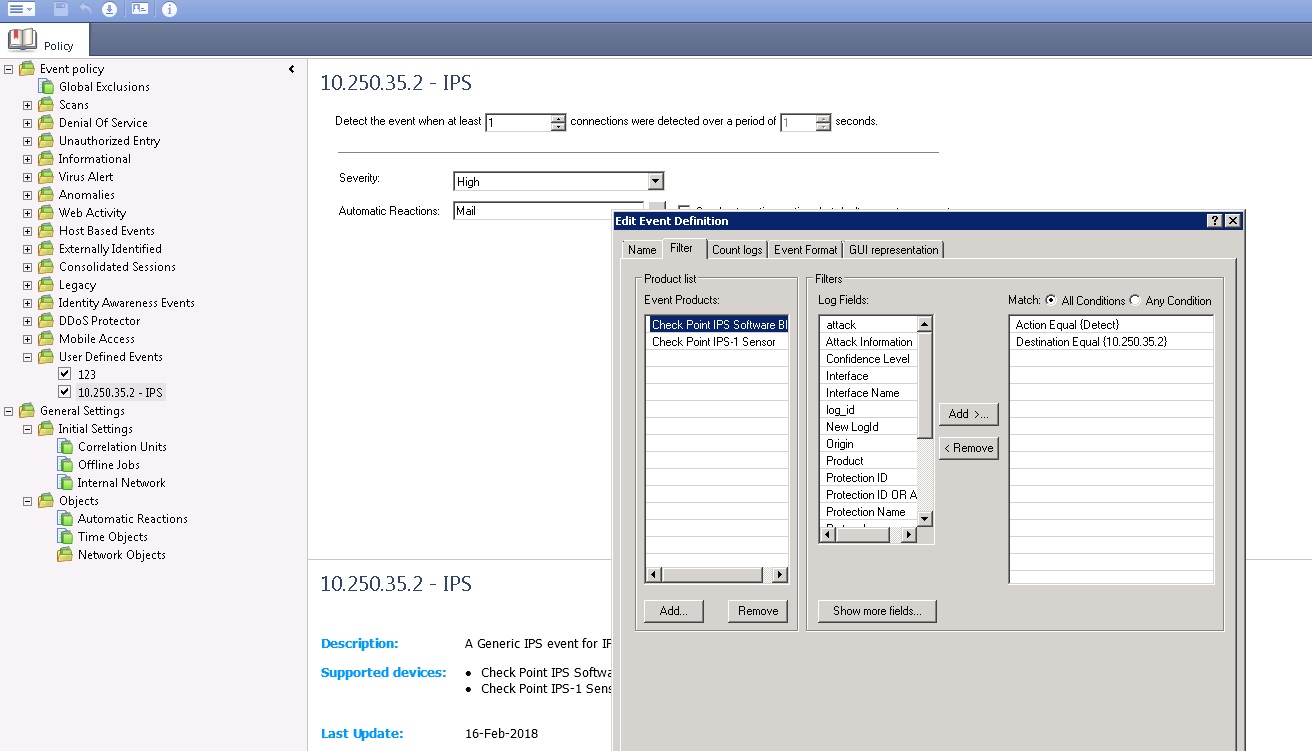
I configured an alert for Action: Detect (IPS blade) but there is no result (screenshot in attach).

There is default entry in "Global Exclusions" (screenshot in attach).
When this record is disabled, notifications about different events that I do not need are sends to my email address.

SmartEvent email notifications

SmartEvent email notifications

I need to configure email notification when critical event is appeared in logs. An email alert must send to administrator mail box when certain IPS protection is appeared in logs. I configuring SmartEvent for this task. An email alert is added in "Objects" -> "Automatic Reactions". Now i configured an alert for certain Firewall blade log (when someone tryng to get access to port 443 of certain IP external IP address, screenshot in attach) and this alert is working.
I configured an alert for Action: Detect (IPS blade) but there is no result (screenshot in attach).

There is default entry in "Global Exclusions" (screenshot in attach).
When this record is disabled, notifications about different events that I do not need are sends to my email address.

I need to configure email notification when critical event is appeared in logs. An email alert must send to administrator mail box when certain IPS protection is appeared in logs. I configuring SmartEvent for this task. An email alert is added in "Objects" -> "Automatic Reactions". Now i configured an alert for certain Firewall blade log (when someone tryng to get access to port 443 of certain IP external IP address, screenshot in attach) and this alert is working.
I configured an alert for Action: Detect (IPS blade) but there is no result (screenshot in attach).

There is default entry in "Global Exclusions" (screenshot in attach).
When this record is disabled, notifications about different events that I do not need are sends to my email address.

0 Kudos
0 Kudos
Alexander_Lario
Explorer
Alexander_Lario
Explorer

Thank you for your answer.

Smart Event 80.10 jumbo hotfix Take 70 

Security Management Server 80.10 jumbo hotfix Take 42.

Yes, i install policy on Smart Event after make changes.

Yes, i returned default exclusions to the initial state.

Thank you for your answer.

Smart Event 80.10 jumbo hotfix Take 70 

Security Management Server 80.10 jumbo hotfix Take 42.

Yes, i install policy on Smart Event after make changes.

Yes, i returned default exclusions to the initial state.

0 Kudos
0 Kudos
PhoneBoy
Admin
Admin
PhoneBoy
Admin
Admin

Can you show a log or two that should have matched this?

(Feel free to mask sensitive data)

Can you show a log or two that should have matched this?

(Feel free to mask sensitive data)

0 Kudos
0 Kudos
Alexander_Lario
Explorer
Alexander_Lario
Explorer

Example notificatinon:

Example notificatinon:

0 Kudos
0 Kudos
PhoneBoy
Admin
Admin
PhoneBoy
Admin
Admin

I recommend having TAC take a look at this, because that should catch it.

Contact Support | Check Point Software 

I recommend having TAC take a look at this, because that should catch it.

Contact Support | Check Point Software 

0 Kudos
0 Kudos
Hugo_vd_Kooij
MVP Gold
MVP Gold
Hugo_vd_Kooij
MVP Gold
MVP Gold

2 things I would like to add here.

  1. Make sure you use the latest Jumbo Hotfix for Smart Event. There is so much more fixed that is not explicitly listed in the fix list. (I had too many TAC cases on SmartEvent 😉
  2. Be aware that if email delivery becomes a problem it will result in some additional issues on SmartEvent. So make sure you don't have a spam filter getting in the way. (Valueable lesson from said TAC cases.)
<< We make miracles happen while you wait. The impossible jobs take just a wee bit longer. >>

2 things I would like to add here.

  1. Make sure you use the latest Jumbo Hotfix for Smart Event. There is so much more fixed that is not explicitly listed in the fix list. (I had too many TAC cases on SmartEvent 😉
  2. Be aware that if email delivery becomes a problem it will result in some additional issues on SmartEvent. So make sure you don't have a spam filter getting in the way. (Valueable lesson from said TAC cases.)
<< We make miracles happen while you wait. The impossible jobs take just a wee bit longer. >>
0 Kudos
0 Kudos