- Products
- Learn
- Local User Groups
- Partners
- More

Scaling Check Point Automation with Arodonata
7 October @ 5pm CET / 11am EDT
What's New in Check Point SASE
The State of Ransomware Q2 2026:
This Quarter's Trends, and Their Impact on Your Defenses
AI Security Masters
Implementing the AI Security Trifecta
CheckMates Go:
Half is Not Enough
Hi there,
is there a way that we can see shared secret key in clear text for site to site VPN in R80.10 management server?
Regards,
Nagarjuna
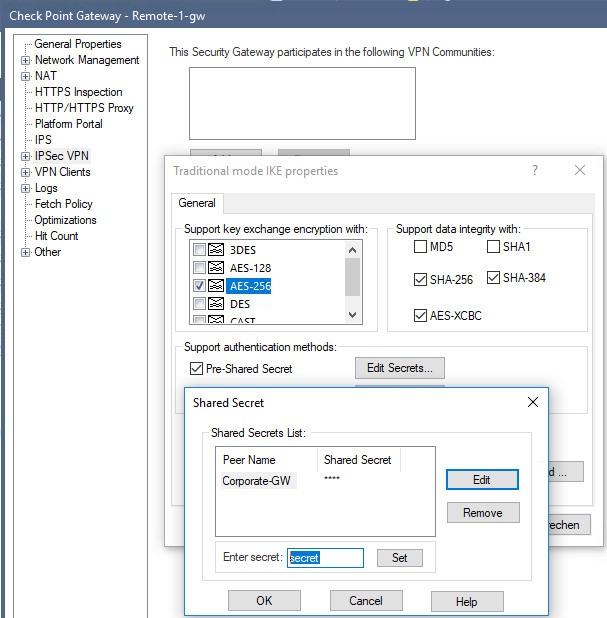
Of Course. In R80.10, simply click 'IPsec VPN > Edit secrets' > Edit > Set / View your secret.

Can you tell me how it is. I know in previous versions if we click on the shared secret it will show the key in clear text. But this is not working in R80.10
Are you trying to edit it within the VPN community? If you look above, Danny is editing the Shared Secret within the Gateway. Try that if you have not already.
Thanks Danny, But apparently this is only for traditional mode VPN's.
You just asked for a way to see shared secrets within R80.10. This is a way.
Looks like this is gone in 81.10.
We removed the ability to see the shared secret in SmartDashboard/SmartConsole sometime in the R65 timeframe.
Um, no. See my screen shot above.
Maybe it came back in R80.10 but it certainly is unreadable in R77.30
When not using traditional mode, then Danny's guide does not give results neither in R80.10 and R77.30. Several versions back it was possible to see the pre-shared secret and it was damn convenient ![]()
Hi Nagarjuna,
Did you ever find a solution to this?
Thanks,
Don
Hi Don,
It is only possible for traditional mode VPN’s in R80.10
This may not be useful to you, depending on your particular situation, but I recently (last year) had to recover some shared secrets for VPNs that had been around for a very long time. I was able to do so because I still had (on my R77.30 management system,) some database revisions dating back prior to the advent of R67.
I extracted a policy revision made under R62 (its just a tarball). I obtained the R62 installation ISO from a checkpoint partner and installed it into a VMWare VM using "Other 2.4.x kernel Linux, 32 bit" as the OS specification. I then overwrote the R62 installation with the extracted tarball files from the R62 policy DB revision. Then started up via cpstart.
I was able to access the policy of the VM using R62 Dashboard and extract the ancient shared secrets which now safely reside in an encrypted password vault.
Obviously, the stars all aligned exactly to make this work for me, but who knows, maybe you still have an old backup or DB revision or migrate export from prior to R67?
Leaderboard
Epsum factorial non deposit quid pro quo hic escorol.
| User | Count |
|---|---|
| 30 | |
| 6 | |
| 5 | |
| 5 | |
| 4 | |
| 4 | |
| 4 | |
| 3 | |
| 3 | |
| 3 |
Wed 23 Sep 2026 @ 06:00 PM (EDT)
Santo Domingo: Workspace Security and SASE Live: Protección Total del Usuario Email, Endpoint y SASEMon 28 Sep 2026 @ 03:00 PM (CEST)
La nouvelle réalité des attaques DDoS: autonomie, échelle et avenir de la défenseThu 01 Oct 2026 @ 05:00 PM (CEST)
Under the Hood: Check Point WAF | Preventing minus-zero-day attacksMon 28 Sep 2026 @ 03:00 PM (CEST)
La nouvelle réalité des attaques DDoS: autonomie, échelle et avenir de la défenseThu 01 Oct 2026 @ 05:00 PM (CEST)
Under the Hood: Check Point WAF | Preventing minus-zero-day attacksWed 23 Sep 2026 @ 06:00 PM (EDT)
Santo Domingo: Workspace Security and SASE Live: Protección Total del Usuario Email, Endpoint y SASEAbout CheckMates
Learn Check Point
Advanced Learning
YOU DESERVE THE BEST SECURITY