- Products
- Learn
- Local User Groups
- Partners
- More

What’s New in Device Diagnostics?
Dec 2nd @ 5pm CET / 11am EST
AI Security Masters
Security in the Pace of AI:
From Threat to Force Multiplier
CPX is Back!
Join us in Las Vegas, Vienna, and/or Bangkok!
Check Point Named a Leader
The Forrester Wave:
Enterprise Firewall Solutions, Q4 2026
What’s New in Agentic Network Orchestration
CheckMates Go:
Fun Ding
Back i R77.30 we used to have a lot of reports automatically sent out to certain people weekly or monthly - and now with R80.10 the feature of SmartEvent/SmartReporter is not there. But there is a way to generate the PDF's - has anyone looked at a way to grab/send them ? ![]()
In the Logs and Monitor view, click on Reports.
Select the report you want to schedule.
Select Actions > Schedule PDF (or Schedule Excel)

From there you can specify how often the report is generated from what timeframe as well as where to send the report.
Interesting - since for 1.5 years with R80 and R80.10 it was confirmed through the channels not to be possible "yet".. That solves a lot of manual routines for us then ![]()
In R77.30 you could as an administrator create scheduled reports - and say that you wanted the Identity information to be hidden (with ****) - only way to anonymize the reports as we need to do by law before sending them to management is to create a reporting user which does not have access to identity information, but then you loose the statistics that would be available to show that there are issues to be handled as we cannot show the usernames in te report. Also I could not find an easy way to add so that the report would only be for "office X, Y or Z" based on their source ip - this was possible with Smart Reporter.
The only work around for that as I see it now is either one report user per country - or cloning each report and looking at hard coding the src part as too be able to differentiate.
- Arnvid
At least in the non-scheduled view, there's an option to "Hide Identities."
That doesn't seem to be there for scheduled reports.
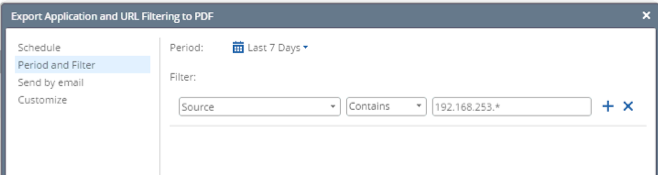
I know when you schedule the reports you can choose filters (not sure this is the correct syntax or not):

Does that not work?
To add to my mentor
, for Identity section
ensure that user does not have permission to :
- identities
- show identities by default

Results with admin user:

Results with the user with 'law" permission:

you will need to login with the user with 'law' permission, in order to schedule the reports without identities
That "No Internal" Activity is exactly what we don't want.. We want the report to show the event list without person identities - i.e ****** .-
Ultimately we would like to have 1 report for each "country" or "hub" - without identity with the information for the users at that entity- to be given to the management of each entity upon request.
Very hard to show that a entity has problems without being able to produce reports that we are allowed to show the people that need to address the problems.
Sorry that I misunderstand it ![]()
1. Please set the following permissions for user:

2. Login with the user and create report/view
Results :

Leaderboard
Epsum factorial non deposit quid pro quo hic escorol.
| User | Count |
|---|---|
| 30 | |
| 8 | |
| 7 | |
| 5 | |
| 5 | |
| 4 | |
| 4 | |
| 4 | |
| 3 | |
| 3 |
Tue 24 Nov 2026 @ 01:30 PM (GMT)
La nueva realidad de los ataques DDoS: autonomía, escala y el futuro de la defensaWed 02 Dec 2026 @ 03:30 PM (GMT)
The New DDoS Reality: Autonomy, Scale, and the Future of DefenseThu 03 Dec 2026 @ 11:00 AM (EST)
Under the Hood: Check Point Cloud Firewall for Nutanix - How to Secure your AI WorkloadsTue 24 Nov 2026 @ 01:30 PM (GMT)

La nueva realidad de los ataques DDoS: autonomía, escala y el futuro de la defensaWed 02 Dec 2026 @ 03:30 PM (GMT)
The New DDoS Reality: Autonomy, Scale, and the Future of DefenseThu 03 Dec 2026 @ 11:00 AM (EST)
Under the Hood: Check Point Cloud Firewall for Nutanix - How to Secure your AI WorkloadsAbout CheckMates
Learn Check Point
Advanced Learning
WE SECURE YOUR AI TRANSFORMATION