- Products
- Learn
- Local User Groups
- Partners
- More

What’s New in Device Diagnostics?
Dec 2nd @ 5pm CET / 11am EST
AI Security Masters
Security in the Pace of AI:
From Threat to Force Multiplier
CPX is Back!
Join us in Las Vegas, Vienna, and/or Bangkok!
Check Point Named a Leader
The Forrester Wave:
Enterprise Firewall Solutions, Q4 2026
What’s New in Agentic Network Orchestration
CheckMates Go:
Fun Ding
Hello,
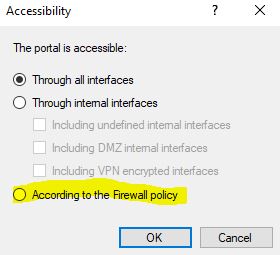
We have Identity Awareness with Browser based authentication activated, which is accessible "through all Interfaces". We want to change this to the option "According to the Firewall Policy". What exact rules are needed here? There is no further explantion for the option in the SmartConsole help. I also couldn't find anything online.
When we activated the "According to the Firewall Policy" option once, the Portal was not accessible at all anymore, although there was a rule with the action "accept (display captive portal)".
We're running R81.10 T45.
TCP port 443 (https) is what is required for Captive Portal to work.
The rule should just have a simple Accept action (not with Display Captive Portal).
Hallo,
thx for your reply, so i would a need a rule like:
Usergroup1 -> GatewayIP (where the Captive portal (should) run) : https accept
But how do I acheive that different User objects are only allowed to access a certain destination then? Does this also mean there are no redirects anymore and customers directly have to enter the Gateway IP or DNS to the Browser?
At the moment we have rules like the following scheme:
Users1 -> DestinationIP1 : services accept(display captive portal)
Users2 -> DestinationnetworkX : services accept(display captive portal)
In the Users Object, LDAP Groups, possible source networks etc are defined.
If the destination is a http site, I'm automatically redirected to Identity Portal.
I mean a redirect is not necesarry, just that I can define different usergroups with different destinations and services
The rule I described allows the Captive Portal to be reached when "According to Firewall Policy" is used.
You still need to have your other rules in place.
Also, HTTPS Inspection must be enabled in order for redirects to occur when the destination site is HTTPS.
Hallo,
thank you very much, I now tried this successfully 🙂
I have one final question: What would I have to change, sucht that there isn't any redirect? So people just have to know that they browse to the Gateway (Identity Portal) first and then after successful login, they can do what they are allowed according to the rules.
Yes, users can browse to a specific URL on the gateway and authenticate manually.
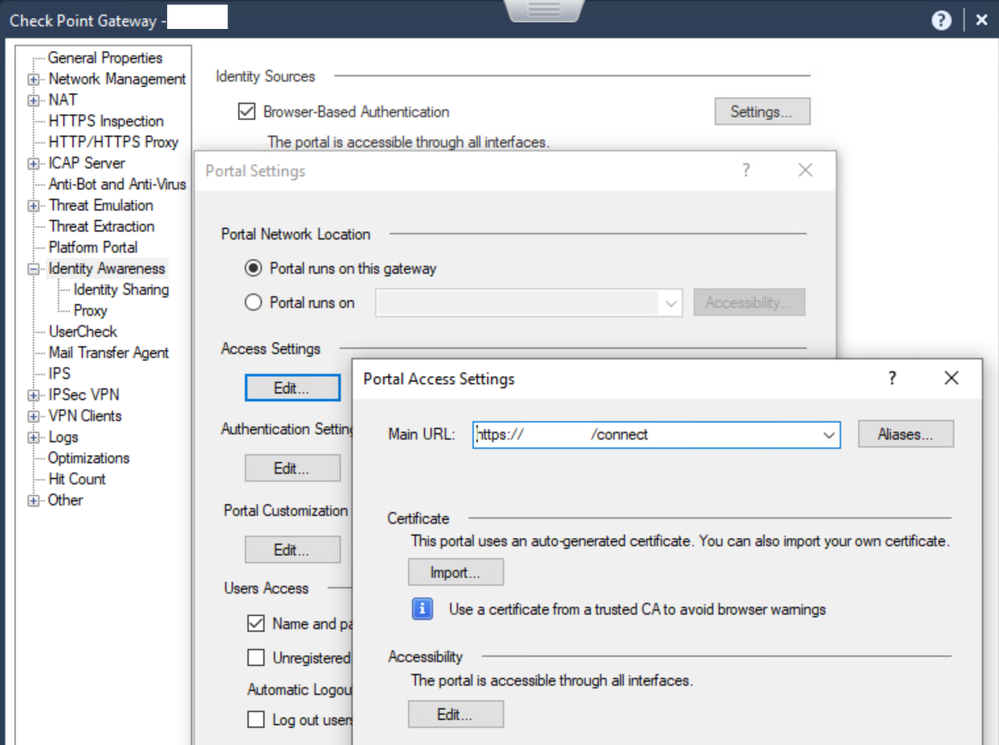
You can see the precise URL for your environment and configure various aspects of it here:
Leaderboard
Epsum factorial non deposit quid pro quo hic escorol.
| User | Count |
|---|---|
| 30 | |
| 8 | |
| 7 | |
| 5 | |
| 5 | |
| 4 | |
| 4 | |
| 4 | |
| 3 | |
| 3 |
Tue 24 Nov 2026 @ 01:30 PM (GMT)
La nueva realidad de los ataques DDoS: autonomía, escala y el futuro de la defensaWed 02 Dec 2026 @ 03:30 PM (GMT)
The New DDoS Reality: Autonomy, Scale, and the Future of DefenseThu 03 Dec 2026 @ 11:00 AM (EST)
Under the Hood: Check Point Cloud Firewall for Nutanix - How to Secure your AI WorkloadsTue 24 Nov 2026 @ 01:30 PM (GMT)
La nueva realidad de los ataques DDoS: autonomía, escala y el futuro de la defensaWed 02 Dec 2026 @ 03:30 PM (GMT)
The New DDoS Reality: Autonomy, Scale, and the Future of DefenseThu 03 Dec 2026 @ 11:00 AM (EST)
Under the Hood: Check Point Cloud Firewall for Nutanix - How to Secure your AI WorkloadsAbout CheckMates
Learn Check Point
Advanced Learning
WE SECURE YOUR AI TRANSFORMATION