- Products
- Learn
- Local User Groups
- Partners
- More

What’s New in Identity and Trust?
11 November @ 5pm CET / 11am EST
AI Security Masters
Security in the Pace of AI:
From Threat to Force Multiplier
CPX is Back!
Join us in Las Vegas, Vienna, and/or Bangkok!
What’s New in Agentic Network Orchestration
CheckMates Go:
Fun Ding
Hi Mates,
I have configured some test Rate Limiting rules for an R80.20 VSX environment. The config was set with "monitor only" mode enabled first and the rules are in place;
[Expert@fvsx_gateway:3]# fw samp get
operation=add uid=<5e7da64e,00000000,21c2f50a,000078b1> target=all timeout=indefinite action=drop log=log service=any source-negated=true source=cidr:172.16.0.0/12 pkt-rate=100 track=source flush=true req_type=quota
I can see that the rules are enabled and seem to be picking up traffic that should be dropped;
[Expert@vsx_gateway:3]# fwaccel dos stats get
Firewall:
Number of Elements in Tables:
Penalty Box Violating IPs: 0 (size: 8192)
Blacklist Notification Handlers: 0 (size: 1024)
SXL Device 0:
Total Active Connections: 0
Total New Connections/Second: 0
Total Packets/Second: 41
Total Bytes/Second: 4077
Reasons Packets Dropped:
IP Fragment: 0
IP Option: 0
Penalty Box: 0
Blacklist: 0
Rate Limit: 0
Number of Elements in Tables:
Penalty Box: 0 (size: 0)
Non-Empty Blacklists: 0 (size: 0)
Blacklisted IPs: 0 (size: 0)
Rate Limit Matches: 154 (size: 262144)
Rate Limit Source Only Tracks: 94 (size: 262144)
Rate Limit Source and Service Tracks: 0 (size: 262144)
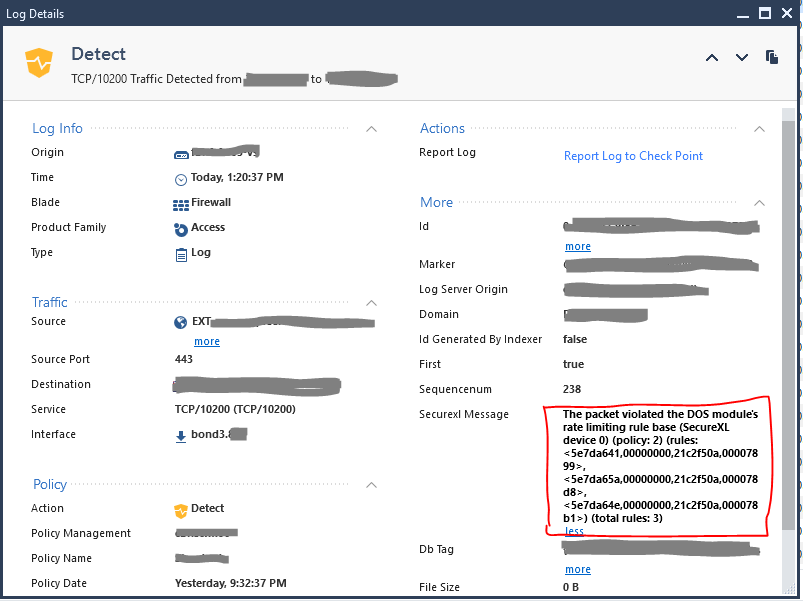
Are these violations also logged in SmartConsole Logs&Monitor?
I've checked against some of the source/dest addresses shown in the "dos_rate_matches" SecureXL table but I can't see anything that suggests that there would be a drop based on Rate Limiting. Has anyone got an example of one of these logs?
Looks like the logs are being presented. I did some updates around actually installing the rules (using "w samp add -t 2 quota flush true") so that may have kicked them into life. They may also just have taken some time to get through to the Mgmt device.
I haven't seen an easy way to search for these ones yet. Free text doesn't seem to work for any of the text or UIDs for the DOS rules. I had to grab the IP out of the fwaccel table ("fwaccel tab -t dos_rate_matches -f") and then search in Logs&Monitor.
Anyone found an easier way to monitor these?
I would also like to know if there is an easier way to search the logs for these results. Has anyone found another method?
Same here. The feature works well but we are a bit blind if we can't filter/search the logs in smartconsole.
As that field is not indexed, you cannot search for these entries, unfortunately.
Could it be indexed?
Not without an Request for Enhancement.
Highly recommend working with your local Check Point office around this requirement.
Hi Luis, try using the parameter "-l a" when creating the rate limiting rule. This will create an alert log in logs & monitor. You are then able to filter by "alerts" so it should be fairly easy to locate them unless you have a lot of other alert rules/logs being generated.
Hey Chad, the best way I have figured out how to help with tracking the logs is to use the "-l a" parameter which creates an alert log in logs & monitor. You are then able to filter by "alerts" so it should be fairly easy to locate them unless you have a lot of other alert rules/logs being generated.
I think it is mandatory to be able to to search by source and destination ip for troubleshooting purposes.
But in terms of monitoring we need to be able to identify this type of alerts. The best and easiest way I can think is with the comment and name that fwaccel dos allows you to set with -c and -n.
This way we could totally control the number of fwaccel dos, we could create graphs to track it, etc.
I'd be interested to see how the SmartEvent DOS mitigation rules being created in term s of acceleration. I believe you can search them by "sam rule" free text search, but it will return all of those.
Leaderboard
Epsum factorial non deposit quid pro quo hic escorol.
| User | Count |
|---|---|
| 30 | |
| 15 | |
| 13 | |
| 8 | |
| 7 | |
| 4 | |
| 4 | |
| 4 | |
| 4 | |
| 4 |
Tue 10 Nov 2026 @ 06:00 PM (IST)
Under the Hood: Introducing Check Point Cloud Firewall as a ServiceTue 10 Nov 2026 @ 08:00 PM (IST)
Check Point Mobile Security | Extending Zero Trust with NetskopeThu 12 Nov 2026 @ 11:00 AM (EST)
Tips and Tricks 2026 #15: Check Point MDR and Incident ResponseTue 10 Nov 2026 @ 06:00 PM (IST)
Under the Hood: Introducing Check Point Cloud Firewall as a ServiceTue 10 Nov 2026 @ 08:00 PM (IST)
Check Point Mobile Security | Extending Zero Trust with NetskopeThu 12 Nov 2026 @ 11:00 AM (EST)
Tips and Tricks 2026 #15: Check Point MDR and Incident ResponseTue 17 Nov 2026 @ 08:30 AM (EST)
Bogota Breakfast & Hack: IA bajo control y ataques en vivo con Workspace SecurityAbout CheckMates
Learn Check Point
Advanced Learning
WE SECURE YOUR AI TRANSFORMATION