- Products
- Learn
- Local User Groups
- Partners
- More

What’s New in Device Diagnostics?
Dec 2nd @ 5pm CET / 11am EST
AI Security Masters
Security in the Pace of AI:
From Threat to Force Multiplier
CPX is Back!
Join us in Las Vegas, Vienna, and/or Bangkok!
Check Point Named a Leader
The Forrester Wave:
Enterprise Firewall Solutions, Q4 2026
What’s New in Agentic Network Orchestration
CheckMates Go:
Fun Ding
Hi,
We have two seperate gateways (let's call them fwext and fwint) which are managed by a single management machine.
Up until today we had IPS enabled only on gateway A (only IPS, no antibot, antivirus, etc....).
In Smart Console it was configured under Custom Policy as:
Source: Any
Destination: Any
Protection/Site/File/Blade: N/A
Services: Any
Action: Gateway_ext_Profile
Install on: fwext
We now want to enable it also on gateway fwint.
I created a new IPS Profile (set to Detect) for gateway B and set it like this:
Source: Specific networks
Destination: Any
Protection/Site/File/Blade: N/A
Services: Any
Action: Gateway_int_Profile
Install on: Gateway fwint
It looks like it's working, I see detection in the logs, BUT:
1. I also see detection which are not coming from the specific network defined.
2. I created exceptions for rule no. 2 but it doesn't have any affect on the traffic.
We also have exceptions for rule no. 1 which works fine.
I'm having trouble understanding the topology and management of the IPS settings for different gateways, since it's basically a shared policy.
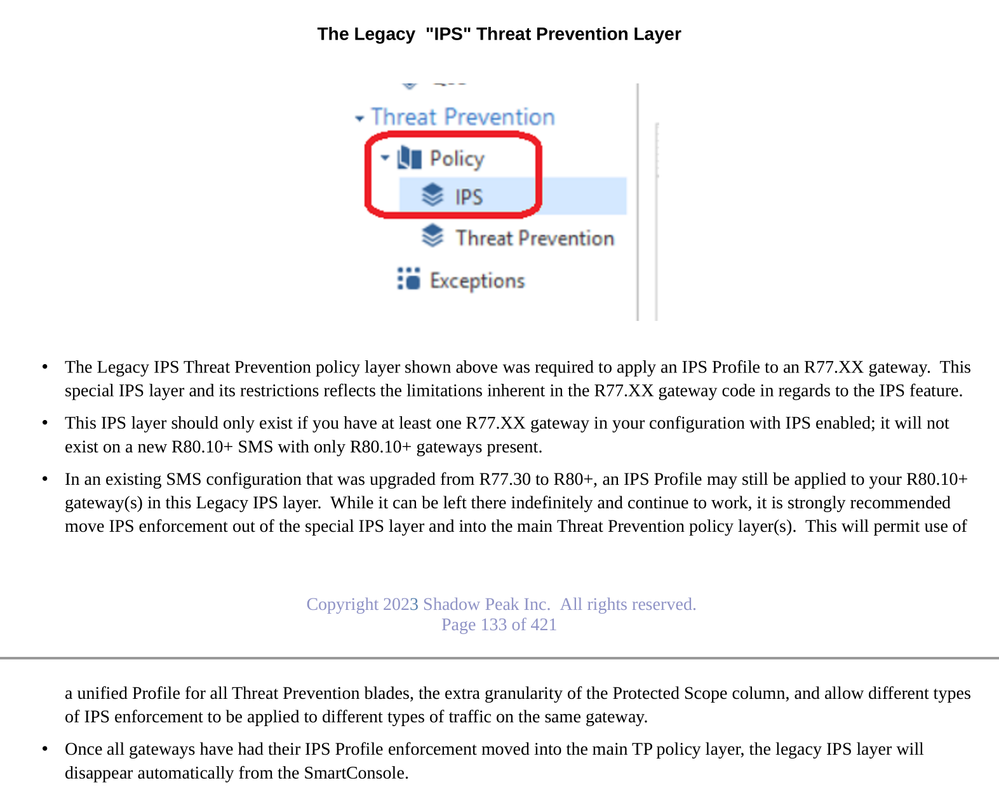
The issues you are experiencing are related to your use of the legacy "IPS" layer. This layer was intended to be used only by R77.30 and earlier gateways and will work with newer gateways, but is inappropriate for use with a gateway running R80.10+ or later. This IPS layer reflects the inherent limitations in the IPS feature on R77.30 and earlier gateways; the IPS capabilities and management were significantly overhauled and unified with the rest of Threat Prevention in R80.10+.
You've already encountered one of those limitations: R77.30 and earlier gateways did not have "Inactive" as a possibility for an exception so while it will let you set that in the SmartConsole, you get Detect anyway. That type of exception will work correctly once you get rid of the legacy IPS layer. Check out the two threads below for the procedure, and I've also included the page from my R81.20 IPS/AV/ABOT Immersion self-guided video course discussing the legacy IPS layer.
Move IPS profile rules to Threat Prevention layer
Difference IPS and ThreatPrevention
Actual log cards with sensitive details redacted would help, along with version/JHF of gateways and management.
You're right, forgot to mention - R81.10, JHF 66.
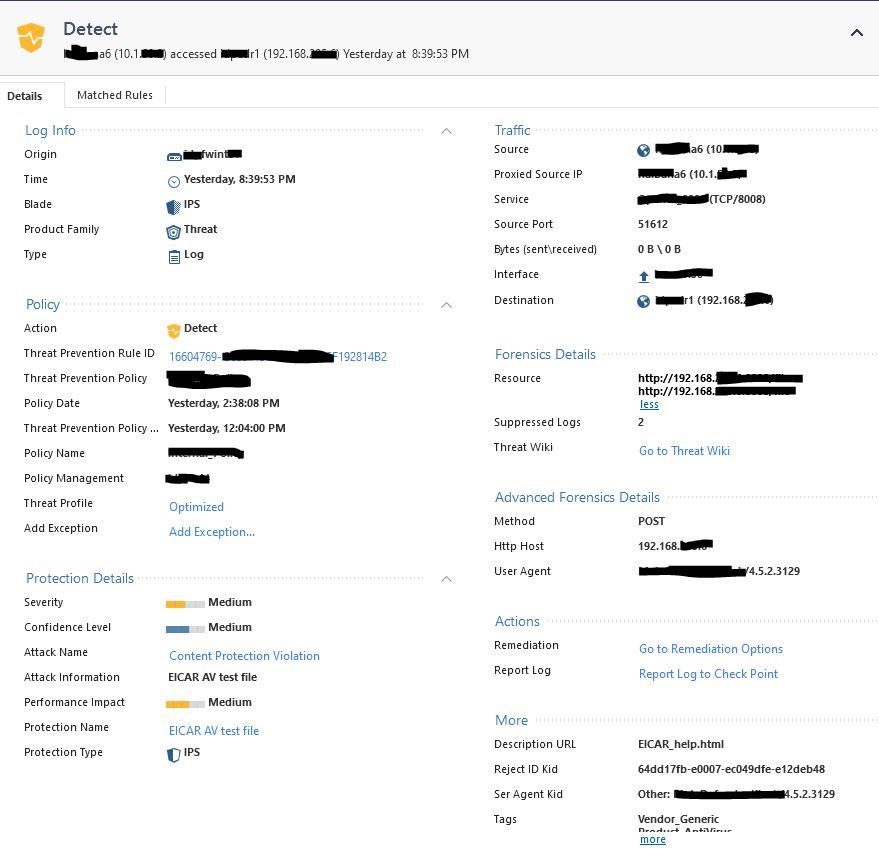
This traffic should have been ignored due to exception rule 2.3 from previous screenshot:
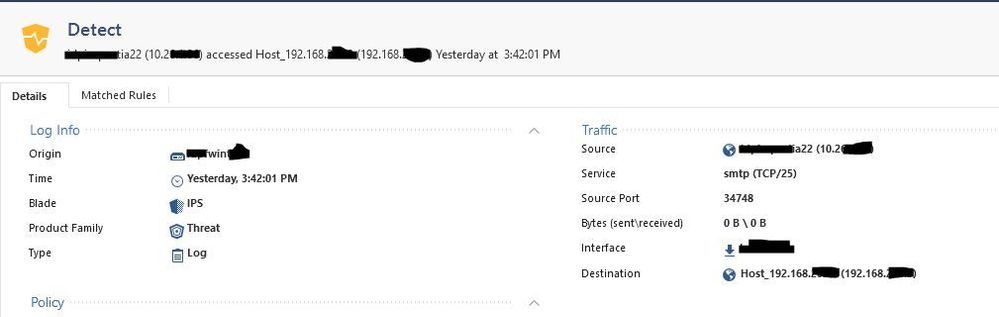
And, according to the Source entries in Rule 2 in screenshots from previous post, the following traffic shouldn't have been detected, it's not originating from the source groups:
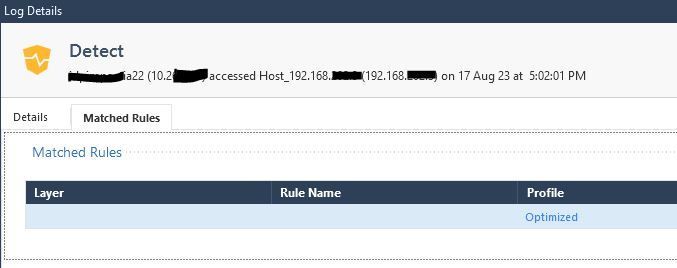
What does Matched Rules say in this case (other tab in the log cards)?
So for both examples I gave, the Matched Rules says:
The IPS profile I use is NOT Optimized, but I see that the Threat Prevention policy is set to Optimize.
Which now raises another question: How come Threat Prevention even works since we don't have these blades active at all (anti-bot,antivirus, etc...)
The issues you are experiencing are related to your use of the legacy "IPS" layer. This layer was intended to be used only by R77.30 and earlier gateways and will work with newer gateways, but is inappropriate for use with a gateway running R80.10+ or later. This IPS layer reflects the inherent limitations in the IPS feature on R77.30 and earlier gateways; the IPS capabilities and management were significantly overhauled and unified with the rest of Threat Prevention in R80.10+.
You've already encountered one of those limitations: R77.30 and earlier gateways did not have "Inactive" as a possibility for an exception so while it will let you set that in the SmartConsole, you get Detect anyway. That type of exception will work correctly once you get rid of the legacy IPS layer. Check out the two threads below for the procedure, and I've also included the page from my R81.20 IPS/AV/ABOT Immersion self-guided video course discussing the legacy IPS layer.
Move IPS profile rules to Threat Prevention layer
Difference IPS and ThreatPrevention
Leaderboard
Epsum factorial non deposit quid pro quo hic escorol.
| User | Count |
|---|---|
| 28 | |
| 8 | |
| 7 | |
| 5 | |
| 5 | |
| 4 | |
| 4 | |
| 4 | |
| 4 | |
| 3 |
Tue 24 Nov 2026 @ 01:30 PM (GMT)
La nueva realidad de los ataques DDoS: autonomía, escala y el futuro de la defensaWed 02 Dec 2026 @ 03:30 PM (GMT)
The New DDoS Reality: Autonomy, Scale, and the Future of DefenseThu 03 Dec 2026 @ 11:00 AM (EST)
Under the Hood: Check Point Cloud Firewall for Nutanix - How to Secure your AI WorkloadsTue 24 Nov 2026 @ 01:30 PM (GMT)
La nueva realidad de los ataques DDoS: autonomía, escala y el futuro de la defensaWed 02 Dec 2026 @ 03:30 PM (GMT)
The New DDoS Reality: Autonomy, Scale, and the Future of DefenseThu 03 Dec 2026 @ 11:00 AM (EST)
Under the Hood: Check Point Cloud Firewall for Nutanix - How to Secure your AI WorkloadsAbout CheckMates
Learn Check Point
Advanced Learning
WE SECURE YOUR AI TRANSFORMATION