- Products
- Learn
- Local User Groups
- Partners
- More

AI Security Masters E7:
How CPR Broke ChatGPT's Isolation and What It Means for You
Blueprint Architecture for Securing
The AI Factory & AI Data Center
Call For Papers
Your Expertise. Our Stage
Good, Better, Best:
Prioritizing Defenses Against Credential Abuse
Ink Dragon: A Major Nation-State Campaign
Watch HereCheckMates Go:
CheckMates Fest
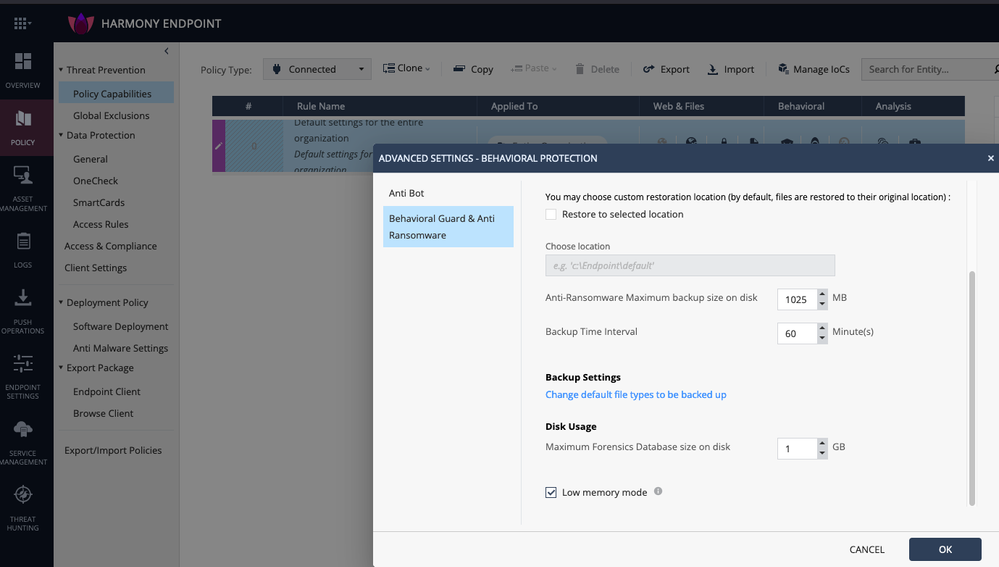
The newest Endpoint Security E87.30 Windows Clients have a new feature:
| Behavioral Guard | |
| EPS-50725 | NEW: Added Low Memory Mode, which reduces memory consumption. Note that this mode may change the security level because it is based on a smaller amount of signatures. |
We can enable it here:
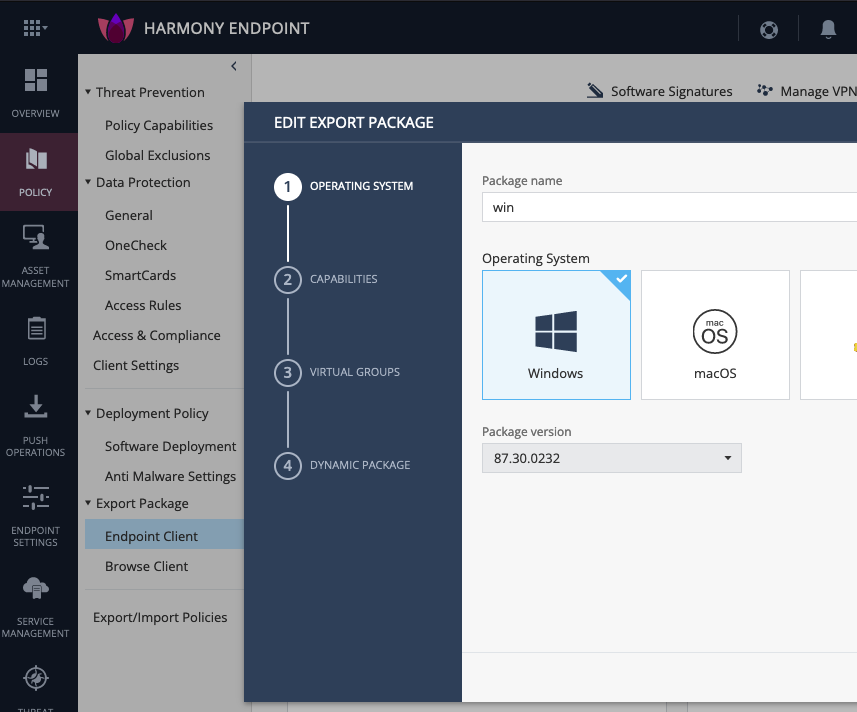
We can use this new feature when configuring a package for export:
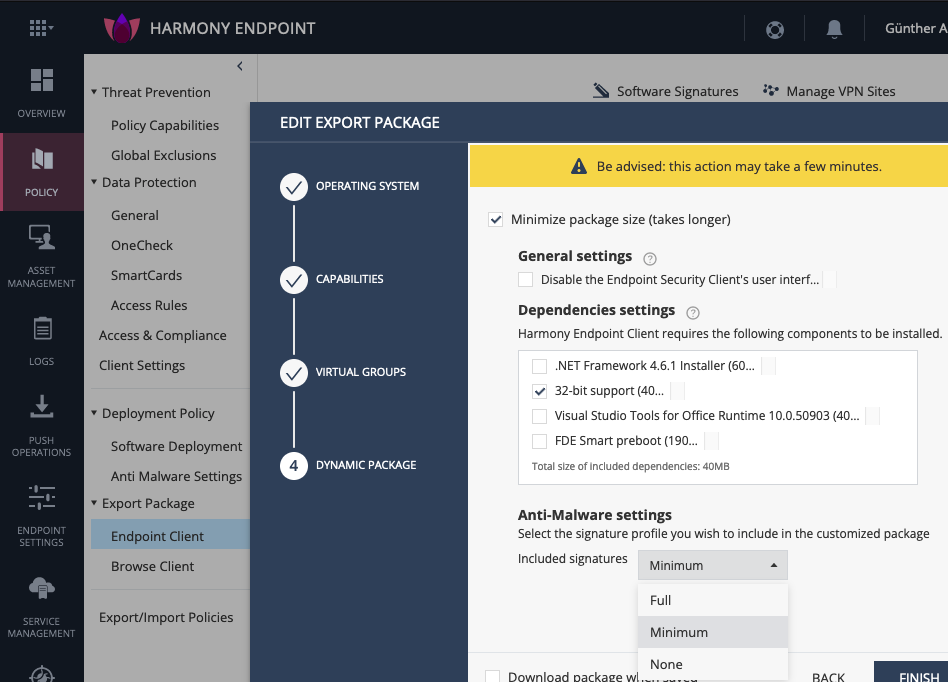
Now we can enable the Minimize Package size option and select the Anti-Malware Settings signature profile footprint:
I would think that Minimum signatures means only most important signatures, but when selecting none, at least part of Anti-Malware blade gets disabled.
Is there any detailed information available, e.g.:
Which kind of signatures are included ?
Which kind of signatures are not included ?
Is this Behavioral Guard or AV or what ?
@Chris_Atkinson any internal hints 😉
Hi @G_W_Albrecht.
If I'm not mistaken, the option to include the anti-malware signatures when configuring a package for export has been available for some time and I would understand that it refers to whether or not the installer package includes the signatures at deployment time. This makes the installer more or less large in size. If configured without signatures, at the end of the installation the agent downloads them, while if configured complete, the agent has much less to update.
I'm not sure if this is related to the new "low memory mode" in Behavioral Guard.
Mike B's feedback is correct
Minimal signatures is a temporary state, which allow creating a smaller package.
After 1st update, AM will download the full set of signatures
Signatures updates are sent as deltas
Any idea, @BarYassure ?
Hi @G_W_Albrecht.
If I'm not mistaken, the option to include the anti-malware signatures when configuring a package for export has been available for some time and I would understand that it refers to whether or not the installer package includes the signatures at deployment time. This makes the installer more or less large in size. If configured without signatures, at the end of the installation the agent downloads them, while if configured complete, the agent has much less to update.
I'm not sure if this is related to the new "low memory mode" in Behavioral Guard.
I am also not sure - that is the reason of my post 8)
> Note that this mode may change the security level because it is based on a smaller amount of signatures.
Does not sound like all will be downloaded. The TinyClient Package is used to make the installer less large in size and download the rest in parts.
"Note that this mode may change the security level because it is based on a smaller amount of signatures."
This warning is about "low memory mode" as shown in Behavioral Protection advanced settings and it's not related to export package options.
"Included Signatures" in "Minimize package" has been available for a long time now and it should reduce the the size of the exported package and not the security effectiveness of the client since all signatures would be downloaded after installation.
A verification of the above from a CP representative would be appreciated.
Also we would like to know what kind of signatures are disabled in low memory mode..
Is there any further information on this? There seems to be a lack of documentation regarding the newer Dynamic packages.
I have created and exported 2 packages, one with FULL signatures (800mb) and one with MIN signatures (423mb). The difference in size is huge.
Are the AV signatures really nearly 400mb? Is that the size of the signature update that clients download every time they get a new daily signature update? If so, then what would the point of a FULL signature package be as it'll only be up to date on the day that it was created. If that package was used to install the client on a device a week later then it would then have to pull down newer signatures anyway after installation.
Thanks
Mike B's feedback is correct
Minimal signatures is a temporary state, which allow creating a smaller package.
After 1st update, AM will download the full set of signatures
Signatures updates are sent as deltas
Hello everyone!
Is there any idea how to get initial agent on on-prem when using only new Dynamic packages?
it is not a problem in cloud. Have i to use initial msi packet via Smart Endpoint?
Thanks!
[ For future would recommend opening a new topic for this to give more visibility since may not clear from thread title ]
The is a known pending item for Web UI on premise
It will be resolved in next MT release (R82) and next R81.20 JHF.
Leaderboard
Epsum factorial non deposit quid pro quo hic escorol.
| User | Count |
|---|---|
| 4 | |
| 2 | |
| 1 | |
| 1 | |
| 1 | |
| 1 | |
| 1 | |
| 1 | |
| 1 | |
| 1 |
Tue 28 Apr 2026 @ 06:00 PM (IDT)
Under the Hood: Securing your GenAI-enabled Web Applications with Check Point WAFThu 30 Apr 2026 @ 03:00 PM (PDT)
Hillsboro, OR: Securing The AI Transformation and Exposure ManagementTue 28 Apr 2026 @ 06:00 PM (IDT)
Under the Hood: Securing your GenAI-enabled Web Applications with Check Point WAFTue 12 May 2026 @ 10:00 AM (CEST)
The Cloud Architects Series: Check Point Cloud Firewall delivered as a serviceThu 30 Apr 2026 @ 03:00 PM (PDT)
Hillsboro, OR: Securing The AI Transformation and Exposure ManagementAbout CheckMates
Learn Check Point
Advanced Learning
YOU DESERVE THE BEST SECURITY