- Products
- Learn
- Local User Groups
- Partners
- More

MVP 2026: Submissions
Are Now Open!
What's New in R82.10?
Watch NowOverlap in Security Validation
Help us to understand your needs better
CheckMates Go:
Maestro Madness
In checkpoint version 80.70 or lower, I was able to have checkpoint installed on my machine and use other VPN's as well.
What I had to do was taking away the obscurity of the trac.defaults and set it on 0. Afterwards it was sufficient to set "allow disable firewall" on true and "firewall_enabled" on false.
But now (due to windows 10 upgrades) I was forced to use a higher version of checkpoint. 80.71> I tried everything but I can't disable the firewall (while being disconnected) anymore. I tried the same procedure as before, but it's not working anymore.
Can someone please assist in how to setup checkpoint to be fully working when connected to a site. But if I'm not connected with checkpoint, still be able to use other VPN's...
Kind Regards
Dierick Bart
As far as I know, the process for allowing end users to disable the desktop firewall have not changed with current versions of the Endpoint client.
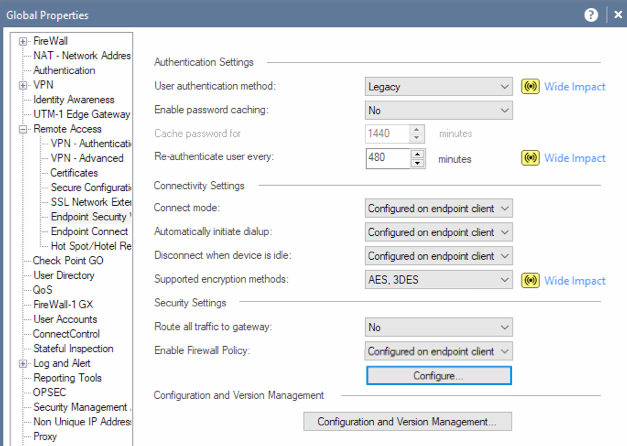
You can definitely configure whether users are allowed to disable the Desktop Firewall as follows:

These settings can be done per user/group as well.
See: Re: Exclude Subnet
Thanks for your answer. But I'm an external consultant. And I have a few customers with different VPN's. One of them has checkpoint. But when I install that one, I can't disable the firewall of it (client side) as I'm only a client user. And this way I can't use my other VPN's anymore because of the agressive CheckPoint VPN
Unfortunately, it's a server-controlled setting by design, especially if your client is using Endpoint Security VPN.
The fact it could have been disabled on earlier versions of the client is considered a defect.
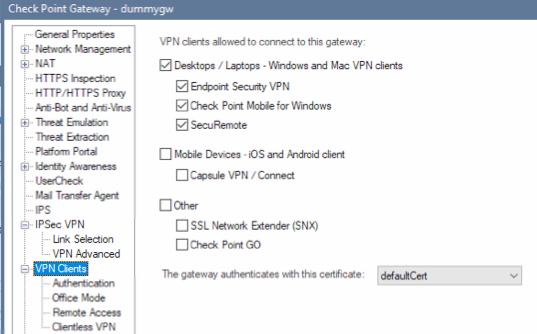
You might try installing the client as "Check Point Mobile" (which does not include the Firewall component).
However, your client would have to allow this client to connect, as shown here:

Very disappointed in the Checkpoint Client software. That everything has to be enabled when I'm connected to a checkpoint environment. I understand that...
I don't understand the fact that when it's not connected, that it's blocking other (VPN) software from working.
Kind Regards
Dierick Bart
We have a number of remote access solutions, as noted here: Check Point Remote Access Solutions
The Endpoint Security VPN client (which includes a firewall) is designed to be installed on endpoints managed by the organization.
That client includes a firewall that is active whether or not you are connected to the organization.
Again, that is by design.
Clearly your endpoint is NOT managed by the organization in question.
You will need to work with the organization in question to either:
Leaderboard
Epsum factorial non deposit quid pro quo hic escorol.
| User | Count |
|---|---|
| 8 | |
| 4 | |
| 2 | |
| 2 | |
| 1 | |
| 1 | |
| 1 | |
| 1 | |
| 1 | |
| 1 |
Fri 12 Dec 2025 @ 10:00 AM (CET)
Check Mates Live Netherlands: #41 AI & Multi Context ProtocolTue 16 Dec 2025 @ 05:00 PM (CET)
Under the Hood: CloudGuard Network Security for Oracle Cloud - Config and Autoscaling!Fri 12 Dec 2025 @ 10:00 AM (CET)
Check Mates Live Netherlands: #41 AI & Multi Context ProtocolTue 16 Dec 2025 @ 05:00 PM (CET)
Under the Hood: CloudGuard Network Security for Oracle Cloud - Config and Autoscaling!Thu 18 Dec 2025 @ 10:00 AM (CET)
Cloud Architect Series - Building a Hybrid Mesh Security Strategy across cloudsAbout CheckMates
Learn Check Point
Advanced Learning
YOU DESERVE THE BEST SECURITY