- Products
- Learn
- Local User Groups
- Partners
- More

The State of Ransomware Q1 2026
Key Trends and Their Impact
Good, Better, Best:
Prioritizing Defenses Against Credential Abuse
AI Security Masters E7:
How CPR Broke ChatGPT's Isolation and What It Means for You
Blueprint Architecture for Securing
The AI Factory & AI Data Center
Call For Papers
Your Expertise. Our Stage
CheckMates Go:
CheckMates Fest
Please help me with this. How to achieve seeing Clients Real Public IP at my backend servers allowing gateways to pass Public IPs through.
~My Network Flow when client tries to open a URL over the internet (Accessing a web page): -
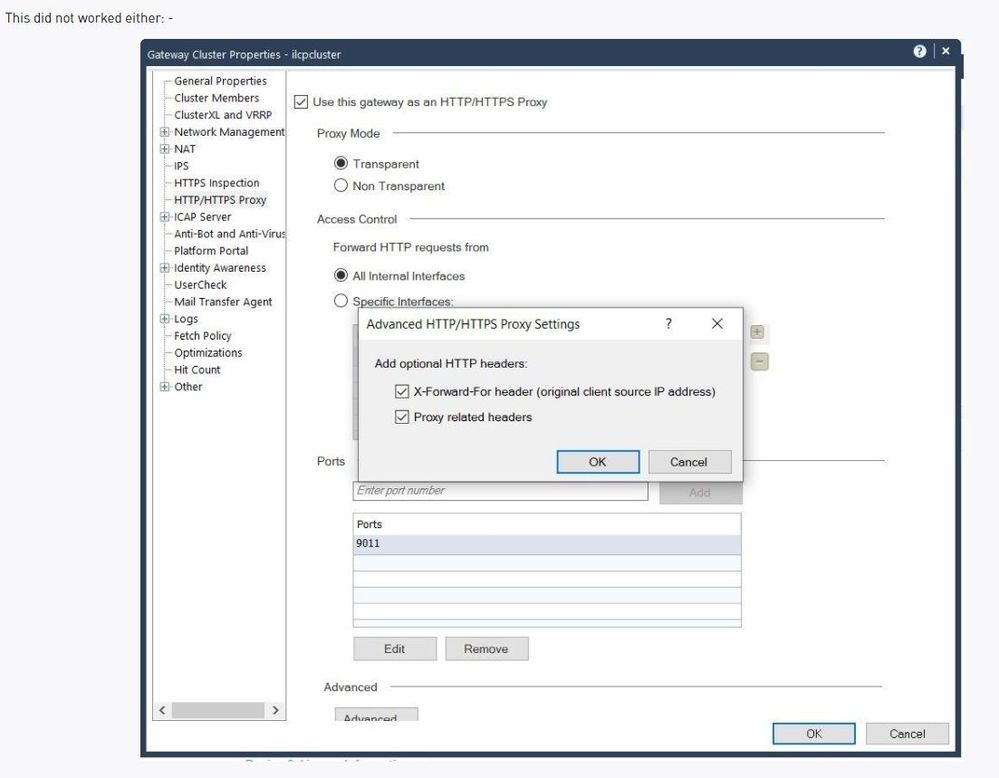
Client --> Internet --> Azure Load balancer (Layer4) --> Cloud Guard IaaS Cluster HA(A-P) R80.30 --> Azure Application Gateway(Layer 7) --> Web Apps (Azure App Services)/Servers
In this architecture I am able to see Clients real Public-IP till the Firewall logs only.
~What I want to achieve: -
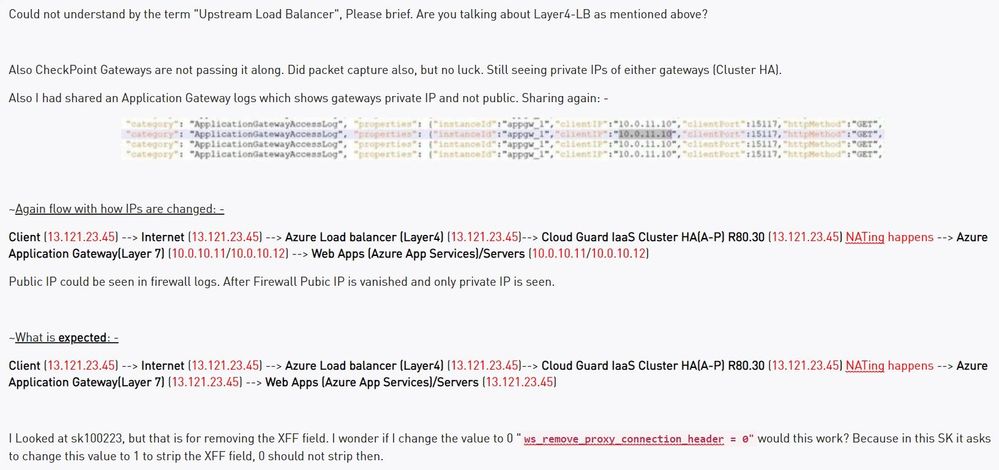
I need the same public IP to be seen at the Azure Application Gateway(Layer 7). Which at the moment I am seeing firewalls internal Translated Source IP (Private IP) for each and every request.
This is the Application Gateway(Layer 7) logs where I am seeing IP as "clientIP:10.0.11.10" which is my Check Point gateways eth1/port2/internal port. Instead of this I should get real clients public-IP.
~As a knowledge: -
I am using NAT here where All internet as a Original Source gets converted to Gateways port2/eth1 (Hide behind NAT) as Translated Source
~Once I am able to see the public IP at Azure Application Gateway(Layer 7), the work is done here.
BR
Amarpreet Singh
This can be achieved by switching to R81 new version of Check Point and use App & URL filtering with https inspection.
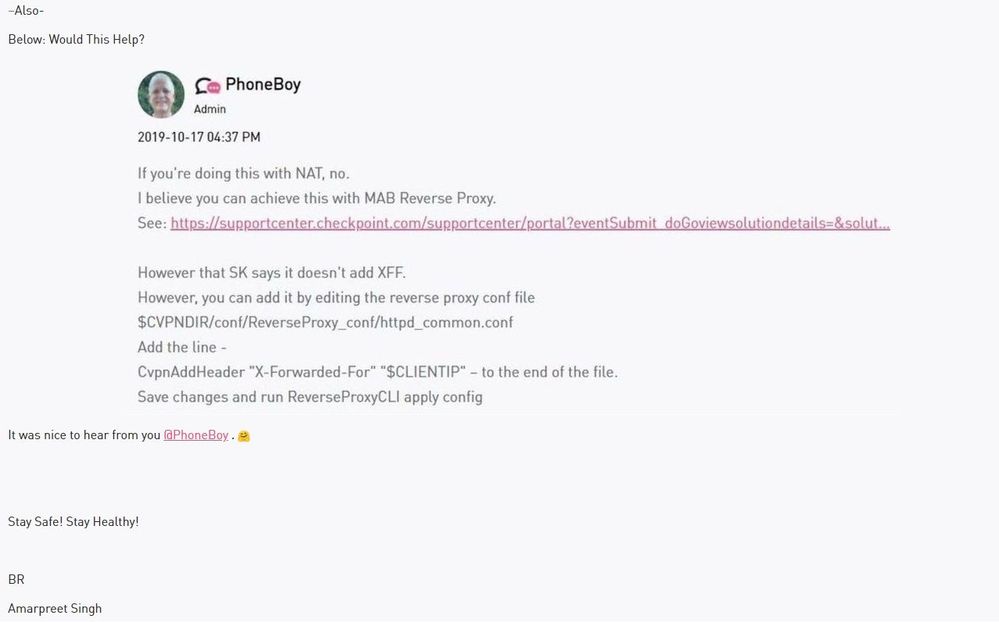
My understanding is this is added by the upstream load balancer, not us.
In which case, we should pass it along.
..
Hi Amarpreet,
do you need Source IP NAT on the Cloud Guard at all ?
Not sure if it´s possible, but if the default route on the Application Gateway / (or the subnet in which the Application Gateway is deployed) is pointing to the internal IP of the cloudguard/internal LB if a Cluster is used, you may dont need the Source NAT.
Matthias
Hi Matthias,
Without snat our scenario does not work
Also on app gateway there are no methods to apply default gateway. It is all based on sessions.
I have tested this with a custom fix provider by R&D .That time it was not ready for production . Fix is to add the client IP in header . You can please check with SE .
I have also noticed that you are using cluster then there is no need of SNAT typically SNAT is needed when u have auto scale architecture .
Hi Harshpal,
Thanks for the reply.
I will try without using SNAT, I had tried it earlier but did not worked.
In my case I have application gateway after firewalls which then sends traffic back to azure app services (PaaS Service) and not IaaS servers. That is why we used SNAT here.
but still i will try other way if SNAT could be removed. And if not then I have to find a soln beside it.
Tried doing it without SNAT. Scenario not working. We need SNAT here. (Translated Source - Hide behind is reqd.)
The Web Apps we are accessing here does not require internet access as these are not servers, these are PaaS offerings. Only inbound is concerned.
~Any other options to go through?
When you deploy an Azure Cluster it deploys also an internal Network Load Balancer.
1. Remove the Translated source from the NAT rule
2. Create a UDR for the Subnet where the AppGW is located , and create a static route with destination 0.0.0.0/0 to the Internal Network LoadBlancer.
Hi Shay,
On your second point. I will perform these changes. And test it removing snat. I think this might work.
Hi Shay,
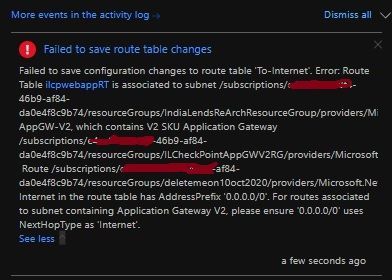
Did not worked: - It is not letting me add next hop as ILB. AppGWs can only route to internet.
Does the application gateway have a public or private IP address?
As it would need to have only private internal IP address
Both, but we are using private IP Add because it is internal and not external.
Please read https://docs.microsoft.com/en-us/azure/application-gateway/configuration-infrastructure#supported-us...
You will need to use AppGW-v1 SKU to route 0.0.0.0/0 to virtual appliance (ILB)
UDR not supported : -
Also I believe that SNAT is required here because App GW can only listen if traffic originates from same V-Net(10.0.0.0/16).
And to make it happen we have to do SNAT to change source public IP to either of the firewalls Internal IP and then DNAT to APPGW private IP.
further options you may have (not tested):
1. Replace the external LB by a Application Gateway (not sure if this is supported by Checkpoint)
2. Setup a additional Application Gateway which has the Public IP of the external LB as the Backend Pool
see https://docs.microsoft.com/en-us/azure/application-gateway/how-application-gateway-works
In either case you could use SSL interception and add the X-Forward Header on the App Gateway
may be too complicated and expensive of course
Hi Matthias,
Thanks for the reply. But Cluster failover won't happen in that case. And yes it is too expensive, Customer will not agree for the same.
BR
Amarpreet Singh
This can be achieved by switching to R81 new version of Check Point and use App & URL filtering with https inspection.
Hello Amapreet, how exactly did you get the public IP in you backend servers after the firewall does the SNAT? just enabling App & URL filtering with https inspection? do I have to configure anything in this blade?

Leaderboard
Epsum factorial non deposit quid pro quo hic escorol.
| User | Count |
|---|---|
| 4 | |
| 3 | |
| 2 | |
| 2 | |
| 1 |
Tue 12 May 2026 @ 10:00 AM (CEST)
The Cloud Architects Series: Check Point Cloud Firewall delivered as a serviceWed 13 May 2026 @ 11:00 AM (EDT)
TechTalk: The State of Ransomware Q1 2026: Key Trends and Their ImpactThu 14 May 2026 @ 07:00 PM (EEST)
Under the Hood: Presentando Check Point Cloud Firewall como ServicioTue 12 May 2026 @ 10:00 AM (CEST)
The Cloud Architects Series: Check Point Cloud Firewall delivered as a serviceAbout CheckMates
Learn Check Point
Advanced Learning

YOU DESERVE THE BEST SECURITY