- Products
- Learn
- Local User Groups
- Partners
- More
AI Security Masters E7:
How CPR Broke ChatGPT's Isolation and What It Means for You
Blueprint Architecture for Securing
The AI Factory & AI Data Center
Call For Papers
Your Expertise. Our Stage
Good, Better, Best:
Prioritizing Defenses Against Credential Abuse
Ink Dragon: A Major Nation-State Campaign
Watch HereCheckMates Go:
CheckMates Fest
Hi,
Testing the CG Network Single Gateway deployment in Azure.
Started following documentation "CloudGuard Network Security for Azure Demo Guide".
Setup:
1. Single Gateway - Standalone
2. Webserver
Configured UDRs to point webserver traffic to Security Gateway Backend IP(for VNET, internet, and subnet)
Configured NAT for webserver like in the documentation....what <<http>> req come on Security Gateway Frontend private IP is translated to Webserver.
Created allow policy from accessing webserver from internet.
Facing the following issue:
--> webserver does not reach the internet
--> I cannot access the webserver from internet
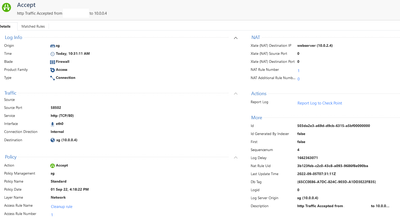
--> I see logs in the SMS both ways(from internet to SG and from webserver to internet) accepted, but neither way the goal communication is not started.
Is there any Single Gateway R81.10 Azure Deployment guide that I can follow to understand what I am missing here?
Any ideea about what is missing in the above setup?
Thanks,
A
Come back with the full Azure Deployment Guide for Single Gateway + Security Management Server.
Doc in Word, not yet been able to make it nice but is Step By Step deployment guide for anyone.
Hope you enjoy it and if requested, I will repost it in several weeks a bit more mice.
The precise steps (with screenshots) you've taken would be helpful.
In terms of troubleshooting: have you done any packet captures on the gateway to see if the traffic is even traversing it? (e.g. with tcpdump or fw monitor)
That will help determine where the issue might be.
Azure Deployment performed steps
removed my public IP for privacy.
The ICMP request from webserver to 8.8.8.8 reaches the GS. Also the http request from my laptop reaches the SG.
it maybe an issue with the routing, since the Check Point is deployed with 2 NIC by default, the route tables in the Operating System needs to be aware how to use the ETH0 for External and ETH1 for Internal, this is because the interfaces are now like trunks or needs to know other Subnets/vNET by the next hop (the router inside the Subnet), this hop is always the first host of each subnet, so when you edit the UDR, are editing this router, but not the Machine and if we remember the Networking 101 where all the collision domains that are different require a router.
Looking at your screenshots, I can say the OS need this route.
set static-route 10.0.0.0/8 nexthop gateway address 10.0.1.1 on
PD: are you not seeing SYN errors or Stateful Inspection drops?
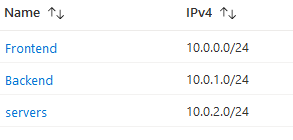
I agree with @ChristianCastil. It is probably a routing issue. Does the CP GW know about the "servers' network? 10.0.2.0/24? Maybe you just need to add this network into the GW routing table?
https://yourgwip -> Network Management -> IPv4 Static Routes
or
SSH -> "show route"
Hello,
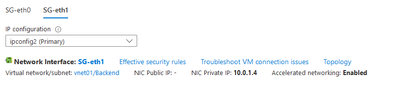
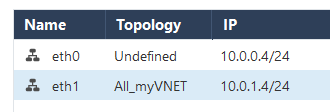
I found the issue - deployment guide related - at step 5. Edited ETH1(internal) in order to be aware of my VNET
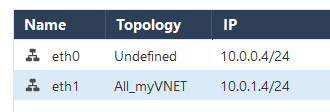
I missed the fact that eth0 remained Undefined.
FIX: Edited eth0 and set it to "Internet(External)".
NAT to webserver is working now.
New situation I am facing now: internet access for VMs is not working.
1. UDR (route table) points all subnet traffic to internal nic ETH1 of the gateway.
2. All traffic is allowed on gateway
3. Seen that there is a difference in standard deployment from Marketplace, between "Single Gateway" and "Single Gateway - Standalone" and that is for the Standalone deployment there are Route tables both for Frontend and Backend subnets. The Internet access for VMs is still not working by default on none of them.
Troubleshooting is not an option as I want to reach straight deployment documentation so that our partners to have the confidence in deploying without any surprises.
Please, help me find the missing steps and then to have here a deployment doc head to toe.
Best wishes,
Andrei
LATER UPDATE
Internet access from subnets VMs solved as soon as I created the subnet object and set it as Hide behind gateway.
If some one of you is aware of an existing working full documentation here for this deployment, please share it here. Otherwise, I will post a full documentation in the next 2 days.
Best wishes,
Andrei
Come back with the full Azure Deployment Guide for Single Gateway + Security Management Server.
Doc in Word, not yet been able to make it nice but is Step By Step deployment guide for anyone.
Hope you enjoy it and if requested, I will repost it in several weeks a bit more mice.
Leaderboard
Epsum factorial non deposit quid pro quo hic escorol.
| User | Count |
|---|---|
| 7 | |
| 4 | |
| 3 | |
| 2 | |
| 2 | |
| 2 | |
| 1 | |
| 1 |
Tue 28 Apr 2026 @ 06:00 PM (IDT)
Under the Hood: Securing your GenAI-enabled Web Applications with Check Point WAFThu 30 Apr 2026 @ 03:00 PM (PDT)
Hillsboro, OR: Securing The AI Transformation and Exposure ManagementTue 28 Apr 2026 @ 06:00 PM (IDT)
Under the Hood: Securing your GenAI-enabled Web Applications with Check Point WAFTue 12 May 2026 @ 10:00 AM (CEST)
The Cloud Architects Series: Check Point Cloud Firewall delivered as a serviceThu 30 Apr 2026 @ 03:00 PM (PDT)
Hillsboro, OR: Securing The AI Transformation and Exposure ManagementAbout CheckMates
Learn Check Point
Advanced Learning
YOU DESERVE THE BEST SECURITY